
Main requests dashboard — searching, filtering, sorting, saved views, and opening a request
Last updated: July 24, 2026 by Steve
Requests Dashboard
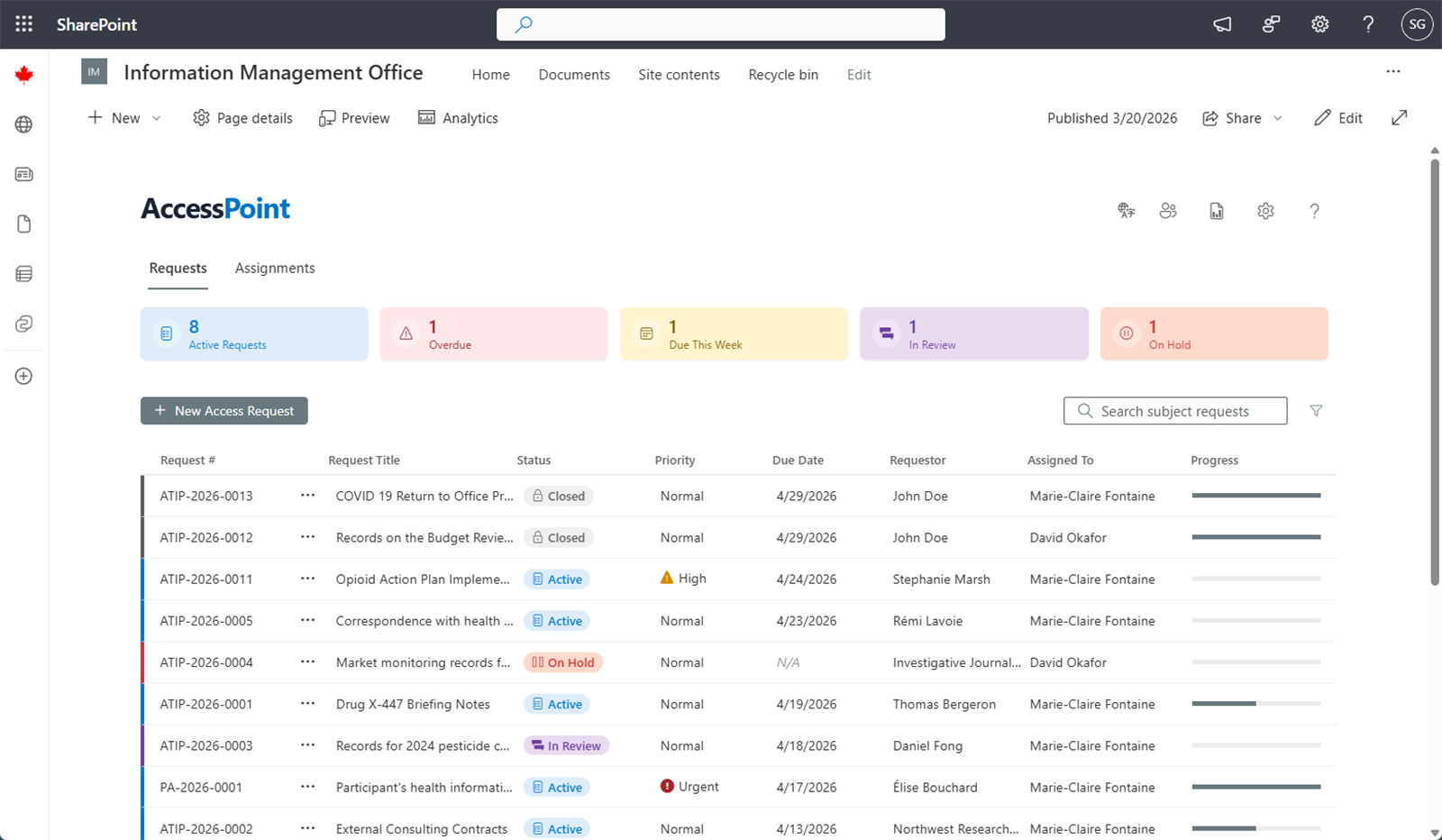
The Requests Dashboard is the home screen for Subject Access Officers, Advisors, and Readers. It is the list of every request you can see, with the tools to find and manage your work. It opens on the Requests tab.
Summary Cards
Across the top, quick-filter tiles summarise your workload:
| Card | Shows |
|---|---|
| Active | Requests currently being processed |
| Overdue | Requests past their due date and not yet closed |
| Due this week | Requests due within the coming week |
| In review | Requests in the review stage before response |
| On hold | Requests paused pending external input |
Click a card to filter the grid to that set; click it again to clear. On-hold requests are excluded from the Overdue and Due this week counts because their statutory clock is paused.
The Toolbar
A single toolbar row carries the New button (shown only if you may create requests), the saved-view tabs, the search box, the Filter button, and the View options (⋯) menu.
The Request Grid
The grid shows one row per request — number, title, status, priority, due date, requestor, assigned officer, and a progress bar. Status colour comes from your tenant's configured status vocabulary. Click any row to open the full request. If the register is larger than one page, a truncation banner appears; refine with search or filters to narrow it.
Searching
Type in the search box to filter instantly across request number, title, and requestor.
Filtering
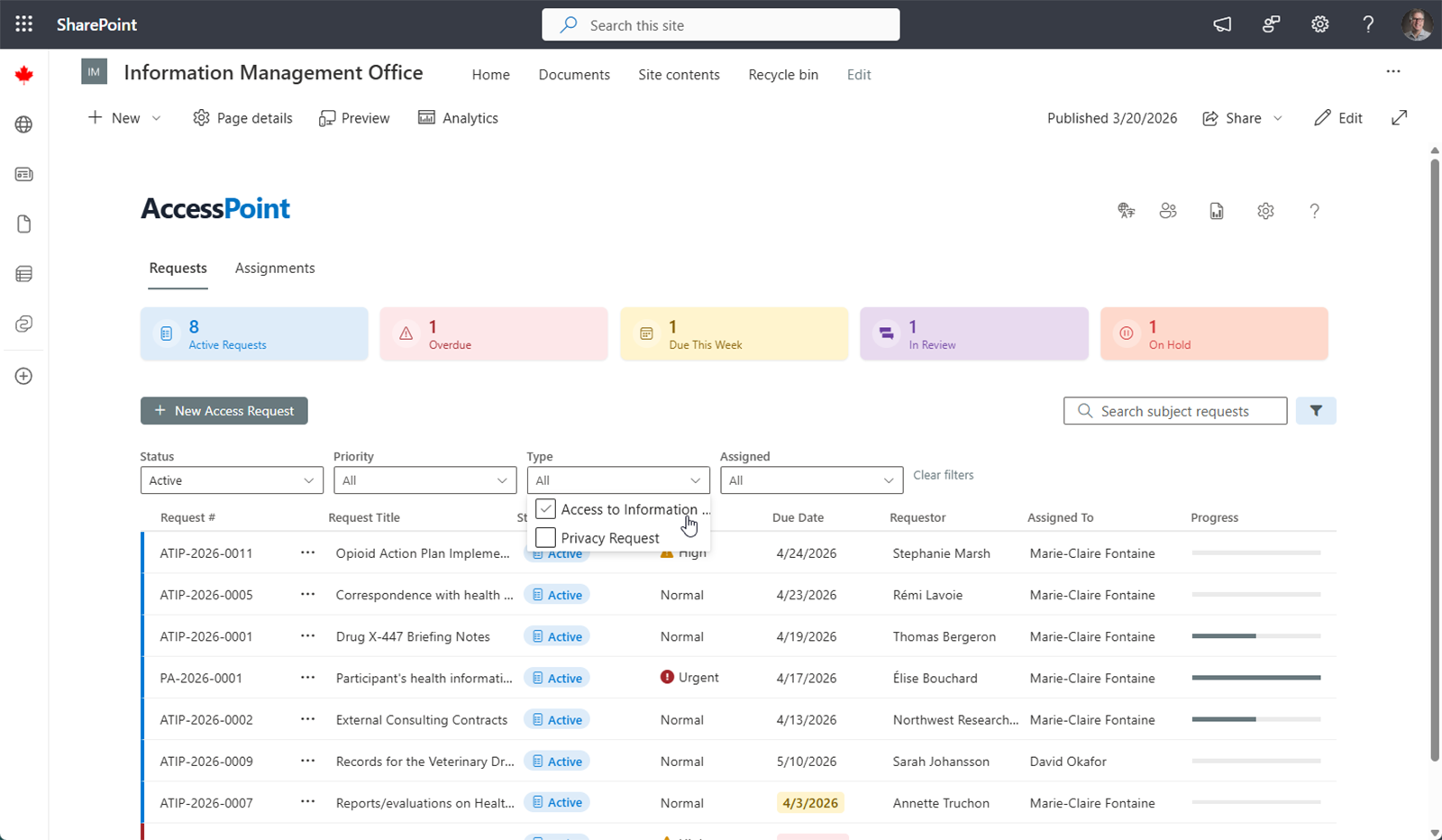
Click Filter to open the filter strip, where you can multi-select by:
- Status
- Priority
- Request type
- Assigned officer — "Assigned to me" is a one-click option
- Any tenant-defined custom fields
The filter icon turns solid and its tooltip lists the active filters. Use Clear to reset.
Sorting and Columns
Click a column header to sort by it; click again to reverse. The View options (⋯) menu lets you show or hide columns, resize and reorder them by dragging, and group the grid by a column (status, type, officer, or a custom field). These choices can be saved into a view.
Bulk Reassignment
If you may modify requests, every row carries a checkbox (with a select-all in the header). Selecting rows reveals a bulk bar — N selected · Reassign · Clear selection. Reassign permanently transfers the selected requests to the chosen officer — an outright change of ownership. It works across mixed current assignees; closed requests, and requests already held by the target officer, are skipped and reported. Every reassignment writes an audit entry per request.
To have a colleague temporarily cover your work while you're away — without changing ownership — use Manage delegations instead. A delegation is an access overlay that reverts when it ends; see Delegations.
Saved Views
Views package a set of filters, columns, sort order, and grouping under a named tab so you can return to a working slice of the register in one click. The tabs sit on the toolbar between the New button and the search box; your tenant ships an All Requests default. See Dashboard Views for creating, sharing, and switching views.
Creating a Request
Click New to open the New access request panel. New is a split button — its dropdown offers New from email…, which turns an email sitting in a mailbox into a pre-filled request. See Creating Requests for a walkthrough of both paths.
Opening a Request
Click any row to open the full request details, where you manage every aspect of the request — see Request Overview.