
Set up rules that turn the dates your cases record into follow-ups, notices and statutory waiting periods, and switch them on safely with Preview.
Last updated: October 20, 2026 by Steve
Follow-up Rules
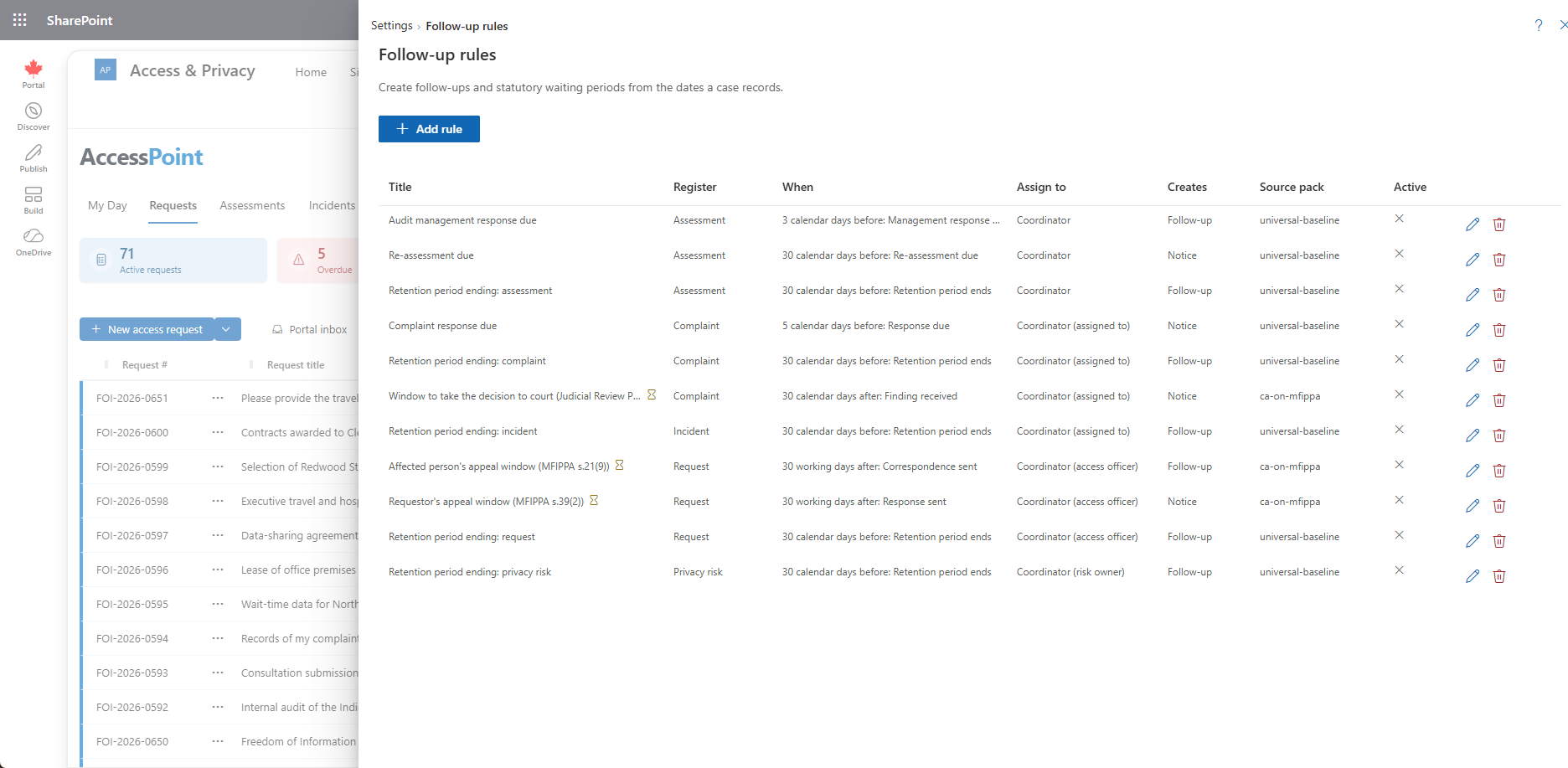
Settings → Follow-up rules (people with Configure follow-up rules; administrators have it) lists the rules that create follow-ups from the dates your cases record. The list shows each rule's title, register, when, who it is assigned to, whether it creates a follow-up or only a notice, on or off, and the jurisdiction pack it came from. People work the results from the Follow-ups card on each case; see Follow-ups and Reminders.
Click a rule to read it. Edit changes it, and the bin deletes it: its follow-ups keep their text, and upcoming ones are cancelled. A rule marked with a warning uses a case date this version does not know and cannot be switched on.
How a Rule Reads
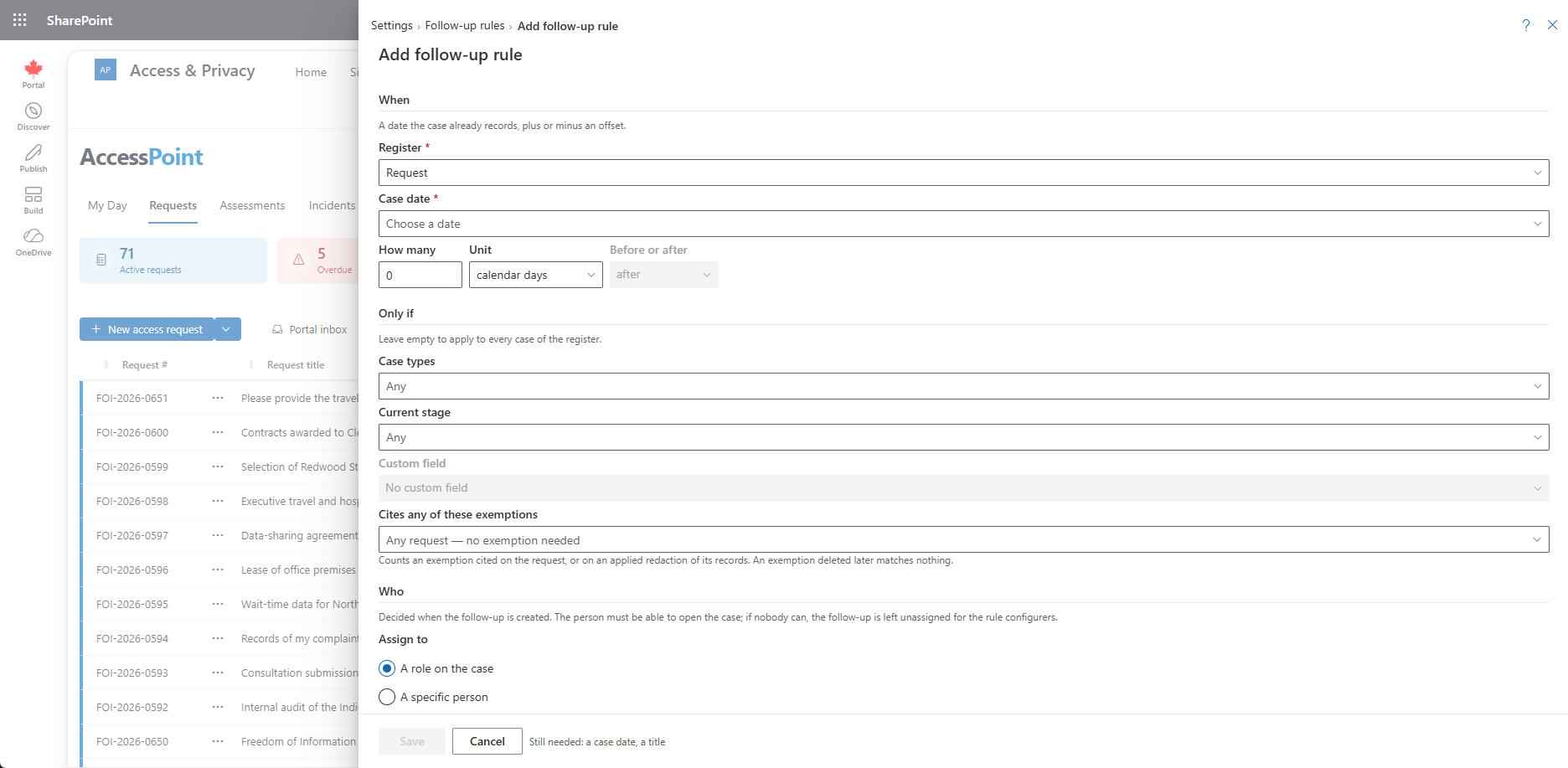
A rule reads top to bottom.
- When — the register (requests, assessments, incidents, complaints or privacy risks), a case date, and an offset. Case dates include Request closed, Correspondence sent (then the kinds of correspondence, such as Third-party decision notice), Approved, Management response due and Risk acceptance expires. The offset is a number of calendar days, working days or months, before or after. Working days use the case type's calendar. An assessment or audit whose type names none counts on the calendar of its jurisdiction (the one your access requests under the same law count on, else the one most of your request types count on), so public holidays are skipped; with no calendar at all, Saturday and Sunday are off. A deadline-type date (a due date) counts only while the case is open, so closing the case cancels what is still upcoming.
- Only if — optionally, case types (risk categories for risks), the current stage, and one single-choice custom field with the values that count. A request rule can also require that the request cites any of these exemptions, picked from your exemption catalogues. An exemption counts when it is cited on the request or on an applied redaction of its records (active or approved, not proposed or withdrawn). An exemption deleted later matches nothing. Empty means every case.
- Who — a role on the case (the coordinator, the senior official, the privacy officer, a reviewer, the risk owner and so on) or a specific person, a fallback, and roles to also notify. The person is chosen when the follow-up is created and must be able to open the case. If nobody can, the follow-up is left unassigned for the rule configurers.
- What — the title and instructions (translatable), whether it creates a follow-up to complete or a notice only, and whether it also sends email and Teams. The notices feed is always written; each person's preferences pick the channel.
- Done when — optionally, a case date that completes the follow-up by itself when it is recorded.
- Waiting period — mark the rule as a statutory waiting period, give its legal reference, and choose what it warns on, one checkbox for each action its register offers: Release (requests), Close, and Approve (the assessment goes in effect) for assessments, for example the regulator's reply period of a prior consultation. With none ticked the rule is a statutory clock: it is shown on the case with its end date and never warns. That is right for a requestor's appeal or complaint window.
Preview and Switching On
Preview shows what the rule would do if it were switched on today: how many cases match now, how many follow-ups it would create, how many it would have created in the last 90 days, and the first due dates. Case numbers appear only for cases you can open.
A new rule is created switched off, and rules that arrive with a jurisdiction pack are always off.
Switch on… asks Apply to cases from:
- Today — only case dates from today on count.
- Earlier dates too — a backfill of 0 to 365 days. Preview in that dialog shows what that choice would create.
Switch off stops the rule: its upcoming follow-ups are cancelled and the open ones stay to be finished. Changing the date, offset, conditions or output of a rule that is on cancels what it had scheduled; the new definition takes over at the next hourly run.
Statutory Rules from Jurisdiction Packs
Some jurisdiction packs ship their statutory waiting periods and obligations as follow-up rules, all switched off. They are a starting point built from public information about the legislation, not legal advice. Your legal counsel validates and adjusts them before you switch them on.
- A window that runs from the third party's decision letter warns on Release. The pack ships that letter as a Third-party decision notice correspondence template.
- A requestor's appeal or complaint window runs from the day the response was sent, and warns on nothing: a statutory clock shown on the request that never interrupts a release or a close.
- Packs for a prior-consultation regime carry the regulator's reply period, which warns on Approve on the assessment.
- Where a complaint or appeal ends in a decision that can be taken further within a fixed period, the pack ships that period as a waiting-period rule on the complaint register, counted from the date the finding was received.
Examples include the Canada federal pack's third-party review window (ATIA s.28(4), s.44(1)) and requestor's complaint window (s.31); the Ontario FIPPA and MFIPPA appeal windows; the BC, Alberta, Australia federal, US FOIA and UK EIR and FOIA windows; and the reply of the supervisory authority to a prior consultation under the GDPR, UK DPA and French CNIL packs. See Configuration Packs for installing and re-applying packs, and review each rule under Settings → Follow-up rules before switching it on.
Why It Matters for Archiving
Case archiving reads the waiting-period rules that are switched on to know when a requestor's time to complain or appeal has ended. An original is archived, and a case offered for disposition, only after those windows. A rule that is switched off does not count, so switching a waiting-period rule on is how your organization adopts that clock. See Storage and Archiving.
Related Pages
- Follow-ups and Reminders — what people see and do on a case.
- Storage and Archiving — the statutory windows that archiving waits for.
- Configuration Packs — installing jurisdiction packs.
- Calendars — the working-day calendars rules count on.
- Notification Templates — the email templates follow-ups use.