
Delegations — arranging coverage of your work by a colleague while you're away (an access overlay, not a reassignment), and managing active delegations
Last updated: July 24, 2026 by Steve
Delegations
A delegation lets a colleague cover your work for a period — for holidays, leave, or load-balancing. Coverage is an access overlay, not a reassignment: while it is active, the delegate can see and act on your in-scope work exactly as you could, but nothing changes hands. Ownership stays with you, and everything reverts the instant the coverage ends — there is nothing to hand back.
Coverage vs. reassignment. If you want to permanently move requests to another officer, that's a bulk reassignment on the Requests dashboard, which changes ownership. A delegation is the opposite: a temporary overlay that leaves ownership exactly where it is.
Who Can Set One Up
Open the Manage delegations panel to set up and manage coverage for yourself. Arranging (or activating or ending) coverage on someone else's behalf requires the configuration.manage (Administrator) permission, because a delegation grants the delegate your in-scope access.
Creating a Delegation
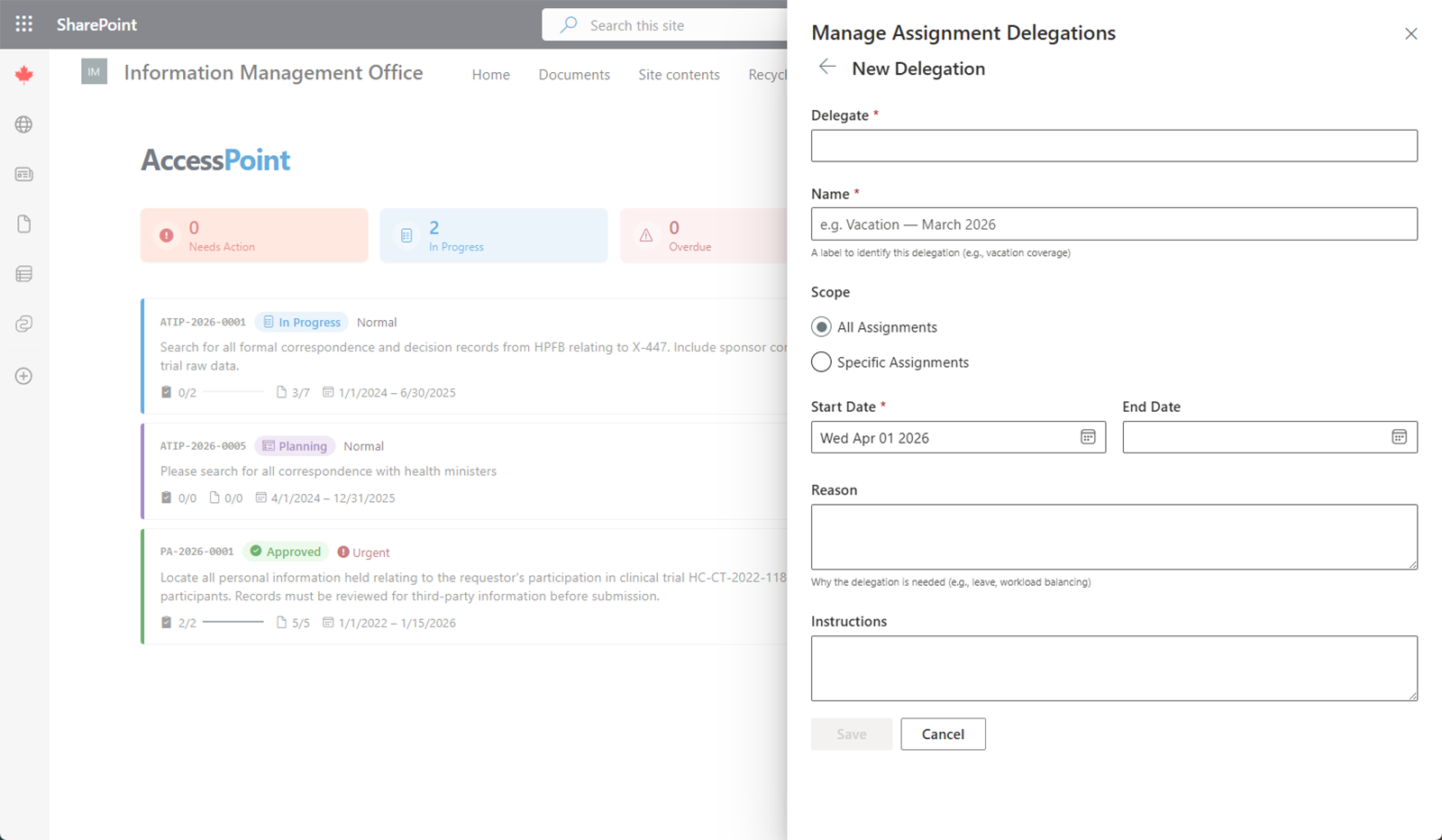
- Click New delegation. Only one active or pending delegation is allowed at a time, so the button is disabled if you already have one.
- Pick the delegate — the person who will cover for you.
- Give the delegation a name.
- Choose the scope:
- Everything — all of your work, or
- Specific areas — tick the areas to cover: Requests, Assessments, Incidents, Complaints, Assignments, Reviews.
- Set a start date (required) and an optional end date, and record a reason and any instructions for the delegate.
- Save. If the start date is today or earlier, coverage activates immediately; a future start date schedules it as Pending. Both you and the delegate are notified when coverage starts and ends.
How Coverage Appears
Each delegation appears as a card showing the delegate, the covered scope, and the date range, with a status badge — Pending, Active, or Cancelled.
While coverage is active:
- The delegate sees a "You're covering for …" item on their My Day.
- Each case you own — request, assessment, incident, or complaint — shows a "Covered by …" chip next to your name, so the team can see at a glance who is standing in.
Managing an Active or Pending Delegation
Use the row actions on the card to:
- Activate a pending delegation early.
- Edit or delete a pending delegation.
- End an active delegation.
Ending a delegation — or letting it lapse at its end date — simply removes the delegate's access. Because nothing was ever reassigned, there is nothing to hand back; your cases were yours the whole time.