
Settings → Audits → Audit types — the Audit-category assessment types, their engagement capabilities, rating and opinion scales, first status and follow-up interval.
Last updated: October 20, 2026 by Steve
Audit Types
Settings → Audits → Audit types lists the assessment types in the Audit category (Privacy compliance audit, Vendor audit and the other baseline types). The Audits group sits after Assessments & controls while the Audits board is on and you can configure assessments. Its first three rows are the assessment panels shown for audits only: the same lists and forms, nothing configured twice. See Assessment Types.
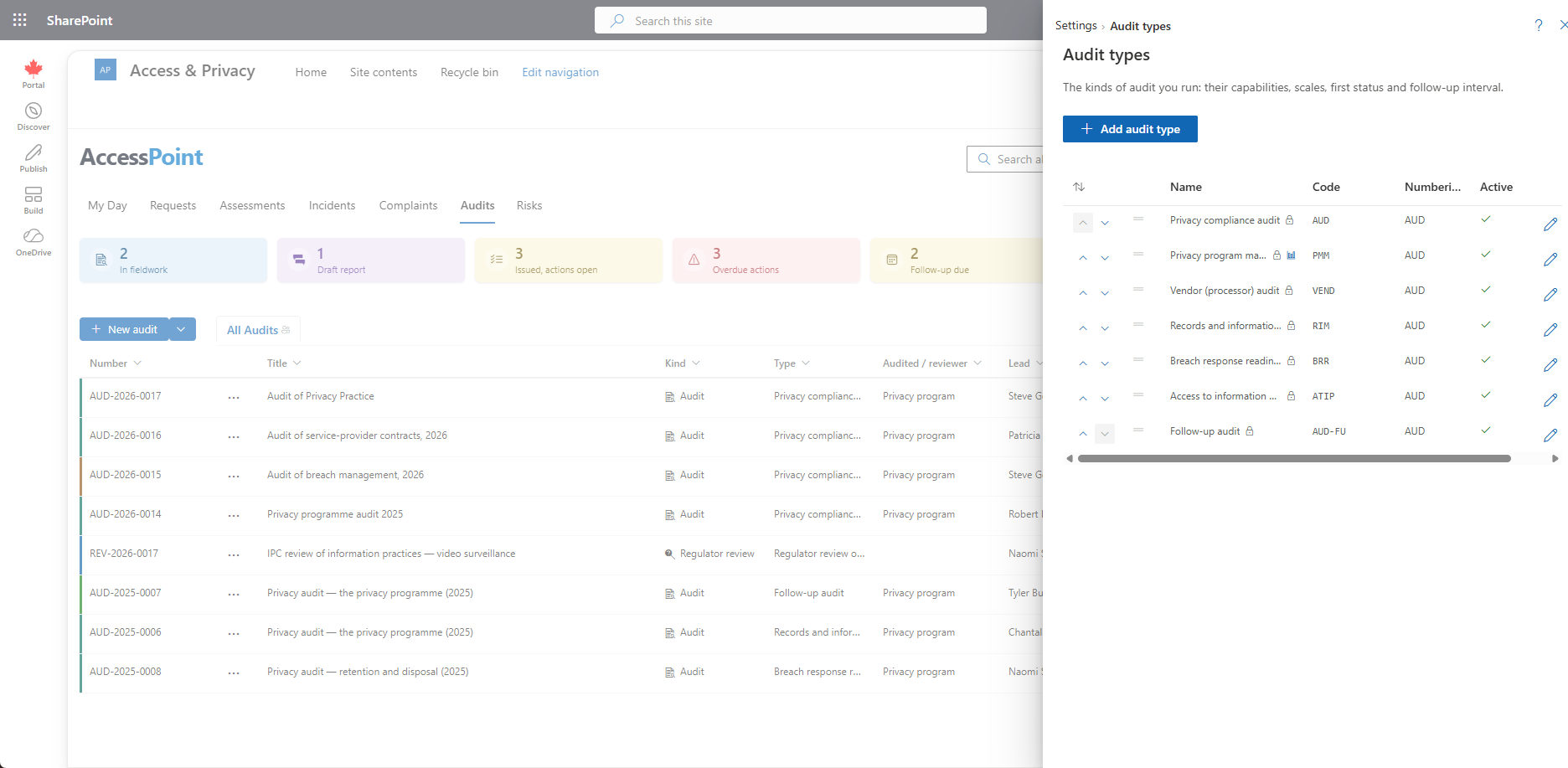
The List
The list has the drag-to-order, read-only view and Edit / Delete of every Settings list, with each type's numbering prefix beside its code. The Universal baseline pack ships seven audit types: the privacy compliance audit, the privacy program maturity assessment, the vendor audit, the records and information management audit, the breach response readiness review, the access to information program audit and the follow-up audit. Pack content is a starting point built from public information about the legislation, not legal advice. Your legal counsel validates and adjusts it.
Adding an Audit Type
Add audit type starts a type already set up as an audit:
- The category is locked to Audit.
- Engagement tracking, the findings register, evidence requests and control testing are on.
- The PIA screening and legal and security reviews are off.
- The review interval is one year and the follow-up interval six months.
An audit type's form leaves out the PIA-only parts, the regulator-filing rule and the harm lens. The scoring model shows only when scoring is on (maturity assessments are scored).
Audit Engagement Section
- Engagement tracking, Findings register and Evidence requests — what an audit of the type carries: the Engagement and Contacts cards, the Findings tab, the Evidence requests tab. See Audit Details.
- First status — the status a new audit starts in. The choices are the enabled statuses of the Active stage that apply to the type, its own first (Planning for the baseline types). With none chosen, a new audit starts in the type's own Active status, else the stage default.
- Follow-up interval (months) — issuing the report sets the follow-up date this many months ahead (1–60) instead of the review interval in years. Leave it blank to use the review interval.
- Finding rating scale and Opinion scale — see below.
Rating and Opinion Scales
Both are ordered lists. Each entry has:
- A value, the code a finding or engagement stores, fixed once saved.
- A label, translatable: the globe under the list holds the labels in your other languages.
- A colour from the status swatches.
- An order (drag, Alt+↑ / Alt+↓ or the move arrows), with the most serious rating and the strongest assurance first.
A value in use cannot be deleted. Its bin is greyed out with In use on audits of this type — rename it instead; change its label. A scale you did not touch is never re-saved, so editing the type in another language never overwrites its labels.
Related Pages
- Audit Templates — the questionnaires of these types.
- Audit Statuses — where an audit lands at each move.
- Audit Root Causes — how findings are classified.
- Audit Settings — the response window, finding age and board toggle.
- Creating an Audit — where the types are offered.