
How much space case files take in your Azure storage, roughly what it costs, which registers and cases hold it, and what storage policies would save.
Last updated: October 20, 2026 by Steve
Storage Report
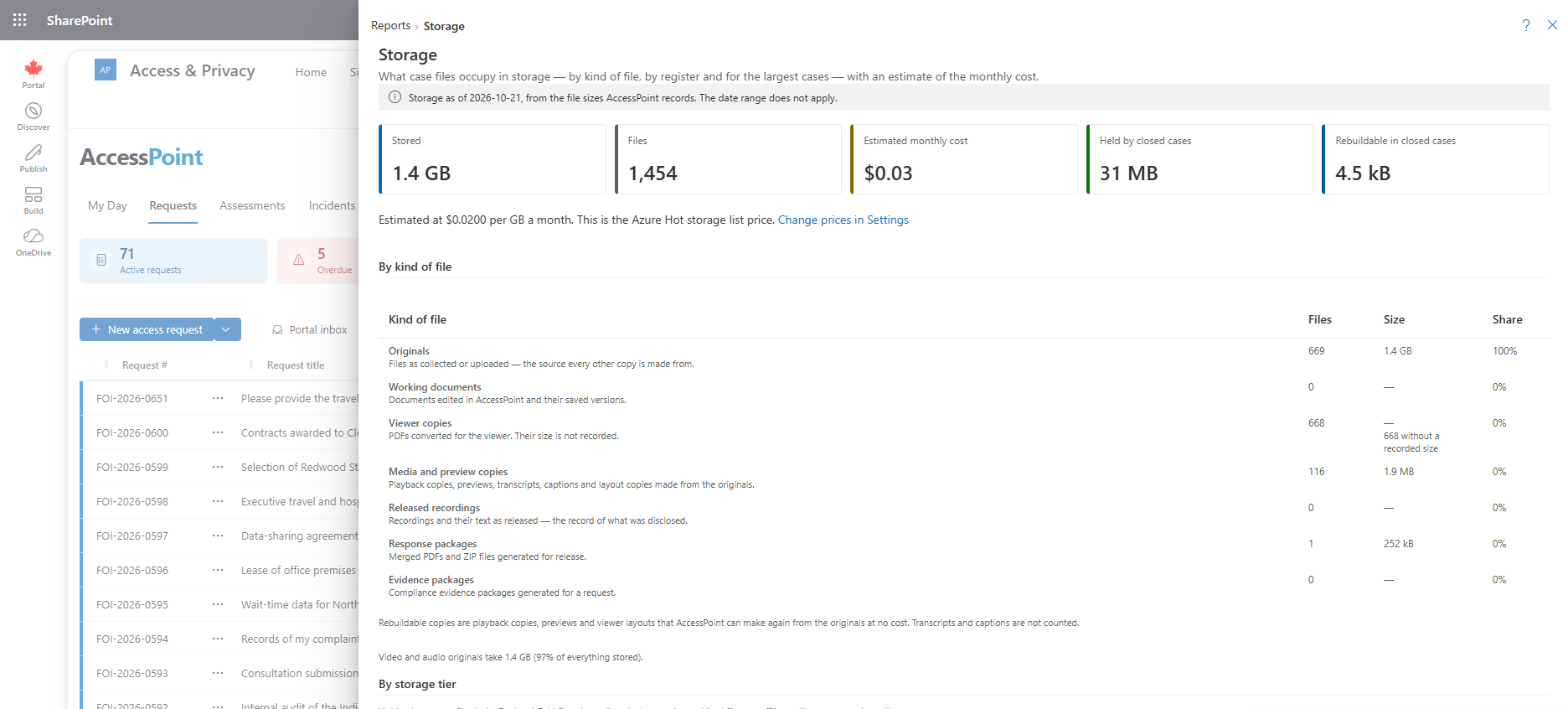
Reports → System and compliance → Storage shows how much space your case files take up in your Azure storage account, roughly what that costs each month, and which registers and cases hold it. Look at it when the storage bill grows, or when you decide how long to keep closed cases.
It is for administrators: it needs the report permission and the configuration permission (configuration.manage), because it names cases and its figures are for capacity planning. It describes storage as of today, so the date range does not apply: the period selector is hidden and a banner gives the as-of date. Like other reports it can be pinned as a tile, showing what is stored, the monthly estimate and what closed cases hold (larger tiles add a chart by kind of file).
What It Shows
- Five headline figures — Stored (the total), Files, Estimated monthly cost, Held by closed cases, and Rebuildable in closed cases: the part of what closed cases hold that AccessPoint could make again from the originals at no cost — playback copies, previews and viewer layouts. Transcripts and captions are not counted as rebuildable. A case counts as closed by the same rule Retention review uses.
- By kind of file — files, size and share of the total for seven kinds: Originals, Working documents (and their saved versions), Viewer copies, Media and preview copies (playback copies, previews, transcripts, captions and layout copies), Released recordings (the record of what was disclosed), Response packages and Evidence packages. Where some files of a kind have no recorded size, the size column says how many. Under the table you see how much of everything stored is video and audio originals, a warning when released recordings are stored a second time inside ZIP response packages (with the size), and, when your deployment has the write-once
evidencecontainer, a reminder that evidence packages are kept there and purging a case does not remove them. - By register — cases, files, size and the part held by closed cases, for requests, assessments, incidents and complaints. Not on a case collects files attached to no case.
- Largest cases — the 50 cases that hold the most, each split into originals (working documents included), copies, released recordings and packages (evidence packages included). Closed cases carry a Closed tag; select a case number to open the case on top of the report.
Storage Tiers and Savings
- By storage tier and By register and tier show files and size in Hot, Cool, Cold and Archive. They read Every file is in Hot until a storage policy moves something.
- What the policies would save compares the monthly cost now with the switched-on policies applied today and in 12 months. It also shows the one-off cost of the moves, the cases covered, those with no window defined or on hold, and the originals waiting for a window to end.
- Restores under way are counted beneath, with any waiting more than seven days.
The Cost Estimate
The monthly cost is the stored total multiplied by a price per GB a month, with each storage tier at its own price once a storage policy has moved files out of Hot. By default those are Azure's list prices (Hot USD 0.0200, locally redundant, Canada Central, October 2026), and the report says so.
Change prices in Settings opens Settings → Records and retention → Storage and archiving → Prices, where you enter your own prices and a three-letter currency code (your negotiated rate in CAD, for example) for the whole organization. The estimate is a capacity estimate only: it leaves out transactions, redundancy options, the storage listed below, malware scanning and any discount. For the bill itself, use Azure Cost Management.
What the Report Cannot See
The report adds up the file sizes AccessPoint records in its database. It never lists the storage account itself, so it stays quick however much you hold. That has limits:
- Viewer copies and the saved versions of working documents are counted, but their size is not recorded, so they add files and no bytes.
- Files left behind by earlier purges. Before 2.5.0, a retention purge or a case delete removed the records of working-document versions, autosave drafts and evidence packages kept in the documents container, but not the files themselves. AccessPoint no longer knows those files, so the report cannot count them, and they stay in storage.
- Storage that belongs to no case record — previous versions and deleted files kept for recovery (up to about 60 days after a change), the import staging area, portal uploads awaiting triage and the portal's delivery copies, the document converter's working files, and the data-protection key ring.
It Changes Nothing
The report only reads. To reduce what closed cases hold, an administrator can switch on a storage policy (cheaper tiers, and housekeeping that removes released recordings stored twice beside a ZIP package marked as sent), or dispose of cases through Retention review once their retention period has run.
Related Pages
- Storage and Archiving — storage policies, limits and the prices the report uses.
- Files in Archive Storage — what archiving looks like on a case.
- Retention Review — disposing of closed cases whose retention period has run.
- Disposition — disposing of files before the case is purged.
- Reports — the reports menu this report opens from.