
The incident detail panel — overview facts, lifecycle, discovery and root cause, the Contained shield, and the live notifications obligations checklist
Last updated: October 20, 2026 by Steve
Incident Details
The incident detail panel is a full-screen workspace where privacy officers and ATIP staff document what happened, decide who has to be told, and prove the obligations were met on time. The header carries the incident number, type, status chip (point at it to see the lifecycle stage), priority, elapsed-days and date-occurred metrics, and a Discussion button. While a notification is still owed, the header also counts down to the soonest notification deadline (Days remaining, or Days overdue once it has passed). A green Contained shield with its date appears once containment is confirmed. Editing requires the incident-manage permission. Closed incidents are read-only until reopened: a bar above the tabs says so on every tab, with Reopen, and reopening asks for a mandatory reason that is written to the activity log.
Like every case panel, the incident shares one header and one … menu with Help and Close. The menu offers Add reminder, Place preservation hold… (when your organization uses case archiving — see Preservation Holds) and, while the incident is active, Delete incident. A follow-ups card lists the incident's open and upcoming follow-ups — see Case Follow-ups. Work is organized into a row of tabs.
The Tabs
| Tab | What it is for |
|---|---|
| Overview | Lifecycle rail, description/cause/subject, affected and notified counts, PI categories, harm types, discovery source, derived risk-of-harm band, key dates, root cause and lessons, hours, and owners |
| Containment | Measures taken to stop or limit the breach, plus the incident-level containment-confirmed toggle |
| Assessment | The risk-of-harm register (RROSH) that drives the notification calculator |
| Notifications | The live obligations checklist — who must be told and by when |
| Remediation | Corrective and preventive actions to stop recurrence, and the commitments that follow from them |
| Review | The configurable sign-off workflow |
| Documents | Evidence files, with Correspondence and Incident Reports segments beside the working list — generated notification letters file under Correspondence |
| Activity | The full audit timeline |
Containment and remediation both open the shared measure panel — see Incident Measures.

The Overview Tab
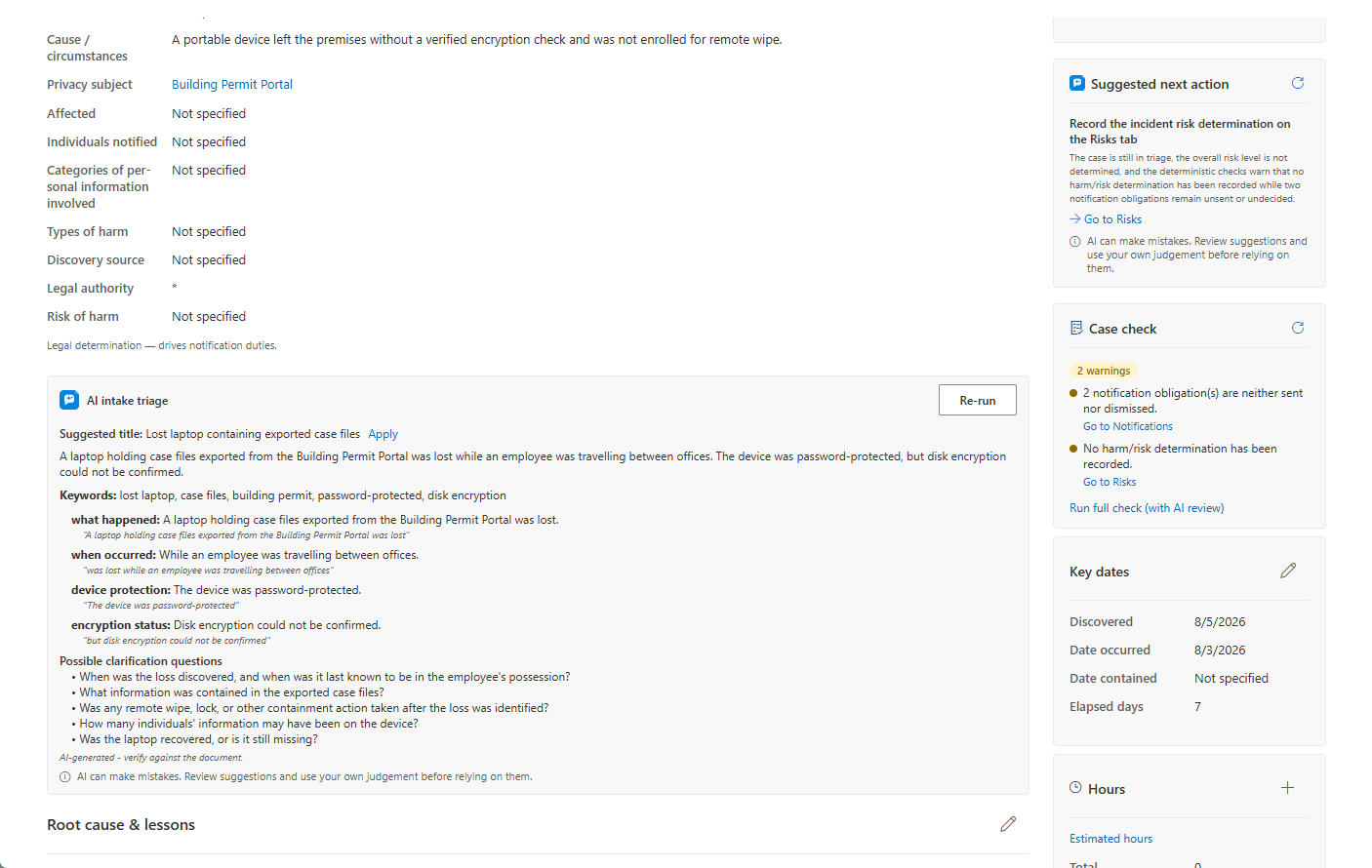
The description block edits as one section — click the pencil, then Save or Discard. On the Overview tab you can record:
- Title, Description, Cause type and narrative
- The linked Privacy subject — when the subject carries a pre-agreed escalation plan, it appears as a banner on the incident: the contact first, the plan text below, so responders know who to call without hunting for it
- Affected individuals (with an "estimate" flag) and notified individuals
- Categories of personal information involved — sensitive categories carry a red shield
- Types of harm
- Discovery source — Internal, External report, Automated detection, Third-party notification, Commissioner inquiry, or Other
- For a breach, the Nature of breach and its Circumstance, which record how the regulator's annual breach statistics count it (see below)
Nature of breach and circumstance. The regulator's annual breach statistics classify each breach as stolen (by an internal party, by a stranger, ransomware, another cyberattack, unencrypted portable equipment, paper records or something else), lost, used without authority (through electronic systems, paper records or other means), disclosed without authority (misdirected fax, misdirected email or other means), or collected without authority through the electronic health record. Choose the best fit: an incident counts once, and changing the nature clears a circumstance the new nature does not offer. This is separate from your own cause type, which describes what happened in your organization's words.
The Risk of harm band and the legal authority are system-derived and read-only. A separate Root cause & lessons learned section captures the record-keeping narratives; the Closure tab shows these read-only. The title, description, cause narrative, root cause, and lessons learned all support optional per-language translations (machine-translated overnight like other case free text; manual translations are never overwritten).
The sidebar holds the status control (same-stage status changes are a quick dropdown; cross-stage moves use Advance), priority, an hours card, key dates (date occurred, date contained), the assigned owner, privacy officer and senior official, one AI Assist card (the suggested next step, the case check, how similar incidents went and, once the incident is closed, capturing what was learned; each part appears only when it has something to say) and one Related card (linked incidents and reference links), which starts folded and remembers whether you opened it.
The Lifecycle Rail
The compact lifecycle rail shows Active → In Review → Closed. In Review is reached by starting a review or by recording the risk-of-harm determination, and it stays checked even after a review returns the incident to Active.
The Notifications Tab
The Notifications tab is the module centerpiece and a live checklist. The calculator re-runs automatically whenever the tab opens and on every incident save, so obligations always reflect the current risk determination, affected count, and legal authority — there is no manual "recalculate" step, though a subtle Refresh is available. Notices are grouped:
- Obligations — every rule-produced notice for the incident's legal authority, statutory notices and advisory rows together in one urgency-sorted list. Each notice shows its recipient, a computed due date, a content checklist of what the notice must contain, the legal reference, and a colour-coded urgency badge (overdue / due soon / as soon as feasible / on track).
- Voluntary notices — anything you add manually beyond the statutory obligations. A pending voluntary notice still blocks closing the incident.
For each open notice you can:
- Mark sent — records the sent date, and optionally a reference number, sent via method, and a filed document linking the actual submission held on the incident.
- Dismiss — sets the notice to Not required; a rationale is mandatory and is stored for the record.
- Generate letter — a small composer: pick the matching notice template (individual-notice or regulator-notice) and the language, review and edit the merged subject and body, optionally apply a letterhead template, then generate. The letter is filed on the incident under Documents → Correspondence — as a ready PDF, or as an editable Word letter for notices to many individuals: complete it as a mail merge against your own recipient list, since AccessPoint deliberately does not store affected individuals' contact details.
Some breach-notification rules carry the date their duty starts: a breach discovered before that day is not measured against the rule. An administrator sets that date under Settings → Incident notification rules.
Use Add notification to log a voluntary notice, choosing a configured type scoped to the incident's authority. If no notification rules match the authority, an explanatory banner appears and the tab stays usable through the Voluntary group. Resolved notices collapse behind a "Resolved (n)" expander.

The Remediation Tab and Commitments
The Remediation tab lists the corrective and preventive actions taken to stop the incident recurring, as measures (see Incident Measures). It also carries the incident's commitments — promises that come out of the incident, tracked to completion with an owner and a due date. See Commitments. The closure tab warns when recommendations are still awaiting a decision.
Reopening a Closed Incident
A closed incident is read-only, and a bar above the tabs says so on every tab. Users with the incident-manage permission can reopen it through a confirmation dialog that records a mandatory reason to the activity log.
AI Assist
When AI Assist is enabled, several optional aids appear on the incident. Each produces a suggestion, an editable draft, or a display of computed facts — a person always decides what to keep.
- AI intake triage — a card that reads the incident's intake text already on the record and suggests a title, a plain summary, key topics, structured findings with the verbatim passages they came from, and clarification questions worth asking. Nothing is applied without a click.
- Draft with AI — in the incident close dialog, this drafts the "why individuals were not notified" rationale, grounded strictly on the record's own facts. Anything the record doesn't say arrives as a literal
[VERIFY]marker rather than a guess. The draft lands in the editor for you to review, edit, and save — it is never sent or saved automatically. - Risk suggestions — on the Assessment tab (the risk-of-harm register), Suggest risks (AI) drafts up to five risk candidates grounded in the incident, the linked subject's prior incidents and assessments, its disclosure and vendor register, and similar risks elsewhere in your register — each candidate cites what motivated it. Add as risk opens the normal risk form pre-filled for your review; nothing is recorded until you save it.
- How similar cases went — a display-only card showing computed outcome facts from similar closed incidents of the same type — determinations and notifications. It works with or without the semantic index, matching by meaning when available and by text overlap otherwise. It reports what happened; it never recommends.
AI Assist runs in your own Azure tenant. Microsoft does not train its models on your data, and prompt and response content is not stored.
Privacy by Design
Custodians and contributors never see requestor or data-subject PII. The incident record is scoped to privacy staff, so harm and notification decisions stay inside the office handling the breach.