
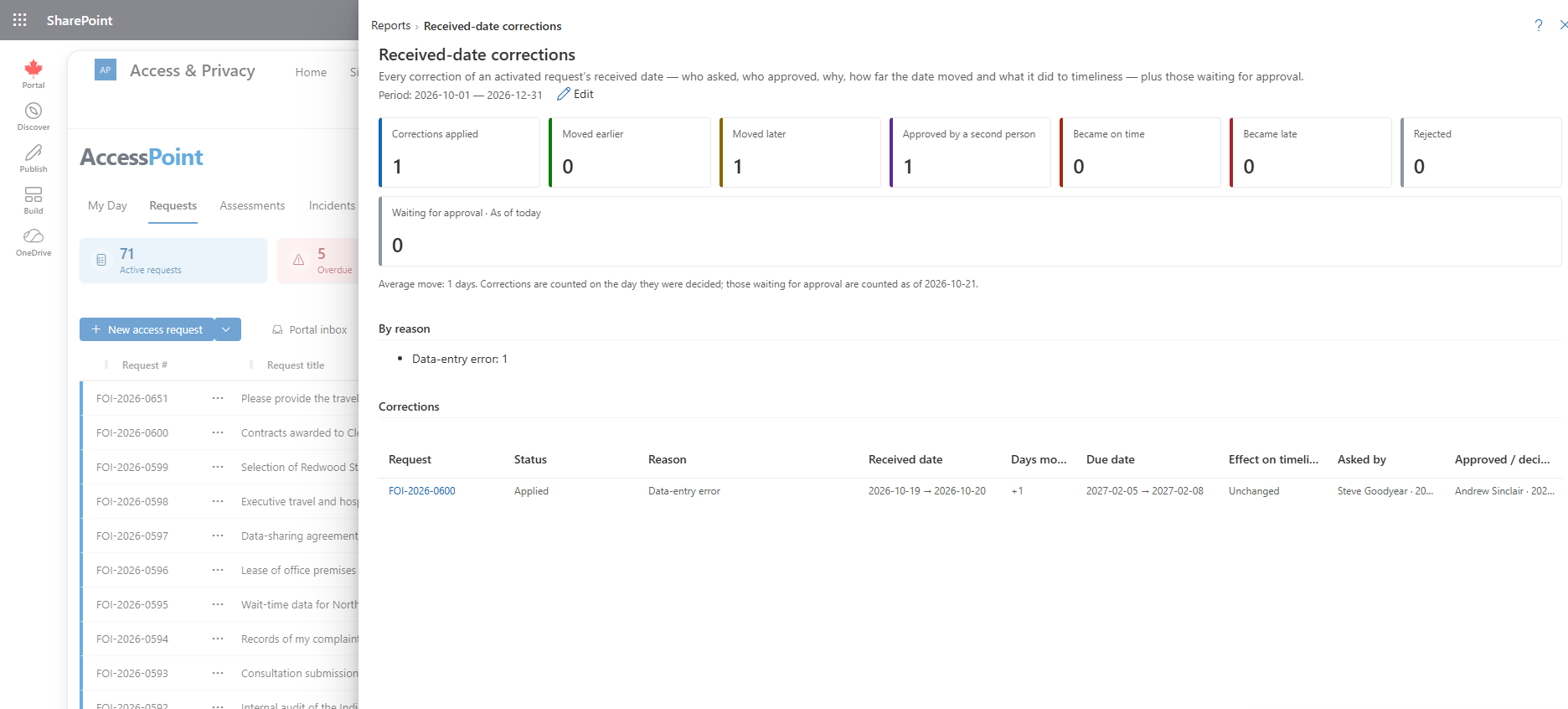
Every correction of an active request's received date decided in the period — who asked, who approved, why, how far the date moved and what it did to timeliness.
Last updated: October 20, 2026 by Steve
Received-Date Corrections Report
The received date of an active request is the anchor of its statutory clock, so changing it is a decision that has to be accountable. The Received-date corrections report lists every such correction decided in the period, with the people, the reason and the effect on the due date, and shows the corrections still waiting for a second person's approval. Privacy officers and senior officials use it to check that corrections are made for the right reasons and that they are not quietly turning late requests into on-time ones.
It is on the Reports menu and is open to people who hold report.view.
What This Report Shows
For the corrections decided in the selected period, each row shows:
- Who asked and who approved (a correction can need a second person, see below).
- The reason: Data-entry error, Received earlier at another office (date-stamped), Transferred request — deemed receipt date, Misdirected request or Other, with the written explanation.
- The old and new received dates and the old and new due dates.
- How many days the date moved and in which direction, earlier or later.
- What the correction did to timeliness: became on time, became late or unchanged.
The report also gives counts by direction and by reason.
The Waiting-for-Approval Figure
One state figure shows the corrections waiting for approval as of today. It is labelled with its as-of date and does not follow the date range, because a correction waiting since last month is still waiting.
How Corrections Are Made
A correction is made from the Key dates card on an active request, with Correct received date. It needs three things: your administrator has switched on Allow received-date corrections on active requests in Settings → Features (it is off by default), you hold Correct the received date, and you can modify the request.
Whether a second person must approve is an administrator setting, Second approver for received-date corrections: Never, Only when the date moves later (the default) or Always. Moving the date later gives the institution more time and can turn a late request into an on-time one, which is why it is the default trigger. The approver must hold Act as senior official, must be able to see the request, and is never the person who asked. Until it is decided, nothing changes.
Each correction is also written to the request's Activity tab and to the audit ledger. If you only need to record that a request became complete later, such as after a fee was paid, use a clock pause rather than a correction.
Using This Report
- Look at the became on time rows first. They show where a correction changed the statutory outcome, and the reason and approver on each row should stand up to review.
- Scan the reasons for a pattern. A run of Data-entry error corrections points at intake, not at the requestors.
- Clear the waiting list. Approvers see each pending correction on My Day.
- The Compliance & overdue report flags responded requests whose received date was corrected. See Compliance Report.
Related Pages
- Reports — the reports menu this report opens from.
- Request Overview — the request panel where the Key dates card sits.
- Compliance Report — on-time and late completion against statutory deadlines.
- Features — where received-date corrections are switched on.