
Have AccessPoint send the acknowledgement letter by itself when a request is activated — who it is sent for, which template, and what happens when it cannot go out.
Last updated: October 20, 2026 by Steve
Automatic Acknowledgement
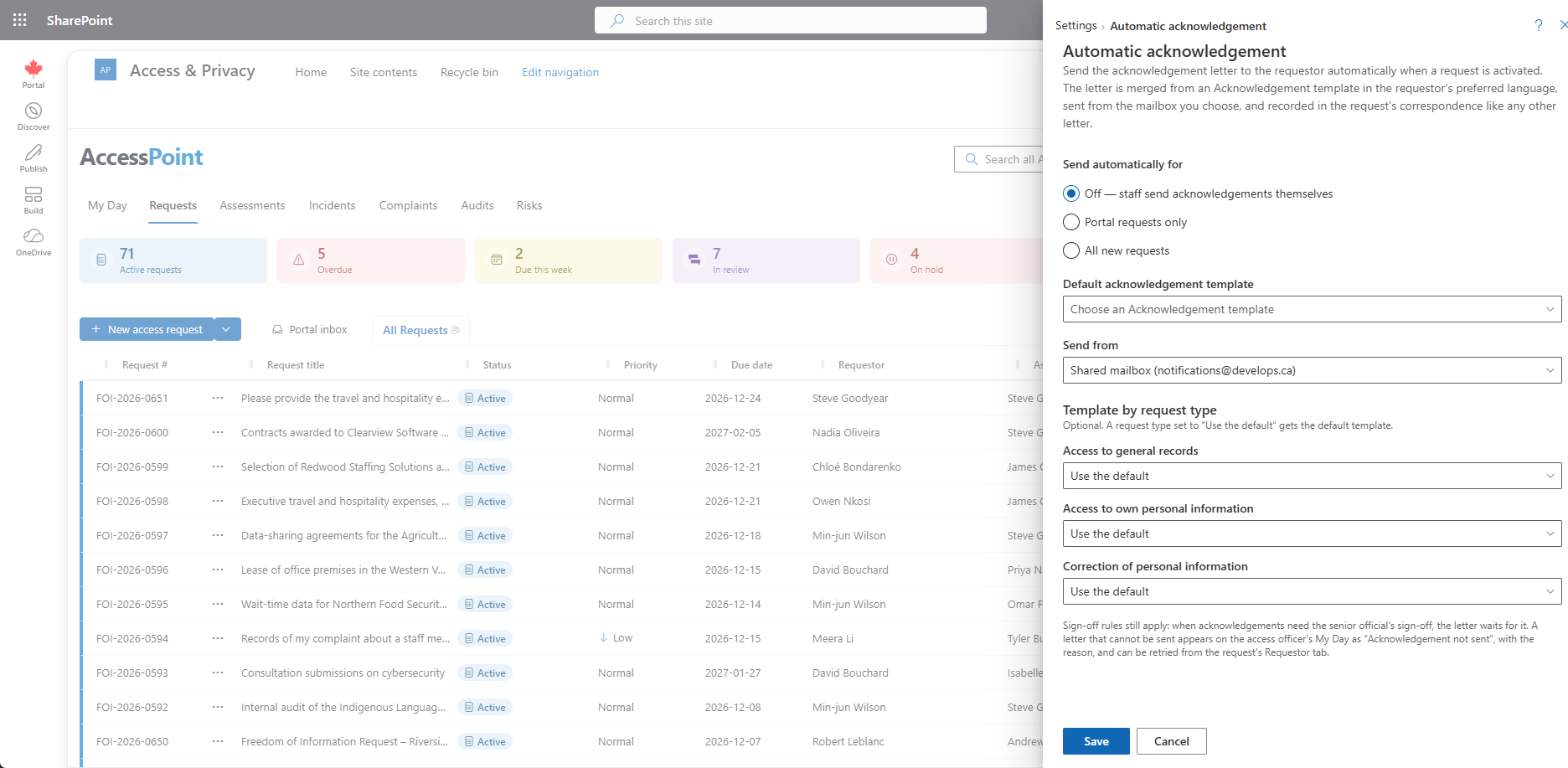
An administrator can have AccessPoint send the acknowledgement letter by itself when a request is activated. It is off by default. Turn it on in Settings → Correspondence & templates → Automatic acknowledgement.
The Settings
- Send automatically for — Off, Portal requests only (requests that came in through the public portal) or All new requests.
- Default acknowledgement template — an active template of type Acknowledgement. It is required to turn the letter on.
- Template by request type — optional. Give a request type its own Acknowledgement template, or leave it on Use the default.
- Send from — the shared sender mailbox (it must be configured, with e-mail notifications on) or one of the intake mailboxes listed in Settings → Organization.
What Happens
Activating a request queues the letter. It never slows or blocks the activation. Within a minute or so AccessPoint merges the template for the request, in the requestor's preferred language (the tenant's default language when there is no content in that language), and sends it through the same path as the correspondence composer.
The letter is recorded like any other: an outbound communication with the purpose Acknowledgement, the rendered PDF, the audit trail and the ledger. The correspondence detail panel shows a Sent automatically badge. For a portal request, the letter is also shared on the requestor's portal case page. A request placed on hold by the active-request limit still gets its acknowledgement.
It Is Sent Once
If the request already has an outbound acknowledgement, for example one staff sent by hand before activation, or one is waiting for sign-off, no automatic letter goes out. Turning the setting off also stops letters that are still queued.
Sign-Off Still Applies
If Acknowledgement is one of the purposes in Correspondence sign-off, the letter waits in Letters awaiting sign-off for the request's senior official, exactly as a composed letter would. Once approved, Send now sends it and records it as an automatic letter. Someone who holds Act as senior official has their letters sent directly. See Correspondence Sign-Off.
When It Cannot Be Sent
These stop the letter at once:
- a missing requestor e-mail address;
- a missing or turned-off template;
- no usable sender mailbox;
- no senior official when sign-off is required;
- a sign-off returned for changes.
A failed e-mail send is tried again a few minutes later, up to three times.
When a letter fails, the access officer sees Acknowledgement not sent on My Day, with the reason. The request's Requestor tab shows the same reason above the correspondence log, with a Retry button for anyone who can modify the request. Fix the cause, then select Retry. Sending an acknowledgement from the composer also clears the My Day item.
Related Pages
- Correspondence Templates — the Acknowledgement template.
- Correspondence Sign-Off — which letters wait for the senior official.
- Organization — the intake mailboxes offered as send-from addresses.
- Sending Correspondence — sending a letter by hand.
- My Day — where "Acknowledgement not sent" appears.