
The privacy program hub — Overview, Inventory, Position, Year, Discovery and Rules: where a privacy office sees what is set up, where the program stands and what is due.
Last updated: October 20, 2026 by Steve
Privacy Program
The Privacy program button on the toolbar (a shield with a padlock) opens the privacy program in one panel. It is the place a privacy office runs its program from: what is set up, where the program stands against the accountability building blocks, what needs fixing, what is due, and the inventory of what the institution holds.
Looking for Privacy subjects & controls? The hub replaced the toolbar's old Privacy subjects & controls button. The privacy subjects directory is now the Subjects register under Inventory, in the same panel.
Reports → Privacy program and the program's pinned tile on My Day open the same panel on its Overview (from Reports, a Reports › Privacy program trail leads back to the menu). A link in a notice or a shared program, subject or vendor link opens it too.
The Areas
You see the areas your role allows.
| Area | What it is for | Who sees it |
|---|---|---|
| Overview | The landing page: setup, your attestations, where each building block stands, what needs attention and what is coming up. | View the privacy program |
| Inventory | The program's personal information inventory, in three registers: Subjects, Vendors and Systems. | Subjects: anyone who can view assessments or incidents. Vendors and Systems: everyone who can open the panel. |
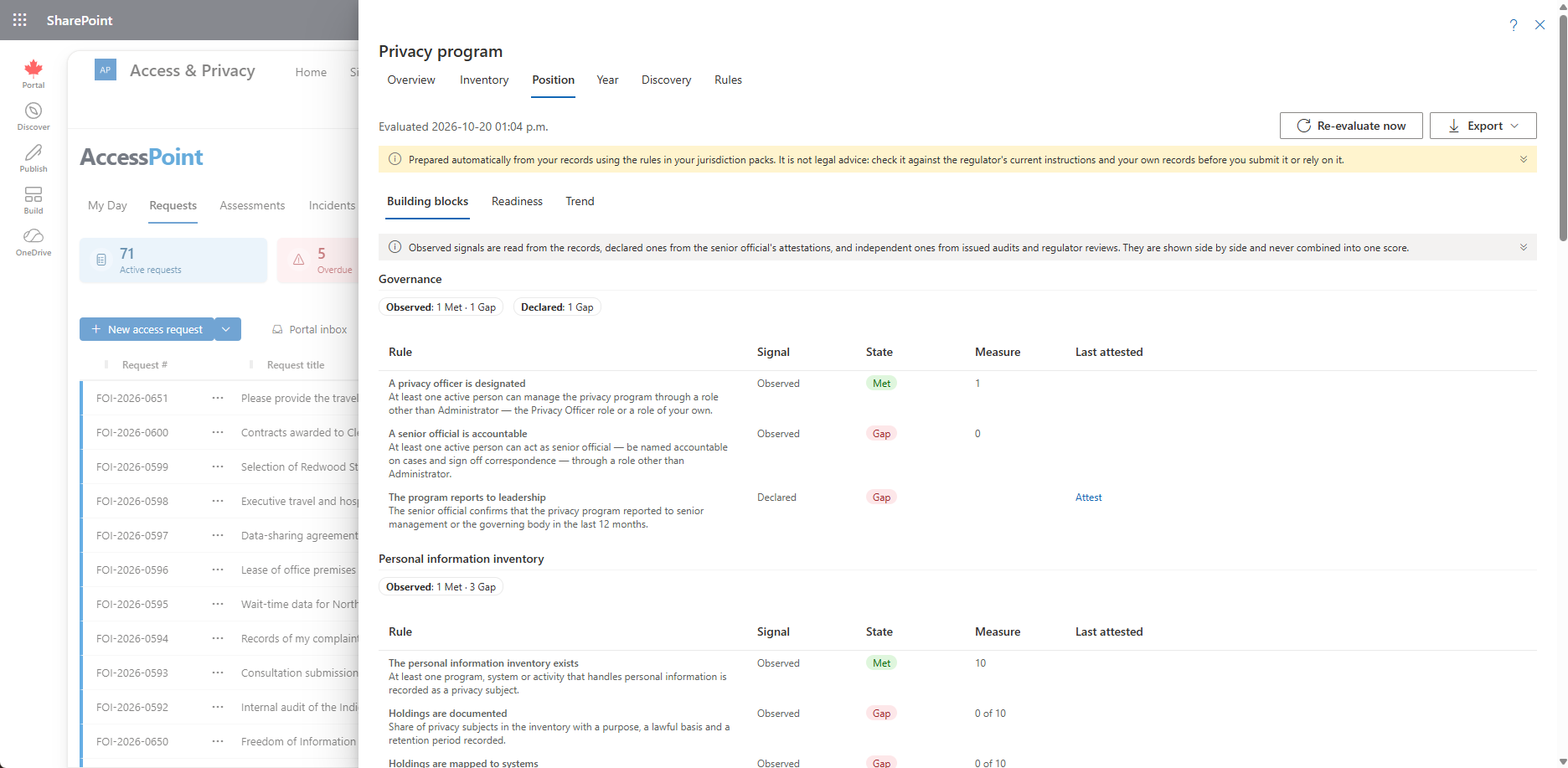
| Position | The evaluation itself, three ways: Building blocks, Readiness by law, and the Trend. | View the privacy program |
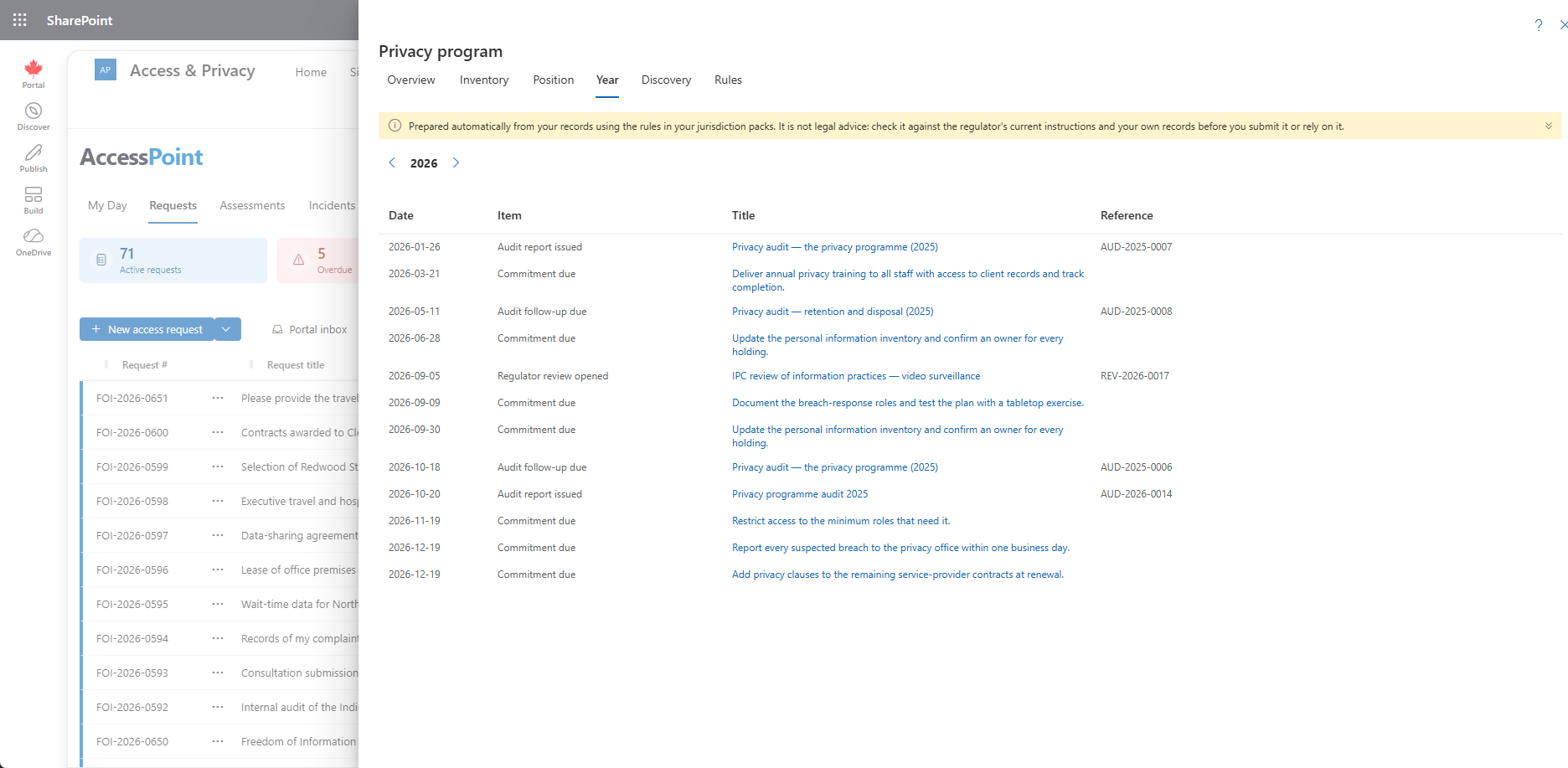
| Year | Everything dated in the chosen year. | View the privacy program |
| Discovery | Catalogues and signals, and Surveys: finding what the inventory is missing. | View the privacy program (actions: Manage the privacy program) |
| Rules | Turn off a rule that does not apply to you. | Manage the privacy program |
Someone who can read privacy subjects but not the program (an assessment coordinator, an incident reporter) gets the same button and lands straight on Inventory. Someone with View the privacy program but no access to assessments or incidents sees the program areas, and Inventory with Vendors and Systems only. Attest the privacy program alone shows nothing: give a senior official View the privacy program with it.
The panel remembers the area you were last in until you reload the page. Links and the Reports shortcut always open the area they name. The first time you see the button, a short hint says the program now opens there; Got it (or opening the panel) puts it away for good on that browser.
On My Day. The first time someone who can manage the privacy program (the built-in Privacy Officer role) opens My Day with no pinned reports, the program's tile is pinned for them. It is offered once: remove it and it stays removed.
Every computed area (Overview, Position, Year and Discovery) carries a notice that the figures are prepared automatically from your records and the rules in your jurisdiction packs and are not legal advice. It shows as one line; Show the whole notice expands it. Inventory and Rules, which are records and configuration, do not carry it.
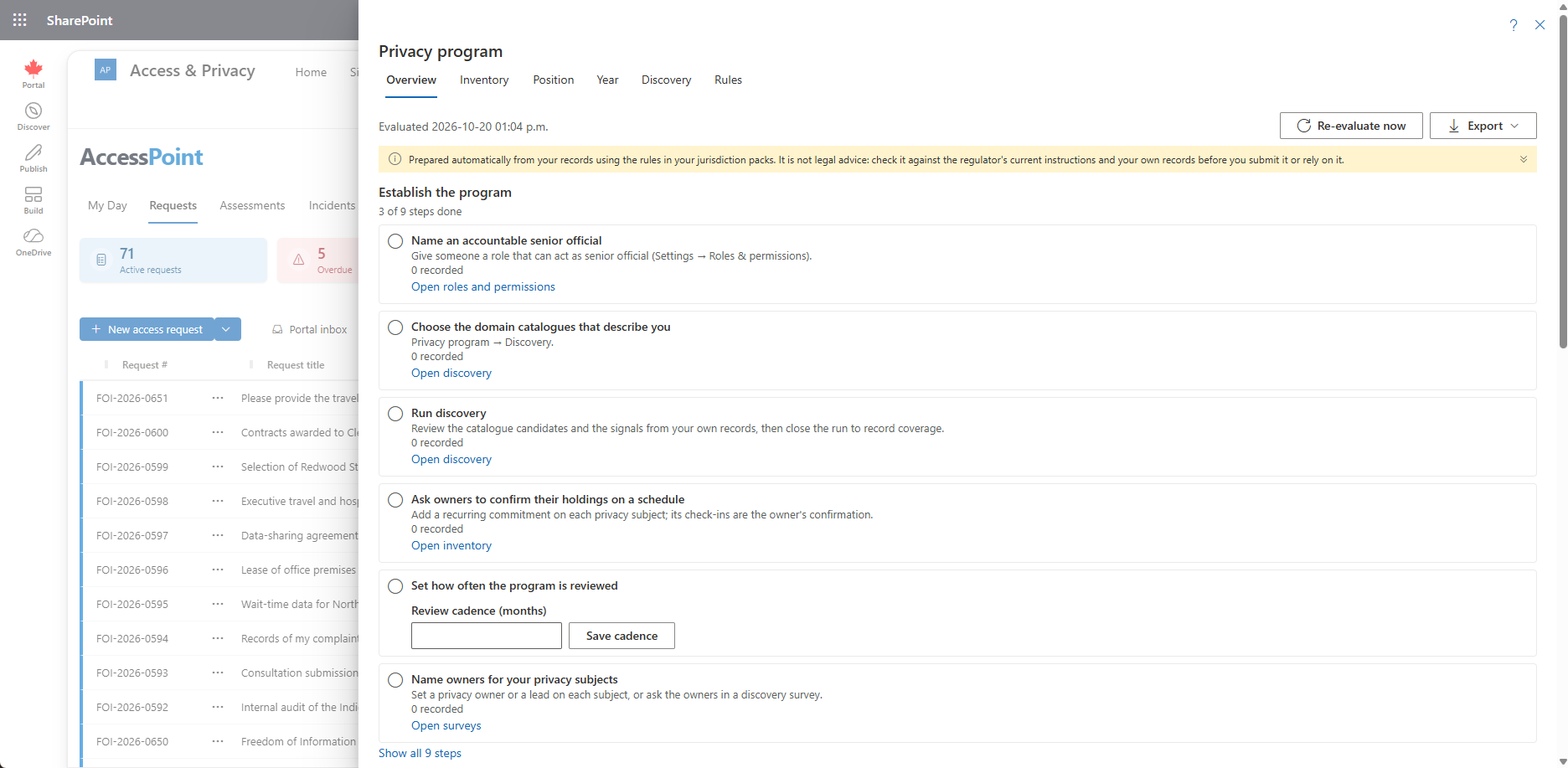
Overview
The Overview answers, in order: is setup done, where do we stand, what should I fix now, what is due soon, and are we ready for each law.
- Establish the program. The setup checklist, until every step is done. Each open step says what it needs and links to the place that changes it (Roles & permissions, Jurisdiction packs, Discovery, Inventory, Surveys) when you may go there; otherwise the hint names the place. Show all steps includes the completed ones. Once setup is complete the card says so in one line, with Review setup. A program manager sets the review cadence (in months) right on the card.
- Your attestations. For someone who can attest: every declared rule, the stale and unattested ones first, then the soonest to expire, each with Attest.
- Where the program stands. One card per building block. Each card has one line per kind of signal (observed, declared, independent) with that kind's own counts, never added together, never a score, a percentage or a single colour for the card, and View rules, which opens Position on that block.
- Needs attention. Every rule in a gap, then stale, then partial, in building-block order (an ordering, not a score), each with a link to the place that fixes it: Inventory, Attest, the Assessments, Incidents or Audits tab, the Commitments report, or Roles & permissions. When you cannot open that place, the link opens the rule on Position instead.
- Coming up (next 90 days). The dated items of the Year view that fall in the next 90 days, with Open the year view.
- Readiness by law. Each regime's obligations met, with View by law.
A position that has never been evaluated says so; a program manager gets Evaluate now. Without the program rules the Overview says how to load them (with Open jurisdiction packs for an administrator).
The steps that make the position meaningful are each ticked from the records: a senior official and a privacy officer named, the jurisdiction packs for your regimes applied, the inventory started, owners asked to confirm their holdings on a schedule (a recurring commitment on each subject), a review cadence set, and owners named on your subjects or asked in a discovery survey.
Position: Where the Program Stands
Position answers the question a senior official, an auditor or a regulator asks first: is the privacy program in place, and how do you know? It reads the answer from the records you already keep, block by block. The blocks are the accountability building blocks of Getting Accountability Right with a Privacy Management Program: governance, the personal information inventory, policies, risk assessment, training and awareness, breach and incident management, service providers, external communication, oversight and review.
Every rule in a block is one of three kinds, and the three are shown side by side, never added up into one score:
- Observed. Read from the records: someone other than the Administrator is designated privacy officer and someone can act as senior official; privacy subjects are recorded, documented (purpose, lawful basis, retention), mapped to the systems they run on and confirmed by their owners; live subjects have an assessment in effect and assessments are not past their reassessment date; closed incidents record a root cause or lessons; vendors that process personal information have a current data processing agreement; open commitments have an owner and a date and are not long abandoned. A ratio is Met at 90 % or more, Partial from 50 %, otherwise a Gap, and the figure behind it ("12 of 15") is shown.
- Declared. Confirmed by the accountable senior official: the program reported to leadership, policies are current, staff are trained, notices are current. Someone holding Attest the privacy program opens Attest on the rule and records where the evidence is kept and an optional note. The attestation counts for 12 or 24 months and then shows as Stale. Attestations are kept permanently, and the dialog shows the history. No built-in role carries this permission; grant it to your senior official.
- Independent. Shown by an outside look: an audit report issued or a regulator review concluded in the last 24 months (both kept on the Audits board), and the actions from them not overdue.
| Where | What it shows |
|---|---|
| Position › Building blocks | Each block with its rules, their state, the measure behind them and, for declared rules, who attested and when it expires. |
| Position › Readiness | Each law whose jurisdiction pack maps its obligations to the program rules (see below). |
| Position › Trend | Met rules out of the total per block for the last six evaluations. |
| Year | Everything dated in the chosen year: reassessments due, audits planned and issued and their follow-up, regulator reviews opened and concluded, recommendations and other commitments falling due, vendor agreements expiring, vendor contracts ending (with the systems in use that depend on them) and vendor reviews due, attestations expiring. Audits, reviews and commitments open their case. An item on a record you cannot open shows only its date and kind (Not visible to you), here and in the export. |
| Discovery | Finding what the inventory is missing. See Discovery and Discovery Surveys. |
| Rules | Program managers only: turn a rule off where it does not apply to you. A later re-apply of the pack keeps your choice. |
The position is re-evaluated every week and whenever a program manager chooses Re-evaluate now or an attestation is recorded. Export to Excel and Export to PDF (the Export menu on Overview and Position) produce the position and the year in your language for a management report or an audit file. Nothing here is tied to a reporting period, and nothing on it names a requestor or an employee: it holds counts. Only the Year view names records, and only those you could open.
The rules arrive with the Universal baseline pack. If the panel says no rules are loaded, re-apply it under Settings → Jurisdiction packs. Reading the program needs View the privacy program; re-evaluating, the review cadence and the Rules area need Manage the privacy program. The built-in Privacy Officer role carries both.
Readiness by Law
A jurisdiction pack can map its statute's privacy obligations onto the program rules. Position › Readiness lists them per statute: the obligation, its provision, the rule that shows whether it is met, and that rule's state from the latest evaluation. It is the same evaluation as the Position, read through the statute's lens, never a second score.
- An obligation not yet in force says from when.
- A rule a program manager turned off reads Rule turned off, and one whose pack has not been applied reads Rule not loaded. Neither ever counts as met.
- An obligation that binds only some organizations says so in its description (an Australian Government agency, a Significant Data Fiduciary under India's DPDP Act, a health information custodian). Turning its rule off under Rules is the way to say it does not apply to you.
The Ontario municipal (MFIPPA) pack maps Bill 97's obligations (a written privacy impact assessment before collecting personal information, notice of collection, the index of personal information banks, breach reporting and notification, breach records and annual statistics, readiness for an IPC review of information practices) and adds a rule counting last year's breaches ready for the annual statistics return. The Ontario health (PHIPA) and child and family services (CYFSA Part X) packs add the same check for their own annual reports, which count every breach that occurred in the year, reported to the IPC or not. The Ontario provincial (FIPPA) pack maps the same obligations under the Act as amended by Bill 194 (in force since 1 July 2025), and the EU GDPR pack maps seven accountability articles. Every other pack for a privacy law maps its obligations the same way, as far as the law requires each: a person or office accountable, policies, a record of holdings, notice, impact assessment, security, contracts with service providers, breach notification, training and audit. Each US state and territory records pack maps its breach-notification law. The packs are a starting point built from public information, not legal advice.
The exports carry the readiness as a third sheet and a section of the PDF.
Vendor Contracts Ending
When an active vendor's contract ends within 90 days, or has already ended, while systems your programs run on today come from that vendor, everyone who can manage the privacy program sees it on My Day: The contract with 'Payroll Co' ends in 30 days, with the systems that depend on it. Clicking it opens the vendor in Privacy program → Inventory → Vendors. The item clears itself when the contract end date moves (a renewal), the vendor is no longer active, or the systems are decommissioned or no longer used. Dismiss holds only for that end date, so a new date raises it again.
The Inventory
Inventory holds three registers, each with its own page:
- Subjects. The searchable directory of privacy subjects. See Privacy Subjects and Privacy Subject Details.
- Vendors. The register of third parties that process personal information. See Vendor Register.
- Systems. Where records live. See Systems Register.
Related Pages
- Discovery and Discovery Surveys — finding what the inventory is missing.
- Vendor Register — the vendor and processor register.
- Systems Register — where records live.
- Privacy Subjects — the Subjects register.
- Reports — the Reports menu, which opens the program's Overview.
- Roles & Permissions — granting the program permissions.