
Storage policies that move closed cases' files to cheaper Azure tiers — off until you switch one on — plus limits, prices, diagnostics and operator settings.
Last updated: October 20, 2026 by Steve
Storage and Archiving
Settings → Records and retention → Storage and archiving (configuration.manage) is where an administrator decides whether and how closed cases' files move to cheaper Azure storage. It has four tabs: Policies, Settings, Prices and Diagnostics. Users see the result on each case; see Files in Archive Storage.
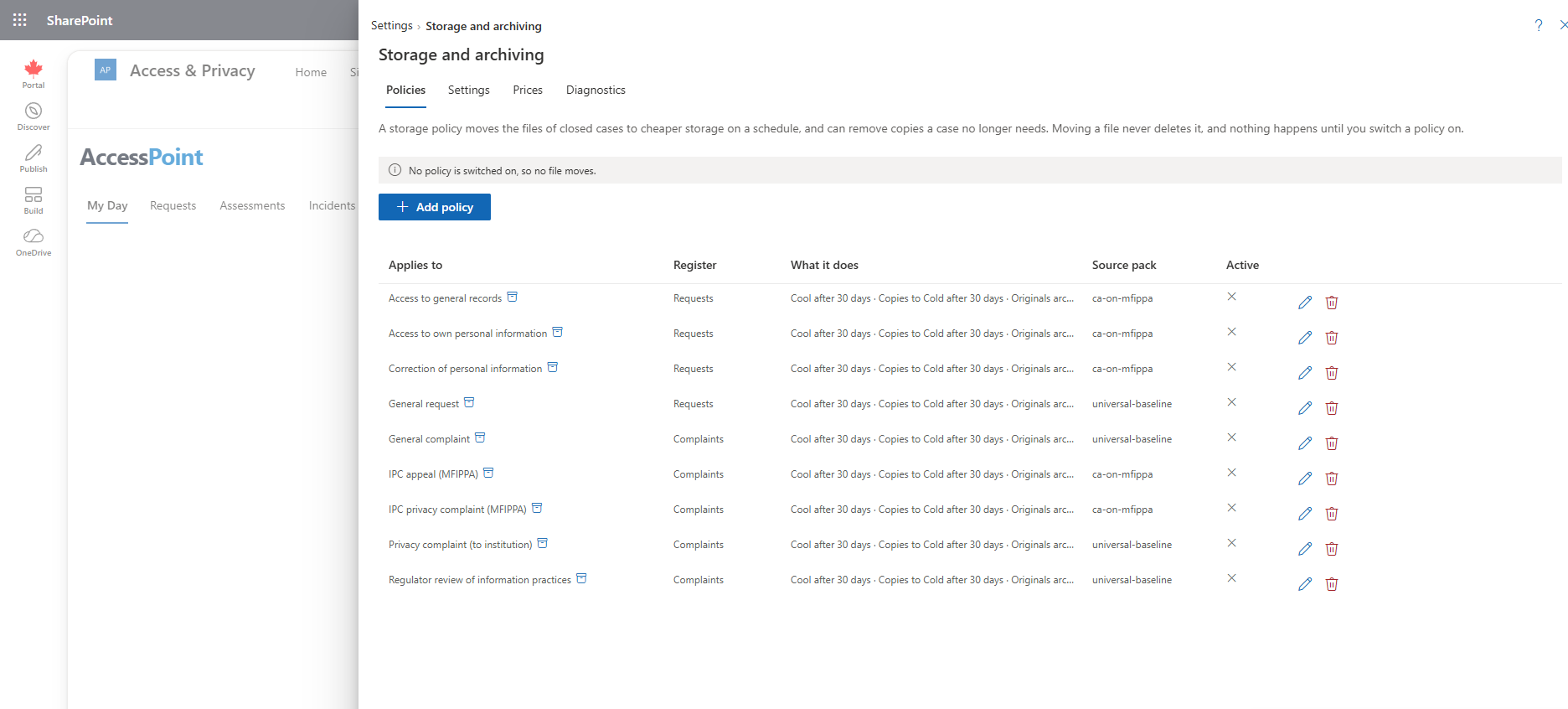
Nothing is archived until you switch a policy on. Storage policies are created switched off, and those a jurisdiction pack recommends arrive switched off too. A tenant that sets up nothing changes nothing.
What Archiving Does and Does Not Do
- It moves the files of closed cases to cheaper tiers, by the rules of a storage policy for the register or the case type.
- With the policy's housekeeping on, it removes duplicate copies and rebuildable preview copies of closed cases.
- With a disposal stage on, it offers closed cases for disposition in Retention review, never automatically.
- It never moves anything of an open case, never changes the retention purge, and never touches the portal's delivery copies, the write-once
evidencecontainer or AccessPoint's own key ring. - Moving a file to a cheaper tier never deletes it.
The Cost Trade-off
The files stay in your own Azure storage account, so the savings and the charges both land on your Azure subscription. These are Azure's list prices for locally redundant storage in Canada Central, in US dollars (October 2026); enter your own under Prices.
| Tier | Storage price, per GB a month | Reading a file |
|---|---|---|
| Hot | USD 0.0200 | At once, no extra charge |
| Cool | USD 0.0110 | At once; USD 0.01 per GB read |
| Cold | USD 0.0045 | At once; USD 0.03 per GB read |
| Archive | USD 0.0018 (about a tenth of Hot) | Only after a restore, which takes hours |
Cheaper tiers cost less to keep but more to read, and Archive is offline. Restoring from Archive costs USD 0.022 per GB plus USD 5.50 per 10,000 files at Standard priority (usually within 15 hours), or USD 0.12 per GB plus USD 60 per 10,000 files at High priority (administrators only; usually within an hour for files under 10 GB). Azure also charges for leaving a tier early: a file moved out of Cool within 30 days, out of Cold within 90 days or out of Archive within 180 days pays for the rest of that time. AccessPoint plans around those minimums, so the charge is rare.
As a rough guide from the User Guide, on a closed request holding 21 GB of recordings, tiering alone removes about 85 % of the monthly cost, tiering with housekeeping about 92 %, and keeping only what was released about 97 %. Moving its files costs under one cent; restoring 12 GB of archived originals costs about USD 0.26 at Standard priority (USD 1.44 at High). Your own figures depend on your files and prices, so use Preview and the Storage Report before you decide.
Policies
The list shows each policy, with the register defaults first (Every type without its own policy), then the case types. Each row says what the policy does (Cool after 30 days, Originals archived after the windows, Housekeeping, Disposal offered, or Nothing moves), whether it is switched on, and the jurisdiction pack it came from. Select a row for its read-only view, with Switch on… or Switch off. Add policy opens the editor.
A register's default reaches every type without a policy of its own; a type's policy is the whole policy for that type. The clock starts when the case closes, or, for a request or complaint type whose retention starts at the response, on the day the response was sent.
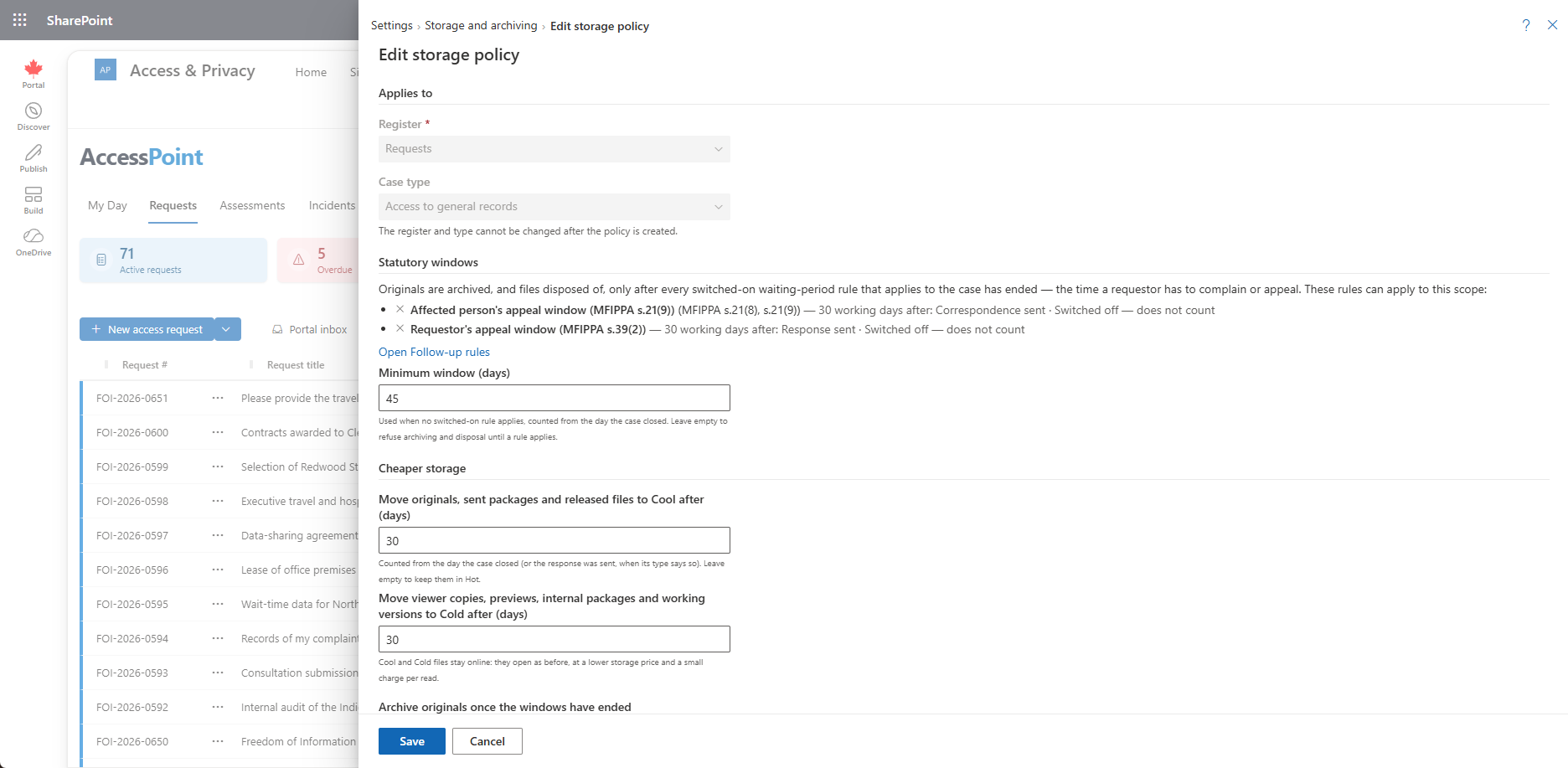
| Section | Field | What it means |
|---|---|---|
| Applies to | Register, Case type | Neither can be changed after the policy is created. |
| Statutory windows | Waiting-period rules (read-only) | The waiting-period rules in Settings → Follow-up rules that can apply to this scope, each Switched on or Switched off — does not count, with Open Follow-up rules. |
| Minimum window (days) | Used when no switched-on rule applies, counted from the day the case closed. Empty means archiving and disposal are refused until a rule applies. | |
| Cheaper storage | Move originals, sent packages and released files to Cool after (days) | From the clock start. Empty means they stay in Hot. |
| Move viewer copies, previews, internal packages and working versions to Cold after (days) | Cool and Cold files stay online. | |
| Archive originals once the windows have ended + Extra days to wait after the windows end | Originals only; offline until restored. Switching such a policy on asks for the redundancy confirmation. | |
| Move sent packages and released files to Cold once the windows have ended | ||
| Housekeeping | Remove duplicate copies once the case is closed + Working-file versions to keep | Empty versions means keep them all. |
| Remove rebuildable preview copies after (days) | Empty means keep them. | |
| Disposal | Offer to keep only what was released, from (days) | Never before the windows end. Empty means never offered. |
| Offer to keep only the case record, from (months) | Must come before the type's retention period. Empty means never offered. | |
| Our records schedule counts copies of responsive records as records + Records schedule reference | On means disposal needs the schedule item that allows it. | |
| Basis | Why these values | Your own note. A pack's recommendation arrives with its reasoning. |
Days run from 0 to 3,650, months from 1 to 600 and versions from 1 to 100. Preview shows what the policy would do today — cases covered, how many have no window defined, files and size per tier, the monthly cost now and with the policy, the saving and the one-off cost of the moves — without naming a case.
The Statutory Windows
An original is archived, and a case offered for disposition, only once the requestor's time to complain or appeal has ended. AccessPoint reads those windows from the waiting-period rules in Follow-up Rules. Every switched-on waiting-period rule that applies to the case counts, computed from the case's own dates, even when the rule was switched on after the case closed. A rule that is switched off does not count. When no switched-on rule applies, the policy's Minimum window (days) stands in; when it has none, AccessPoint refuses to archive or dispose of anything of that case (No statutory window is defined for it). A request also waits for every complaint linked to it to close and for that complaint's own windows to end, and a complaint waits for the requests it is linked to.
Policies a Jurisdiction Pack Recommends
After you re-apply a jurisdiction pack (2.5.0 or later), its recommended policies appear in the Policies list beside your own — one per request or complaint type of the pack, switched off, with the pack's reasoning under Why these values. These are a starting point built from public information about the legislation, not legal advice; your legal counsel validates and adjusts them.
Open each one, check its values against your records schedule, change what does not fit, and use Switch on… for the ones you adopt. Re-applying the pack never switches a policy on, and never changes a policy that is switched on or that you edited.
The packs' recommended values follow a common pattern: originals and sent packages move to Cool 30 days after the clock starts and derived copies to Cold after 30; originals go to Archive once the statutory window has passed plus a buffer (30 days where the deadline cannot be extended, 60 where a late filing can still be accepted, 90 in the United States and 120 in the United Kingdom and Ireland); duplicate cleanup is on, keeping the last 3 working-file versions; and "keep only what was released" is offered 365 days after the response on own-information request types under GDPR-style regimes and Canadian privacy regimes, still behind the records-schedule gate. See Configuration Packs.
Switching a Policy On
A new policy is created switched off. Switch on… explains that, from the next nightly sweep, the files of the policy's closed cases move on its schedule, and asks for what the policy needs first:
- With Archive originals on, the confirmation I understand that archiving originals keeps the storage account on its current redundancy. It is recorded once, with your name and the date.
- With a disposal stage on while your schedule counts copies of responsive records, the records schedule reference.
- With Archive or a disposal stage on, a switched-on waiting-period rule that can apply, or a minimum window. Otherwise the dialog says the policy cannot archive or offer disposal yet.
Editing a switched-on policy checks the same rules again. Switch off and Delete move nothing back: files stay in the tier they are in, and restores under way carry on. If someone changed the policy after you opened it, saving says so; open it again and redo your change.
Archiving Originals Commits Your Storage Account's Redundancy
AccessPoint's documents storage account is locally redundant (LRS). Azure supports the Archive tier only on locally and geo-redundant storage (not zone-redundant), and once any file has been archived on an LRS account, Azure cannot move that account to geo-redundant storage (GRS). Any later change of redundancy first needs every archived file restored. If your organization plans to move the account to geo-redundant storage, do that before you switch Archive on, or leave Archive originals off and use Cool and Cold, which lock nothing.
The Settings Tab
Values that apply to every policy, read by the nightly sweep each time it runs:
- Pause archiving — saved the moment you switch it, and shown with who paused it and when. While paused, the nightly sweep moves no file to a cheaper tier and removes no duplicate or rebuildable copy. Pausing never restores anything: files already moved stay where they are, and restores that people ask for, or that are under way, carry on, including the automatic restores. Switch it off and the next sweep carries on where it left off.
- Smallest file to move (MB) — default 1 (0 to 1,024). Smaller files stay where they are.
- Days a restored file stays online — default 30 (1 to 365). A copy made or rebuilt in that time is not removed by housekeeping either.
- Most file moves in one nightly sweep — default 10,000 (100 to 100,000). The rest wait for the next night.
- Daily limit on standard restores (GB) — default 200 (0 to 10,000). The most data people can restore from archive storage at Standard priority in any 24 hours, for the whole organization. Past it, only an administrator can restore. 0 means only administrators can restore at Standard priority.
- Restore a request's archived originals when a complaint is linked to it — default on.
Save settings saves only what you changed; a value outside its range is refused and nothing is saved. Use defaults puts the values under Limits back to their defaults at once; it does not change the pause. Every change is recorded in the audit ledger with the values before and after.
The Prices Tab
The prices the Storage report, the policy preview and the restore prompt use: storage per GB a month for each tier, reading back per GB, restoring from Archive per 10,000 reads (standard and high priority) and moving files to a tier per 10,000 moves, in a three-letter currency. The defaults are Azure's list prices for Canada Central in US dollars. Enter your own agreement's prices (each from 0 to 1,000). Use list prices puts the defaults back.
The Diagnostics Tab
When the nightly sweep last ran for your organization and what it did, its last error, whether AccessPoint can read the storage tier of your files (Storage access), the files moved out of Hot by the tier they are in now, and the restores waiting on Azure or pending for more than seven days (a restore pending that long usually means Azure refused it). Refresh reads them again.
For the Operator
These are App Service settings, not on this page:
Archiving__Enabled(defaulttrue) is the kill switch for the nightly sweep and the restore check together.Archiving__SweepHourUtc(default2) sets the hour the sweep runs.Archiving__SweepHours(24),Archiving__RestorePollMinutes(10) andArchiving__MaxParallelTierOperations(8) rarely need changing.Storage__EvidenceRetentionDays(default 2555) should equal the deployment'sevidenceRetentionDays, so the disposal preview dates the surviving write-once evidence copies correctly. The template does not set it, so a deployment with anotherevidenceRetentionDayssets it by hand (App Service, Environment variables).
No template change and no new Azure role are needed: the API's identity already holds the storage role that changes a file's tier.
Related Pages
- Files in Archive Storage — what users see and how restores work.
- Disposition — the disposal stages in Retention review.
- Storage Report — where your files are and what policies would save.
- Follow-up Rules — the waiting-period rules that set the statutory windows.
- Preservation Holds — holds, which stop archiving and disposal.
- Configuration Packs — jurisdiction packs and their recommended policies.