
Retention review — disposing of closed cases (requests, assessments, incidents, complaints, standalone risks) whose retention period has expired, and the purge workflow
Last updated: July 30, 2026 by Steve
Retention Review
Under the Maintenance group in Reports, the Retention review panel is where administrators dispose of closed cases whose retention period has expired — the deletion step that keeps you compliant with your records schedule. Its entry in the Reports menu carries a live count ("N closed case(s); M eligible for purge"), so you can see at a glance whether there is disposition work waiting without opening the panel.
Pin It as a Tile
Retention review can be pinned to My Day or the Reports home like any other section, and it renders a purpose-built tile rather than generic request statistics. At the smallest size it shows the two numbers that decide whether you need to act — requests to purge and closed requests. Larger sizes add the rest of the picture: all cases to purge across the five registers, the number of documents that would be destroyed, anything held back by an open linked case, and how long the oldest item has been waiting — plus bar charts breaking eligible and closed cases down by case type.
The tile is stamped As of today rather than with the dashboard's report period, because retention eligibility is a point-in-time state: a request that expired two years ago is eligible now, whatever period the dashboard is showing.
Five Registers, One Panel
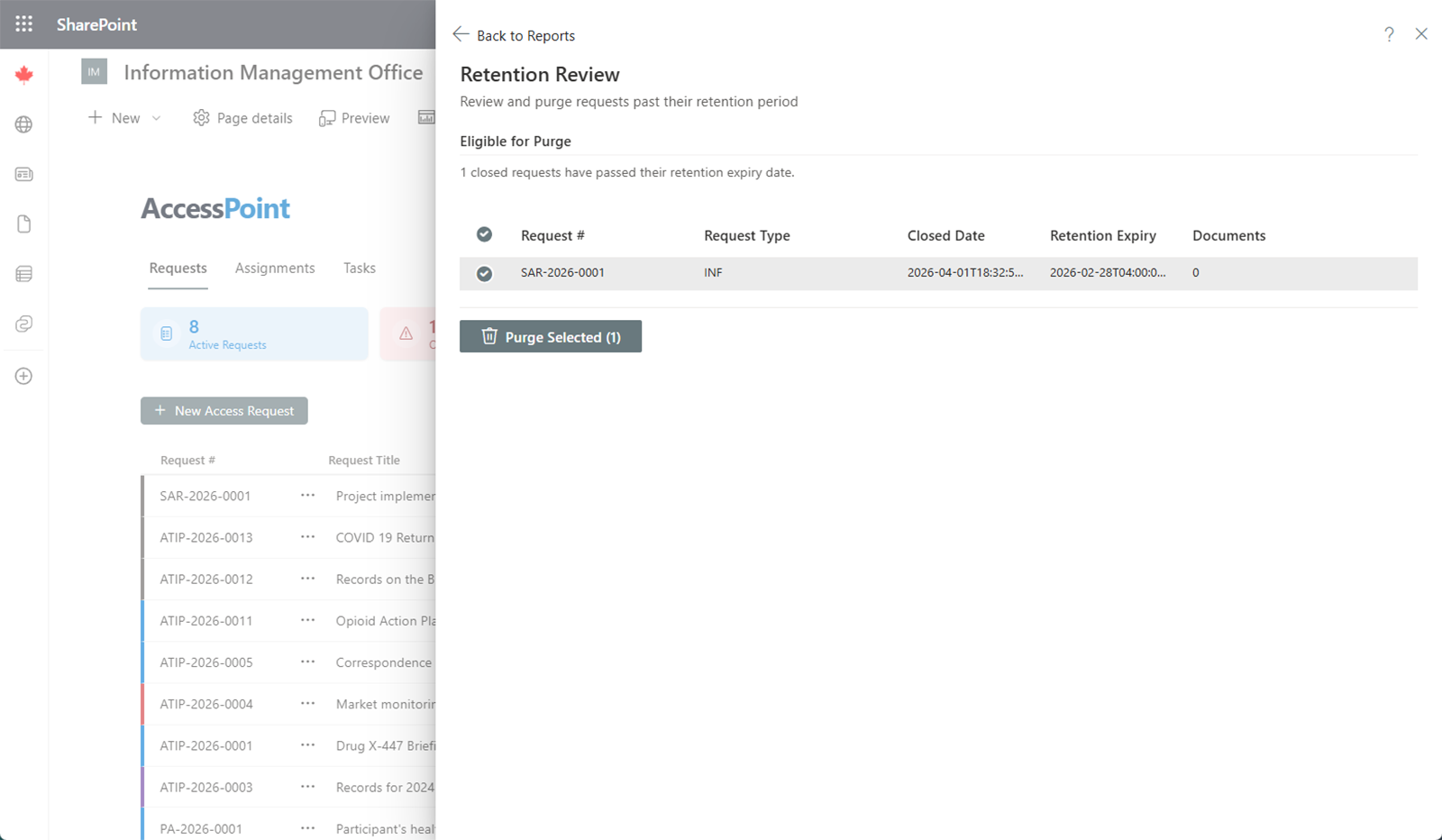
Retention covers five registers through one engine: requests, assessments, incidents, complaints, and standalone privacy risks. The eligible list shows a Case type column alongside each record's number, type, close date, retention expiry date, and document count — so a single review session disposes of everything that has aged out, whatever kind of case it is.
You Set the Clock Per Type, Not Globally
Each request type, assessment type, incident type, and complaint type carries its own Retention period (months) and, where more than one date makes sense, a Retention start point — configured in Settings. Standalone risks take their period from their risk category.
Leaving the period blank means keep indefinitely, and that is the default: a tenant that never configures retention never purges anything. Nothing ages out until you decide it should.
What Can and Can't Age Out
Some records are excluded by construction, not by policy — the engine won't offer them:
- An assessment is eligible only once Closed. An assessment sitting In Effect is the standing privacy record for its program, so it is never listed.
- An Accepted risk is never eligible. Acceptance is a live posture with a sign-off and an expiry, not a finished record.
- A risk attached to a case has no independent clock — it is deleted with its case, never on its own.
Cross-case dependencies also block disposition. An expired record that another open case still depends on — an open complaint contesting the request, an open request that a complaint contests, or a live attached risk — is listed with its block reason and refused server-side. Purging it would orphan the other side's evidence trail.
Only records whose retention expiry date has already passed appear; records with a future expiry (or none) are not shown. If nothing is eligible, the panel tells you so.
The Purge Workflow
- Tick the cases to dispose of. You can multi-select across case types; the running total of documents that will be destroyed is tracked as you go.
- Click Purge selected. A confirmation dialog states exactly how many cases and documents will be permanently deleted, behind a severe-warning banner.
- Confirm. Eligibility is re-checked at the moment of purge — not just when the list was drawn — so a case that was reopened between listing and confirming cannot slip through. The purge runs and a result banner reports how many succeeded and how many failed, listing the first errors if any.
Purging permanently removes the case record and all its children, including:
- Its dependent records (assignments and tasks, allegations, measures, sections)
- Uploaded documents, blobs, and blob storage
- Attestations
- Audit history
- Converted PDFs and annotations
- Export packages
This Action Is Irreversible
Retention purge is permanent and cannot be undone — the case record, its children, its documents, and blob storage are removed. Every purge is recorded in the Purge log shown below the eligible list (case type, record, who purged it, when, and the document count). The purge log is the only surviving evidence that the record ever existed, and it is never itself purged — a defensible audit trail of your disposition actions.
Because retention purge destroys data, it should be reserved for administrators following your organisation's approved records schedule.