
Reports launcher — the report period selector and the grouped menu of reports and analytics
Last updated: September 03, 2026 by Steve
Reports
The Reports area turns your live request, privacy, and complaint data into the statistics an ATIP office needs for management oversight, annual reporting, and records retention — without exporting to a spreadsheet first. Open it from the dashboard toolbar's Reports button, which slides in the Reports menu panel.
Reporting is read-only and analytical, so it is available to coordinators, reviewers, and administrators. Every figure is computed from the same records you work with day to day, so a report always reflects the current state of the system.
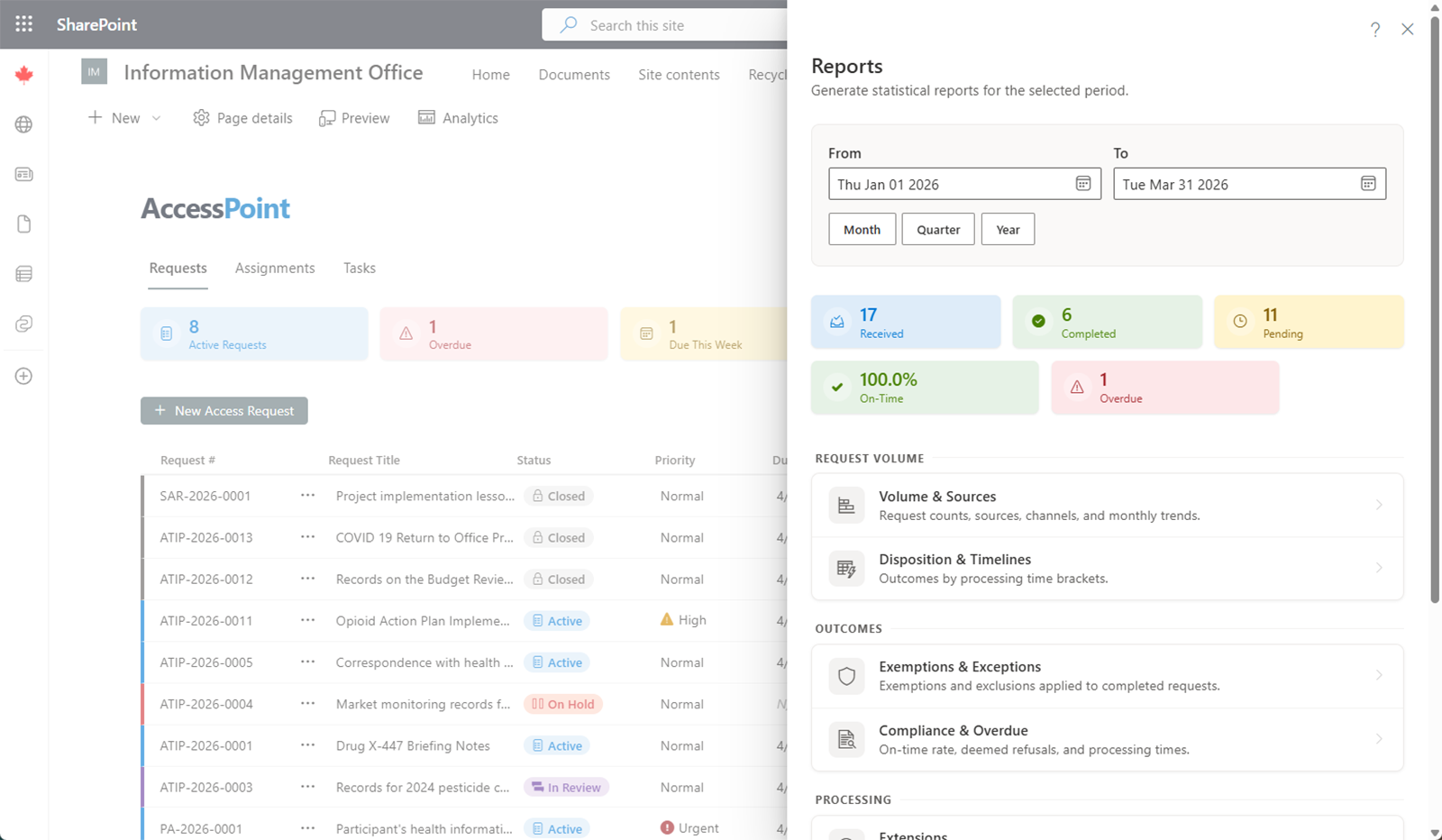
The Period Selector
At the top of the menu sits a period selector that governs every fixed report you open from here:
- Set the range with the From and To date pickers, or
- Click the Quick range button and choose a preset. Presets are grouped into Current period (this month, quarter, or year), Last period (last month, quarter, or year), and Rolling (last 7, 30, or 90 days). The button label always shows the range currently in effect.
The panel defaults to This Quarter and shows a row of summary KPI cards for the chosen period, so you get headline numbers before drilling in. The range you last applied is remembered, so returning to the menu from a report keeps your period.

The Report Menu
Below the KPI cards, reports are organised into groups — Request volume, Outcomes, Processing, Privacy, Management, Custom, and Maintenance. Click any row to open that report.
| Report | What it answers |
|---|---|
| Volume | How many requests were received, closed, and remain open over the period, with trend. |
| Disposition | How closed requests were resolved (fully disclosed, disclosed in part, refused, transferred, and so on). |
| Exemptions | Which exemption and exclusion provisions were applied, and how often. |
| Compliance | On-time versus late completion against statutory deadlines — deemed-refusal risk at a glance. |
| Extensions | Time extensions taken, by reason and duration. |
| Consultations | External consultations raised, by party and status, including turnaround. |
| Complexity | Requests by complexity, page counts, and document volume. |
| Workload | Request load across coordinators, plus dwell time and SLA measurement across stages. |
| Complaints | Complaints and appeals received, closed, overdue, open recommendations, and any binding orders, with trend, aging, breakdowns, and findings by allegation. |
The same menu carries reports for the rest of the mandate — assessments, incidents, service levels, and the governance registers:
| Report | What it answers |
|---|---|
| Assessments | PIA and AIA volume, status mix, and timeliness over the period. |
| PIA findings | Which checklist requirements live assessments keep failing, by requirement, with the risks and action items each finding raised. |
| Incidents | Incidents discovered, closed, and open, with cause and risk breakdowns and open-inventory aging. |
| Statistical reports | The jurisdiction annual return, computed from live data and exported to Excel or XML. |
| Service levels | Open-inventory health, stage bottlenecks, and what needs attention. |
| Incident service levels | Statutory notification-deadline compliance by notification type. |
| Assessment service levels | Due-date and review compliance across assessments. |
| Requestor volume | Who files the most requests, by requestor and by institution. |
| Assignment coverage | Delegated work across custodian assignments, assessment sections, and complaint workstreams — including the custodian integrity checks. |
| Risk register | Privacy risk posture across assessments, incidents, and the standalone register. |
| Commitments | Whether promises were kept, including regulator-recommendation implementation. |
| Vendor assurance | DPA coverage, expiry exposure, and overdue vendor reviews. |
| Case hygiene | Open QA findings across every open case, from the same deterministic rules as the per-case Case check card — overdue cases and actions, missing approvals and attestations, redactions citing no exemption, risks without mitigations or owners, and more. |
| AI systems register | Every AI or automated-decision system on the register: deployment status, risk classification, human involvement, mandatory-control gaps, and the derived approval position. |
| Review throughput | Approval turnaround by review type and approver, escalation, and rework. |
| Redaction throughput | Severance volume by origin, the machine-proposal backlog, and flag resolution. |
| AI governance | AI Assist usage, consumption, and the accept/edit/dismiss oversight split. Administrator only. |
| Document access | Who viewed or downloaded which records, and off-case downloads. Administrator only. |
The register reports (risk register, commitments, vendor assurance, case hygiene, AI systems register, assignment coverage, and the retention review) describe a current position rather than activity inside the period — each says so in a banner with its as-of date, and period-scoped figures within them are labelled as such. Several fixed reports let you drill from a summary figure through to the underlying requests, and statistical reports export to Excel or XML for jurisdictional filing. Jurisdiction packs ship ready-made statutory annual/quarterly report templates where the statute mandates one — including the Canadian federal ATIA/Privacy Act returns, Ontario, Québec, B.C., Alberta, Saskatchewan and Newfoundland annual reports, US FOIA, Washington JLARC, UK FOI, Scotland (quarterly), Ireland, Australia (federal and state), New Zealand, and Switzerland — and you can define additional templates in Settings.
Working With a Report
Each fixed report opens in its own panel showing the active period at the top. You can Edit the range inline — a From/To editor with the same quick-range presets — and click Apply; the new range is remembered and carried back to the menu. Breakdown tables show counts and percentages, and where a report supports it a Compare toggle shows the previous period alongside the current one with change indicators. Export to Excel to take the data further.
Build Your Own
When no fixed report answers your question, Custom Reports & Report Studio let you choose a subject, group and measure fields, filter, and save or share the result — even arranging several report widgets into a dashboard with one shared period — no SQL required.
Ask AccessPoint
When AI Assist is enabled, you can also ask for a report in plain language. From the custom-reports home and from My Day, Ask AccessPoint takes a question such as "how many requests did we close per month, by outcome?" and builds a report definition against the same field catalogue the report editor uses. It never writes SQL, personal-information fields are never offered to it, and every result opens in Report Studio for you to refine, save, or export — so a wrong answer is a wrong chart, never a data leak. Ask AccessPoint is optional: it appears only where AI Assist has been deployed and the feature is switched on.
Reports on My Day
You can keep the figures you watch most within reach from My Day:
- Pinned report tiles — pin a saved custom report (from the custom-reports home or Report Studio) or a built-in report section (with the pin toggle on any row of the Reports panel) and it renders as a live tile above your action buckets, in one aligned grid. Built-in manager tiles include request deadlines & service levels, workload with the heaviest-loaded coordinator called out, and complaints, incidents, and assessments summaries. Tiles are built to be read at a glance: most figures carry a period-over-period arrow (▲/▼ vs. the preceding equal-length period — green when the movement is good, red when it isn't, gray for neutral demand metrics like received), and figures that demand attention are colour-coded (red for overdue counts and poor on-time rates, amber for warnings such as due-soon or reviews overdue). When a tile size can't fit every figure, a small +N chip appears — hover it to see the hidden stats. Manager tiles also surface forward-looking signals: extensions expiring within 14 days and open inventory by age on the service-levels tile, average days to notify on the incidents tile, and assessments stalled 30+ days on the assessments tile. Each tile has a small menu to set its size (Small / Medium / Large / Extra large — bigger tiles show more of the underlying figures), choose where it appears (My Day, the Reports home, or both), or unpin it. Clicking a tile opens the full report. Pins are personal to you.
- Daily brief — when AI Assist is enabled, a Brief me card on My Day summarizes your action feed in a few sentences with the top items pulled forward. It runs on demand only, and the action feed below it remains the authoritative list.
Records Disposition
Under Maintenance, the Retention review panel lists closed records whose retention period has expired — across requests, assessments, incidents, complaints, and standalone risks — and manages the permanent purge that keeps you compliant with your records schedule.