
The Follow-ups card on a case — open, upcoming and finished follow-ups, statutory waiting periods, personal reminders, and the warning before you release or close.
Last updated: October 20, 2026 by Steve
Follow-ups and Reminders
A follow-up is a small piece of work tied to a date the case already records: 30 days after the request closes, check whether the requestor appealed; the day the PIA is approved, send a copy to the regulator; 20 days after the third-party decision notice, the third party's review window ends. Follow-ups are created by the follow-up rules your administrator switches on (see Follow-up Rules). You can also set personal reminders yourself.
Every request, assessment (and audit), incident, complaint and privacy risk shows a Follow-ups card in the Details sidebar.
What the Card Shows
- Open — follow-ups whose date has come, with who they are assigned to. An overdue one says Overdue since ….
- Upcoming — follow-ups whose date has not come yet. A statutory waiting period is marked Waiting period — ends … with its legal reference (for example ATIA s.28(4)). A window that only marks a statutory clock — for example the requestor's time to complain or appeal after the response was sent — is shown here while it runs, even when the rule creates only a notice.
- Recently finished (folded) — what was done, skipped or cancelled in the last 30 days, by whom and when.
Working a Follow-up
Each follow-up offers, as the rule and your role allow:
- Done — with an optional note.
- Under …: Skip (a reason is required), Snooze (until tomorrow, for a week, or until a date — it comes back on that day and you are told again), Reassign (to someone who can open the case), and Reopen for one that was done or skipped.
You can act on a follow-up assigned to you, or on any follow-up of a case you may change.
A follow-up also completes itself when the work it asks for is recorded (the rule's done when — for example the date the PIA was submitted to the regulator). It is cancelled when its date disappears, for example when a case is reopened and so has no close date any more. A waiting period cannot be marked done or skipped: it ends on its date.
Personal Reminders
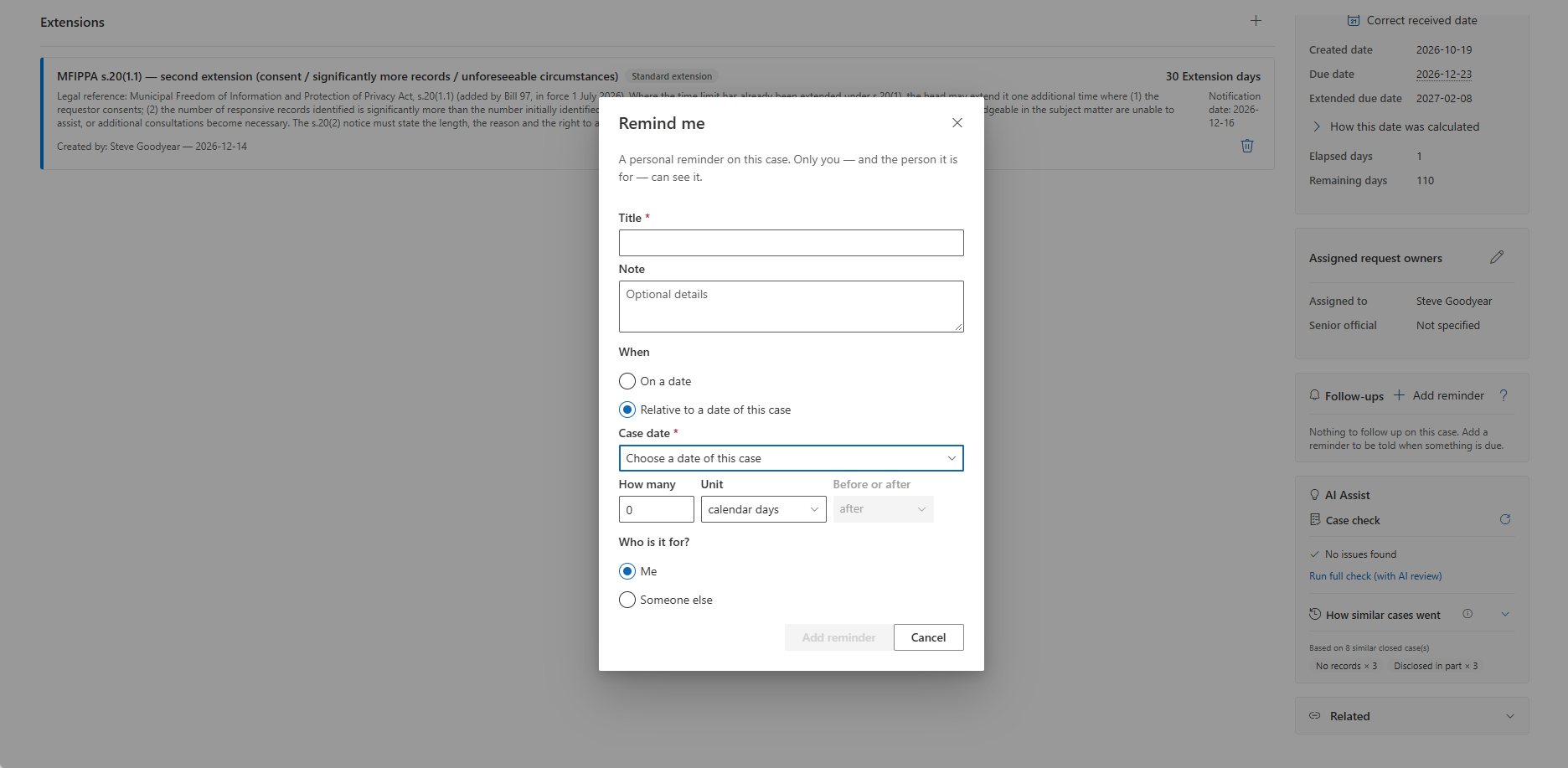
Choose Add reminder on the Follow-ups card or in the … menu of the case panel (the task panel calls it Remind me…). Give it a title and an optional note, then say when:
- On a date — the reminder comes due that day (no date means due now).
- Relative to a date of this case — pick the case date, how many calendar days, working days or months, and before or after: for example 30 calendar days after: Request closed. If the case does not have that date yet, the reminder waits until it does, then takes its due date.
If you hold Assign reminders to others, you can choose Someone else and pick a colleague who can open the case; they are told.
A personal reminder is private: only you and the person it is for can see it. On the Follow-ups card it is marked Only you, and nobody else sees it there, in the case activity, or anywhere else. You can change, reassign or delete a reminder you set, or one set for you.
Your Language
A follow-up made by a rule shows its title and instructions in your language when the rule has a translation for it — on the card and on My Day in the language you use AccessPoint in, and in its email, Teams message and notice in your preferred language. Without a translation you see the rule's text in its default language. A personal reminder always reads exactly as it was typed.
On My Day and in Notices
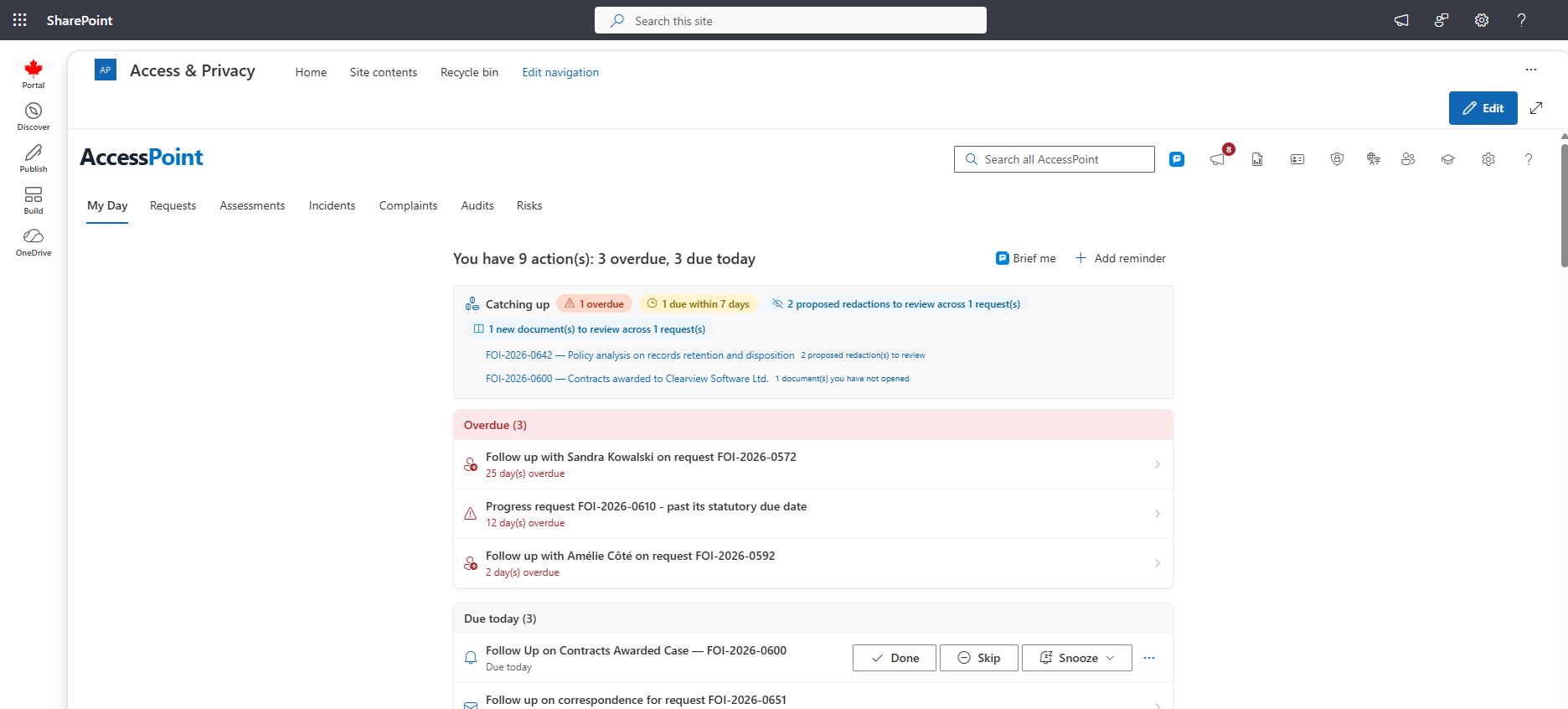
Open follow-ups and reminders — and upcoming ones that fall due soon — appear in the urgency buckets of My Day with their case number. Click one to open its case (a risk opens on the Risks tab). Done, Skip and Snooze work right on the row.
A Follow-ups notice tells you a follow-up came due, a snoozed one is back, or someone assigned you a follow-up or set a reminder for you. The case number shows only when you can open the case.
If a rule could not find anyone on the case to assign a follow-up to, people who can configure follow-up rules see it as Unassigned follow-up on cases they can open. Assign it with Reassign under …, or act on it.
The Warning on Release and Close
Some waiting periods are set to warn on release or close — for example "do not release until the third party's 20 days to seek review have passed". While such a window is open, releasing or closing the case shows a warning first. It lists each open window: the rule, its legal reference and the day it ends.
- Release anyway or Close anyway goes ahead. The windows you acknowledged, their law and end dates are recorded in the audit ledger.
- Cancel does nothing, and the screen says so.
The warning never blocks. It appears on every path a rule names: generating the response package, delivering records through the portal, and every way of closing a request (including a transfer), an assessment or audit (including Approve on the last step of a review that closes it), an incident, a complaint or a risk. A reply period that is still running on an assessment asks Approve anyway? when a rule warns on approval. The malware and hidden-content checks of a release still run as before.
A waiting period that warns on nothing is a statutory clock only: it shows on the Follow-ups card with its end date and never asks anything.
Related Pages
- Follow-up Rules — how administrators set up the rules that create follow-ups.
- My Day — where open follow-ups and reminders appear.
- Notifications — the Follow-ups notices and the in-app feed.
- Notification Preferences — email and Teams settings for the Follow-ups category.