
Configuration and administration guide for AccessPoint system administrators
Last updated: October 20, 2026 by Steve
Administrator Guide
This guide covers AccessPoint deployment, configuration, and ongoing administration. Almost nothing is hard-coded — AccessPoint follows a configuration-over-code approach, so you can reshape request types, letters, exemptions, calendars, roles, and the privacy program from Settings without a developer or a redeployment.
Start here: Deployment Guide — provision Azure resources, install the SPFx web part and Teams app, and connect them to your Microsoft 365 tenant.
Who is this guide for?
- IT Administrators responsible for deploying and maintaining AccessPoint
- SharePoint and Azure Administrators who manage the Microsoft 365 and Azure environment
- System Owners who configure business rules and operational settings
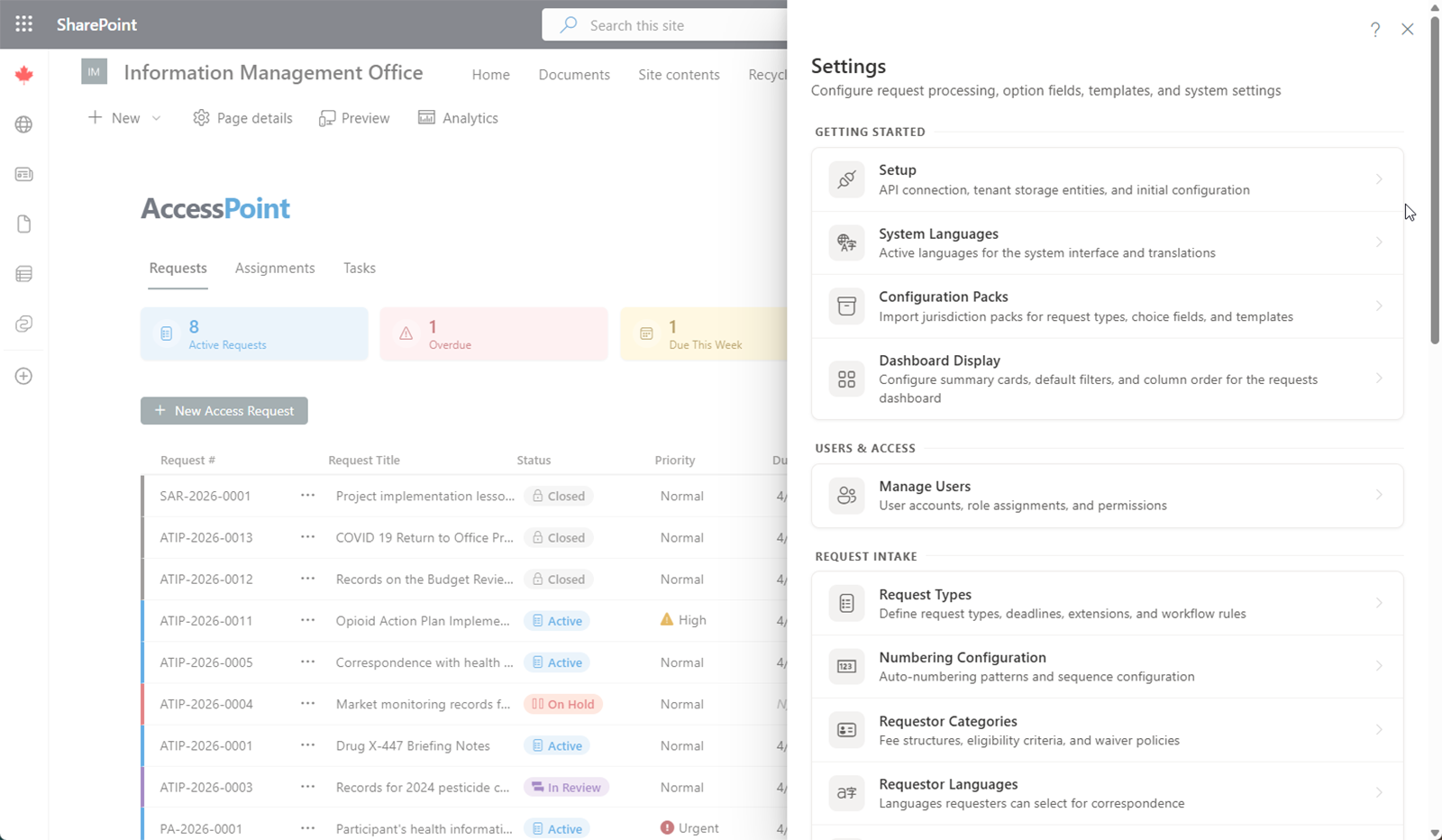
The pages below mirror the Settings hub. See the Settings Overview for the hub as the app presents it.
Getting started
- Settings — the grouped directory of every configuration area
- Setup — API base URL, Azure deploy/update, and email + Teams notifications
- System health — whether the database is keeping up, and what to do when it isn't
- Training — train mode, the training copy, guided help, team exercises, and training roles
- Jurisdiction packs — import jurisdiction or universal packs and review applied packs
- Organization — the institution display name merged into notices, letters, and tokens
- Languages — active tenant languages, default language, and display order
- Calendars — business-day calendars and statutory holidays for due-date math
- Features — per-tenant feature opt-out toggles
Foundations
- Public portal — the public intake portal: forms, program areas, the reading room, and requestor messages
- Payment providers — registering Stripe, Paymentus, or a hosted payment page, and reconciliation
- Repository connectors — registering connectors, identity modes, Test connection, health, and Hybrid Connections
- Notification contacts — the Security, Privacy and Operations contacts reached when something is wrong
Data and AI
- AI suggestions — the guidance-proposal inbox for AI-drafted playbook and catalog refinements, plus question mining of Ask AccessPoint questions into aggregate themes
- Data import & export — migrate historical caseloads via a tenant-generated import template, and export a business-readable Excel workbook
Users, roles & access
- Manage users — assign or remove application roles per user (last-admin guard)
- Roles & permissions — build tenant roles from a categorized, scoped permission catalog
Request intake
- Request types — categories, default durations, date conventions, and expedited rules
- Request statuses — configurable status labels for the request lifecycle
- Numbering configuration — prefix/separator/year/sequence patterns with live preview
- Requestor categories — fee categories (media, public, business) used in volume reporting
- Requestor category taxonomy — translatable contact and institution classification lists
- Requestor languages — preferred-language options for requestors
- Requestor flow control — active-request limit, hold reason, activation policy, and stale-hold days
- Request pattern review — when My Day suggests reviewing a requestor's pattern of requests
- Relationships — requestor-to-subject relationship types (self, representative, third party)
- Information categories — classifying the type of information requested
- Custom fields — tenant-defined fields added to entities
Request lifecycle
- Extension reasons — reasons with suggested/min/max durations and applicable request types
- Closure reasons — the reasons a request can be closed
- Response methods — how responses are delivered to requestors
- SLA targets — per-stage business-day targets for requests, assignments, and consultations
- Follow-up rules — follow-ups, notices, and statutory waiting periods created by rule
Collaboration & reviews
- Communication methods — how the office communicates with requestors
- Consultation types — inter-departmental and external consultation categories
- Correspondence templates — milestone-typed, multilingual letter/email templates with tokens
- Automatic acknowledgement — acknowledgement letters sent when a request is activated
- Notification templates — reminder rules and multilingual notification content
- Review types — the kinds of review used by the review engine
- Review workflows — sequential/parallel stage templates with reviewers, gating, and reminders
- Required reviews — mapping review templates to trigger stages across case areas
- Hours tracking — self-entry toggle and hours categories (fee-rate, scope)
Documents & review
- Document types — classifying documents within a request
- Document tags — colour-coded tag taxonomy, categories, mutual exclusivity, and email-family cascade
- Document templates — letterhead/blank/merge templates for working files
- Document workspace views — tenant-shared saved views pinned in the Documents workspace
- Document conversion — spreadsheet layout, hidden content, releasing spreadsheets as files, and SharePoint lists
- Relevance options — document relevance classifications used during review
- Legal authorities — the "which law" reference (type, jurisdiction, citation, regulator)
- Exemptions — exemption/exclusion provisions for redacting documents
- Redaction appearance — final style, redline transparency, exemption overlay, and approval-before-export
- Attestation templates — the certification text custodians sign when submitting
Privacy configuration
- Assessment types — PIA/AIA/Security types, scoring, tiering, and summary templates
- Assessment statuses — configurable status labels for the assessment lifecycle
- Assessment templates — the questionnaire builder (sections/questions), versioning, and screeners
- Screening lists — regulators' lists of processing that requires, or is exempt from, a DPIA
- Control option lists — the Controls-library lookups: control families, control kinds, and baseline profiles
- Incident types — categories for privacy incidents and breaches
- Incident statuses — configurable status labels for the incident lifecycle
- Incident option lists — cause, PI-category, harm, containment, remediation, and notification taxonomies
- Complaint types — categories for complaints and appeals
- Complaint statuses — configurable status labels for the complaint lifecycle
- Complaint choice fields — grounds, dispositions, and other complaint lists
- Risk categories — shared risk-register categories and appetite settings
- Privacy subject choice fields — subject types (with the AI/ADM system flag), categories of personal data (shared with incident reporting), categories of data subjects, and categories of recipients
Audits
- Audit types — the kinds of audit, their starting status, follow-up interval, and rules
- Audit templates — audit questionnaires and the standard sections
- Audit statuses — the audit lifecycle labels
- Audit root causes — the root-cause list for audit findings
- Audit settings — the management response window, the finding age threshold, and the Audits board
Records and retention
- Storage and archiving — storage policies, archive tiers, housekeeping, and disposition
- Preservation holds — holds that stop any deletion, and who may place them
Reporting configuration
- Dashboard views — tenant-shared saved views across entity dashboards
- Reporting brackets — timeliness day-range buckets for statistics
- Report catalog — enable or rename custom-report-builder fields per tenant
- Statistical report templates — jurisdiction annual-report templates and custom definitions
System & compliance
- Audit ledger — the append-only, hash-chained audit trail and integrity verification
- Disaster recovery — backup, recovery, rollback procedures, health monitoring, and scaling