
Jurisdiction packs — importing jurisdiction-specific configuration from the Realizer platform
Last updated: August 06, 2026 by Steve
Jurisdiction Packs
Jurisdiction Packs (formerly "Configuration Packs") are pre-built bundles of settings tailored to specific jurisdictions. They let you quickly set up AccessPoint with the correct request types, extension reasons, choice fields, exemption codes, and translations for your regulatory environment.
AccessPoint ships one Universal Baseline pack plus 136 jurisdiction packs spanning Canadian access and health/privacy regimes, US federal and state public-records laws, and access and data-protection regimes across Europe, the UK, Asia-Pacific, Africa, and Latin America. A tenant installs the baseline plus the pack(s) matching its mandate — a general access-to-information pack, and (for health authorities or private-sector bodies) a sector-specific privacy pack. Browse the live list under Settings > Jurisdiction packs, or see the Solutions hub for the jurisdiction pages.
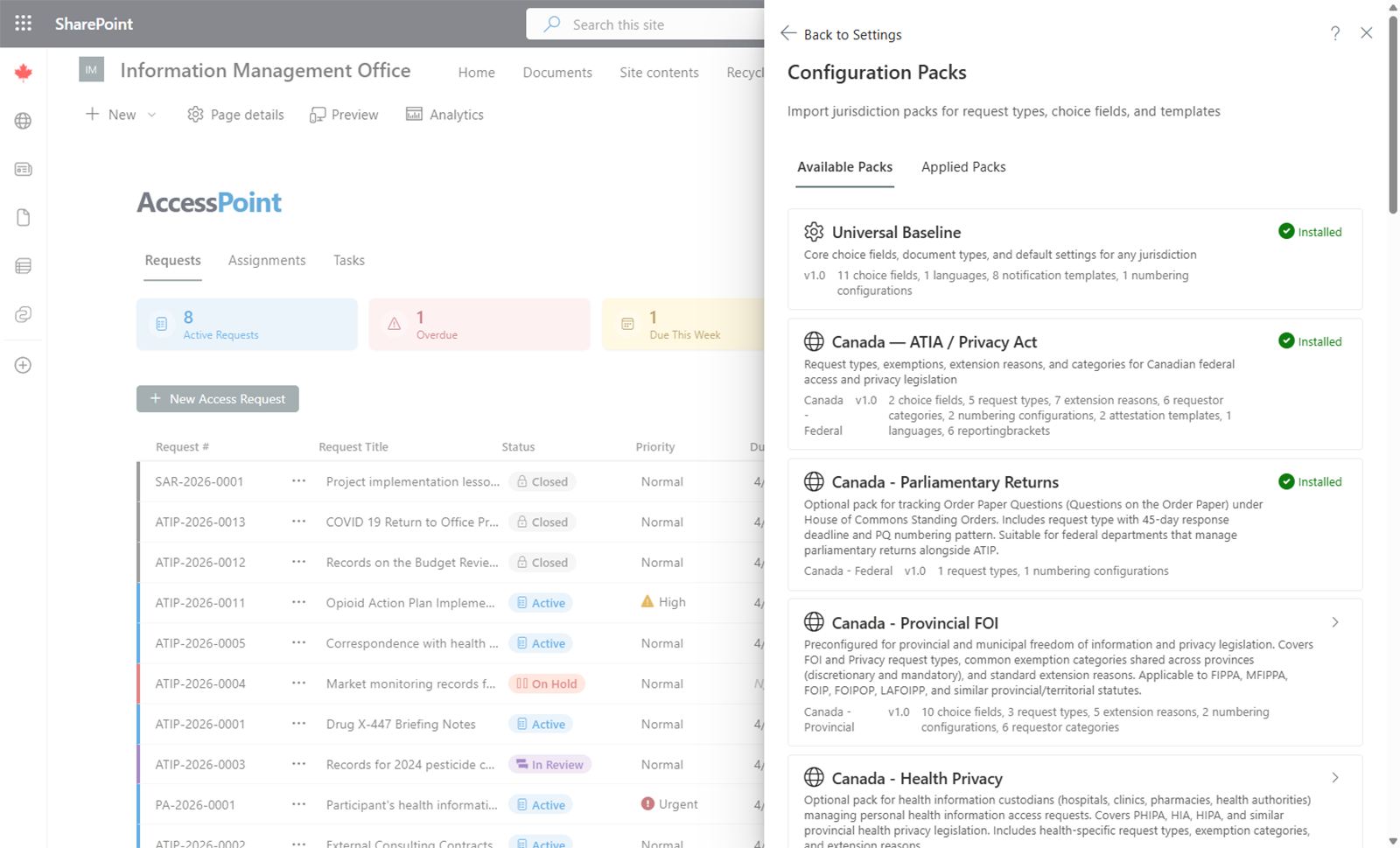
Importing a Jurisdiction Pack
- Go to Settings > Jurisdiction packs.
- Browse the list of available packs. Each pack shows the jurisdiction and a summary of what it includes.
- Select a pack and click Import.
- Wait for the import to complete. The system will create all included items in bulk.
What Gets Imported
A jurisdiction pack typically includes:
- Request types with standard processing deadlines and date calculation rules
- Extension reasons with suggested durations
- Closure reasons appropriate to the jurisdiction
- Exemption and exclusion provisions linked to the applicable legislation
- Legal authorities referenced by the exemptions
- Business-day calendars with the jurisdiction's statutory holidays
- Complaint and appeal types with the regime's grounds, disposition, and allegation-finding vocabularies
- Correspondence and notification templates carrying the statutory wording and citations, in the jurisdiction's languages
- Statutory annual/quarterly report templates where the statute mandates a defined return — 24 jurisdictions ship one (including the Canadian federal ATIA/Privacy Act returns, Ontario, Québec, B.C., Alberta, Saskatchewan and Newfoundland, US FOIA, Washington JLARC, UK FOI, Scotland, Ireland, Australia, New Zealand, and Switzerland); packs for jurisdictions with no mandated form deliberately ship none
- Breach-notification rules where the regime's privacy modules apply
- Suggested-redaction detection rules — the personal-information detectors that feed the proposed-redaction pipeline, with the jurisdiction's exemption citations wired on (see below)
- Choice field values for dropdowns throughout the system
- Translations for all imported items in the supported languages
- AI grounding (optional) — a jurisdiction playbook of process guidance, and per-item AI guidance text (see below), used only when AI Assist is deployed
The Universal Baseline pack supplies the jurisdiction-neutral foundation underneath: kind-neutral workflow statuses, generic incident choice-field values (harm/cause vocab is not law-specific), saved-view presets, default numbering, template skeletons — including the direct-to-institution complaint lane (a generic direct-complaint type with acknowledgement/response clock policy and its acknowledgement, response, and recommendation-response letters in all 11 languages) — and the core personal-information detection rules described below. Jurisdiction packs layer the regime-specific vocabulary and statutory content on top.
Suggested-Redaction Citations
Importing a jurisdiction pack also wires up your suggested-redaction rules. AccessPoint ships a set of universal personal-information detection patterns (phone numbers, email addresses, SIN/SSN, payment cards, postal codes, and dates of birth) in the Universal Baseline pack. When you import your jurisdiction's pack after the Universal Baseline, those core patterns are automatically wired to that jurisdiction's personal-information exemption.
The result: accepted suggested redactions arrive pre-tagged with the correct provision out of the box, with no manual mapping. A few notes:
- Import the Universal Baseline pack first, then your jurisdiction pack — the wiring is applied when the jurisdiction pack is imported (import them in the other order and it simply applies on re-import).
- Any exemption citation an Administrator has set or changed on a rule is preserved; pack imports never overwrite your edits.
- A few jurisdictions are intentionally left unwired where a single personal-information exemption doesn't map cleanly; you can set the citation manually under Settings > Redaction Appearance > Suggestion patterns. See Redaction Appearance.
AI Grounding Seeded by Packs (Optional)
When the optional AI Assist component is deployed, packs can also seed the model-facing text that keeps AI answers grounded in your regime. None of this is used unless AI Assist is enabled, and it is English-only.
- Jurisdiction playbook — process guidance ("how do we handle a transfer," "who signs off on an extension") scoped to a legal authority. The case assistant reads these entries to answer how-to questions in your jurisdiction's terms. Edit or add your own under Settings > Jurisdiction playbook — a pack re-import never overwrites an entry you've changed. See Jurisdiction Playbook.
- Per-item AI guidance — many pack items also carry an optional plain-language AI guidance field, separate from the human-facing description: exemption detection guidance (feeding redaction suggestions and automatic exemption tagging), "how this type is worked" notes on request/complaint/incident/assessment types, when-it-applies notes on extension reasons and consultation regimes, tag meanings for document auto-tagging, and eligibility/fee cues on requestor categories.
Because it is inert without AI Assist, importing packs is safe whether or not you use the AI features.
After Import
Review and customize the imported items to match your organization's specific needs. All imported settings can be edited, renamed, or removed through their respective settings screens.
Jurisdiction packs are designed as a starting point. Your organization may need to add additional items or adjust defaults after import.