
Settings page listing every active preservation hold on your cases, with who placed it and why, and a way to release one with a reason.
Last updated: October 20, 2026 by Steve
Preservation Holds
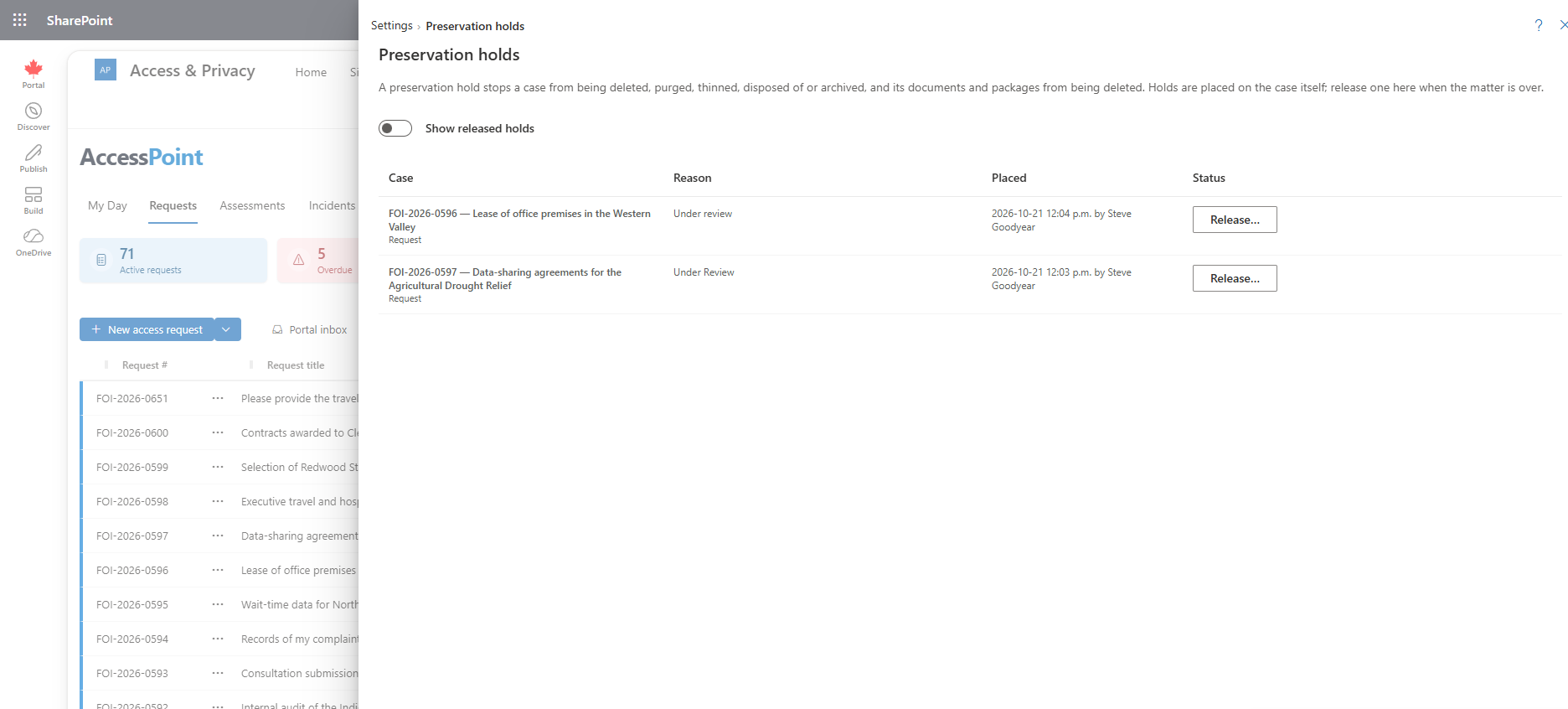
Settings → Records and retention → Preservation holds lists every active hold across your cases. Holds are placed on the case itself; this page is the one place to see them all and to release one. For what a hold does and how it is placed, see Preservation Holds on a Case.
What the List Shows
For each active hold:
- the case, with its number and title where you can open it;
- the reason and reference;
- when and by whom it was placed;
- whether it keeps the files online.
Show released holds adds the released ones, with who released them and why.
Releasing a Hold
Choose Release… on a hold and give a reason. The case stays held while another hold reaches it, for example a hold placed by someone else for a different matter, or one inherited through a linked complaint. Every release is recorded in the audit ledger, reason and reference included.
Who Can Open This Page
The page needs Place preservation holds (case.hold). Someone who holds that permission without Manage configuration still gets the Settings gear, showing only the pages their permissions open, and this row is among them.
Related Pages
- Preservation Holds on a Case — placing a hold and what it protects.
- Storage and Archiving — storage policies, which never archive or dispose of a held case.
- Audit Ledger — where every place and release is recorded.
- Roles and Permissions — granting the Place preservation holds permission.