English

Hosted AccessPoint

The full AccessPoint, without the IT project.

Access requests and your privacy program — requests, redaction, PIAs, breaches, complaints, audits and risks — run for you by Realizer. Sign in with your Microsoft account and start today, on your jurisdiction's rules.

  • 30 days free, no card
  • Unlimited users on every plan
  • Your data stays in the region you choose

Not on Microsoft 365? Any Microsoft account works, including one you make with your work email. By starting a trial, your organization accepts the Terms of Service for Hosted AccessPoint.

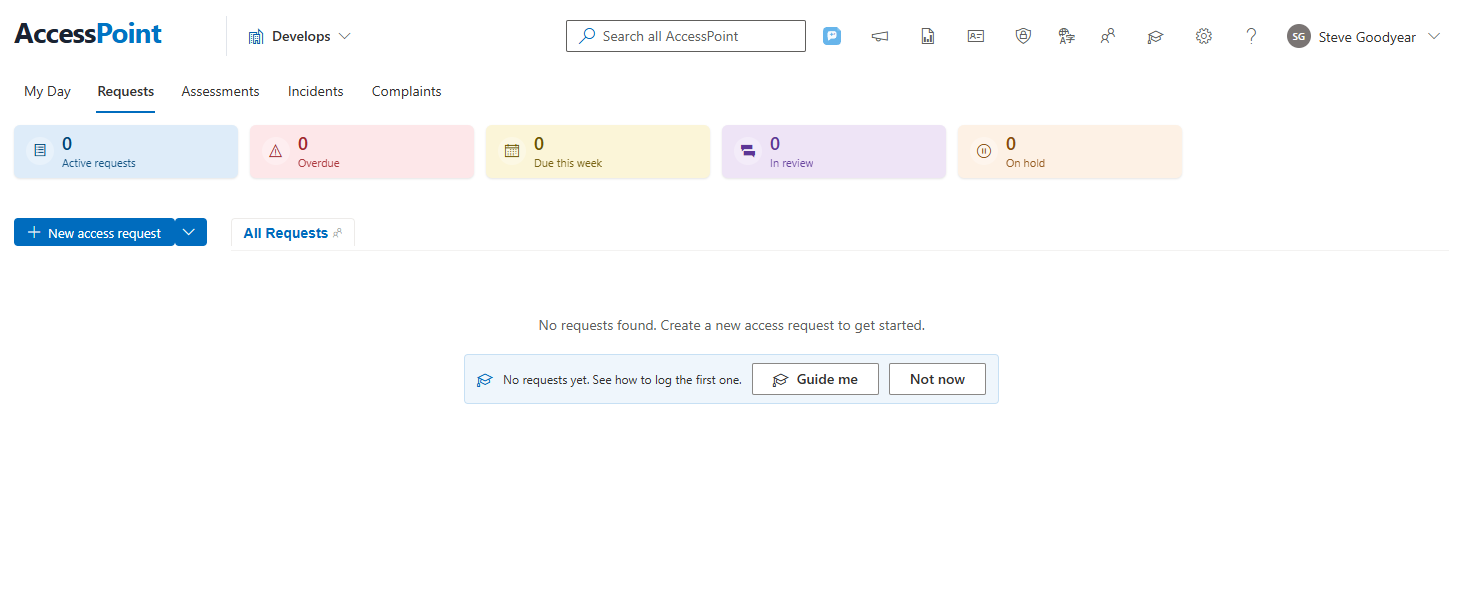
Hosted AccessPoint on its first day: the Requests page, ready for the first request, with a Guide me prompt

Working on your first request today

No Azure subscription to set up, nothing to install, no project plan. Most offices are working a real request within the hour.

Sign up with Microsoft

Use your work account. You choose where your organization's data will be kept before you create anything.

Choose your jurisdiction's pack

Your law's request types, deadlines, exemptions, fees and letter templates load from one of more than 140 jurisdiction packs — a starting point built from public information about the legislation, not legal advice, which your legal counsel validates and adjusts.

Invite your colleagues and start

A guided welcome walks each person through their first day, Lab mode gives them realistic training cases to practise on, and Continue where you left off picks up the demo you just tried.

Interactive demo

Try it before you sign up

The same screens your trial opens on, running a fictional town’s caseload under your jurisdiction’s rules. No sign-up, nothing saved.

ATIP and FOI coordinators

Redact a record under the Act

Open a live request, find the personal information in its records and redact it with the exemption that applies — then see the page as the requestor will.

Guided · about 3 minutes

Redact a record (opens the demo in a new tab)

Privacy officers and analysts

Run a privacy impact assessment

Answer a section of your jurisdiction's own PIA template, draw the data flow, score a risk and send it for sign-off.

Guided · about 4 minutes

Start a PIA (opens the demo in a new tab)

Rather look around on your own? Open the full demo — requests, releases, assessments, breaches, complaints, risks, audits and reports, in 11 languages. Or book a live walkthrough on your own records.

Plans for every size of office

Start free, pay monthly or yearly, and never pay per user. Every plan includes your jurisdiction's pack, Lab mode, 11 languages and a full download of your data.

Free

For very small offices.

$0

Free for good — no card

  • 5 requests and 5 assessments a year
  • Every request you receive is recorded
  • Lab mode to practise on training cases
  • 2 GB of storage
  • No card

Essentials

Access requests first, a few privacy assessments.

$79/month

or $790 a year

  • 10 requests and 1 assessment a month — 150 and 15 a year on annual
  • Complaints and appeals, fees and privacy breaches
  • PIAs, DPIAs, AIAs and threat-risk assessments
  • Unused allowance kept for 12 months
  • 100 GB of storage, any add-on

Enterprise

Need higher volume?

from $6,990/year

Annual contract; the price varies with your organization’s size and the resources and services you need

  • Unlimited requests and assessments (fair use)
  • Priced by the people you serve
  • Your own database or region as add-ons
  • Annual contract and a named contact
  • Every plan starts with a free 30-day trial on your jurisdiction's pack — no card. When it ends, choose a plan or carry on with Free: your records stay.
  • Never refused. A request that arrives when your allowance is used up is still recorded with its due date. Add 10 requests for $49 in one click, or wait for next month's.
  • Unlimited users on every plan. People are never what you pay for.
  • Prices in your currency, plus tax. The same numbers in Canadian and US dollars; your data stays in the region you choose.

Add-ons, bundles and the full pricing →

Never refused, never locked out

An access office can't turn a request away because a software plan ran out. AccessPoint is built the same way.

Every request is recorded

A request that arrives when your allowance is used up is still recorded with its due date and its acknowledgement. Add a bundle in one click, or it waits for next month's allowance.

Read-only, never hidden

Anything outside your plan stays readable and exportable. Move down a plan, or let a trial end, and your records are all still there.

A trial that ends gently

When the 30 days are up, choose a plan or carry on with Free. Nobody is locked out of their own records.

Your data, whenever you want it

Download all of your organization's data at any time, on every plan. There's an audit trail you can trust, too: a tamper-evident ledger of what happened on every case.

What every plan includes

Your jurisdiction's pack

Request types, deadlines with holidays and clock pauses, exemptions, fees and letter templates, from more than 140 packs — every Canadian province and territory and the federal government, every US state, the UK, the EU, Australia and New Zealand, and more.

Requests end to end

Intake, acknowledgement, assignments to staff, records search and collection, redaction, consultations, fees, extensions, letters in your requestor's language, and numbered releases.

Deadlines computed for you

Never typed: every extension and clock pause is recalculated, and each date says how it was calculated.

Redaction in the browser

Word, Excel, PDF, e-mail and images, each mark tagged to its exemption, with release packages that are checked so nothing redacted can leak.

Privacy assessments

PIAs, DPIAs, AIAs and threat-risk assessments from your jurisdiction's templates, with diagrams, risk scoring and sign-off by a senior official.

Lab mode and learning

Practise on realistic training cases, free on every plan, with How we decide coaching beside the key decisions and learning paths for your jurisdiction.

11 languages

English, French, German, Italian, Spanish, Dutch, Danish, Portuguese, Finnish, Swedish and Polish.

Unlimited members

Invite everyone who works a case — coordinators, custodians, reviewers and senior officials. Users are never what you pay for.

Your data stays in the region you choose

What Realizer does with the service, in plain terms. The Terms of Service for Hosted AccessPoint and the privacy notice say it in full.

Kept in your data region

Cases, documents and everything the service stores stay in the Microsoft Azure region you choose at sign-up. Today that is Canada — Canada Central, with geo-redundant backups in Canada East — and more regions are planned.

Isolated by organization

Every organization's data is separated at every layer; nobody at another organization can reach it.

Encrypted and protected

Encrypted in transit and at rest, behind Azure Front Door with a web application firewall.

Every upload scanned

Microsoft Defender for Storage scans every uploaded file for malware; a flagged file can't be opened, downloaded or released.

Sign-in with Microsoft

Your administrators invite your people, can limit sign-in to your own Microsoft organization, and set session limits.

AI is your choice

AI Assist uses Azure OpenAI models provisioned in Canada. Microsoft may process some prompts and answers in its other Azure regions, so it stays off until your administrator allows it.

Built to WCAG 2.2 AA. Want everything inside your own Microsoft 365 and Azure tenant instead? That's AccessPoint for Microsoft 365 — the same product, deployed by your IT team.

Hosted, or in your own tenant?

Two editions of one product. Same features, same jurisdiction packs, same screens — the difference is who runs it and where your data lives.

QuestionHosted AccessPointAccessPoint for Microsoft 365
Who runs itRealizer, in its own Microsoft AzureYour IT team, in your own Microsoft 365 and Azure
Getting startedSign up and start the same dayDeploy from Microsoft Marketplace into your own tenant
Where your data livesRealizer's Azure, in the region you choose (Canada today; more planned)Your own Azure subscription
Sign-inMicrosoft account sign-in; invite your colleaguesYour Microsoft 365 tenant, in SharePoint and Teams
Collecting recordsUploads and e-mail today; Microsoft 365 and records-system connectors are on the roadmapStraight from SharePoint, OneDrive, Outlook and Teams, and from records systems through repository connectors
Priced byPlan: Free, Essentials, Professional — or Enterprise by sizeCovered population (employees), unlimited volume
Best forSmall and mid-sized offices, quick starts, no AzureLarger and IT-led organizations: unlimited volume, everything in your own tenant
Moving laterExport your organization's data and import it into your own tenant when you're readyThe same import brings a hosted organization's cases, records and history in

Hosted AccessPoint questions

Do I need Microsoft 365 or Azure?

No. You sign in with a Microsoft account and Realizer runs the service. If you want AccessPoint inside your own tenant instead, that's the Microsoft 365 edition.

Can we move to our own Microsoft 365 tenant later?

Yes. Both editions are the same product, and the export workbook from one is the import template of the other, so your requests, assessments, incidents, complaints and their documents carry across with their statuses and due dates. Start hosted now and move when your IT team is ready.

What happens when I use up my allowance?

Nothing stops. New requests are still recorded with their due dates and wait; add a bundle in one click or wait for next month's allowance. There is never a surprise bill.

Can I change plans?

Yes, at any time from Settings → Subscription. Upgrades take effect at once; downgrades at the end of the period you paid for. Nothing you made is deleted — anything outside the new plan stays readable.

I'm already subscribed — can I use a promotion code?

Yes. An administrator enters it in Settings → Subscription → Promotion code, and it applies from your next invoice. One discount applies at a time, so a new code replaces the current one after you confirm. A code meant for a first purchase only can't be used there.

Can I remove extra storage I no longer need?

Yes, yourself: Remove 100 GB in Settings → Subscription. It stays until the end of the period you paid for, and only goes if your files fit in the smaller allowance — nothing is ever deleted.

We need an annual contract and invoicing. Is that only for large organizations?

No. Enterprise starts at $6,990 a year (€5,990, £4,990): an annual contract, invoicing, a named contact and more volume than Professional. The price varies with your organization's size and the resources and services you need — talk to us.

What happens when my trial ends?

Choose a plan, or carry on with the Free plan. Your records stay, readable and exportable — nobody is locked out.

Is there a limit on users?

No. Every plan includes unlimited members; you invite your colleagues, and your administrators decide who does what.

A colleague already uses AccessPoint — can I join?

Yes. Sign up with your work account: AccessPoint shows the organizations of your Microsoft organization that you can ask to join, and their administrators decide.

Which currency will I pay in?

Canadian dollars in Canada, US dollars in the United States, euros in the euro area and pounds in the UK — the same face value in Canadian and US dollars. Canadian organizations pay GST/HST on top.

Can I get my data out?

Yes — a full download of your organization's data at any time, on every plan, Free included.

Where is my data?

In the data region you choose when you sign up, in Realizer's own Microsoft Azure. Today that is Canada: Azure's Canada Central region, with geo-redundant backups in Canada East. More regions are planned.

Is AI Assist on by default?

No. AI Assist is an add-on, and it stays off until your administrator allows it. It uses Azure OpenAI models provisioned in Canada; Microsoft may process some prompts and answers in its other Azure regions, which is why the choice is yours. Text recognition, search and transcription are processed in Canada.

Start on your jurisdiction's rules today

30 days free, no card, unlimited users. When the trial ends, choose a plan or carry on with Free.

Start free trial Book a live demo

By starting a trial, your organization accepts the Terms of Service for Hosted AccessPoint.