
Solutions · By capability
Search every records system from the case, not just Microsoft 365
GCdocs, Hyland OnBase, Laserfiche, Axon Evidence, network file shares, line-of-business databases — browse and search them from the same Add from… picker as SharePoint, Outlook and Teams, and capture records into the case server-side with a verified SHA-256, full provenance and an audit-ledger entry. All of it in your own Microsoft 365 and Azure tenant.
Responsive records rarely live only in Microsoft 365. A federal ATIP search runs through GCdocs — OpenText Content Server — across the Government of Canada; many municipal and provincial searches reach into OnBase; a police request needs the evidence system; nearly every search touches a network share or a line-of-business database. Those have been the parts of the search an access office does by email: ask the system's owner to look, wait for an export, upload it by hand, and hope no one asks later what was searched and whether the copy is the record.
AccessPoint 2.5.0 brings those systems into the case. A repository connector puts a records system in the same Add from… picker as SharePoint, Outlook, OneDrive and Teams, on every Documents workspace — requests and their assignments and tasks, privacy assessments, incidents and complaints. Coordinators browse it with a real breadcrumb, search the source itself, open a record's details to see the metadata the source publishes, and add records or collect a whole folder in the background. The capture happens server-side: the API fetches each record, streams it into the case's storage while computing its SHA-256, compares that with the hash the source declared, and processes it exactly like an upload.
Your browser never talks to the source. Every click goes to the AccessPoint API in your own Azure subscription, which calls the connector with its own identity and tells it who is asking, for which case and why — browse, search, capture or collect. Captured copies are stored in your tenant's own storage, and nothing about a connector ever passes through Realizer. Some connectors are built into the API and need only configuring; others are small HTTPS services you host beside the source — in your Azure subscription, or on a server on your premises reached through an Azure App Service Hybrid Connection, with no VPN and no inbound firewall rule. If your system isn't covered, build a connector on the published AccessPoint Connector Protocol with the .NET SDK, or in any language against its OpenAPI specification. Connectors are included in every plan; there is no per-connector fee.
Connectors ship today for these systems. Ready-to-run connectors you host in your Azure subscription or on your premises: network file shares, Hyland OnBase, OpenText Content Server and its Government of Canada service, GCdocs, Laserfiche and Axon Evidence. Built into AccessPoint and configured in Settings: Azure Blob Storage, SQL Server and Azure SQL views, CMIS 1.1 repositories such as Alfresco and Nuxeo, and MCP search servers. Building your own? See the connector developer guide. Product names are trademarks of their owners; AccessPoint connects through each vendor's published interfaces and is not affiliated with or endorsed by them.
Sound familiar?
Three moments every access office that searches beyond its mailbox recognizes — and what each one risks.
The search you did by email
Half the responsive records are in the records system. You email its owner, wait a week for a zip file, and upload it by hand — with no note of what was searched, or how.
The question you can't answer
On appeal, the commissioner asks where you searched and whether the released copy is the record. The answer is an email thread and a folder of renamed files.
The link that changed
The case file pointed at a document in the source system. Someone edited it after the request closed, and now no one can show what was actually reviewed.
What to look for when FOI software reaches beyond Microsoft 365
Whatever you buy — including if it isn't AccessPoint — these are the questions that separate a link to another system from a defensible collection.
How repository connectors work in AccessPoint
One picker, every source — these are the load-bearing pieces.
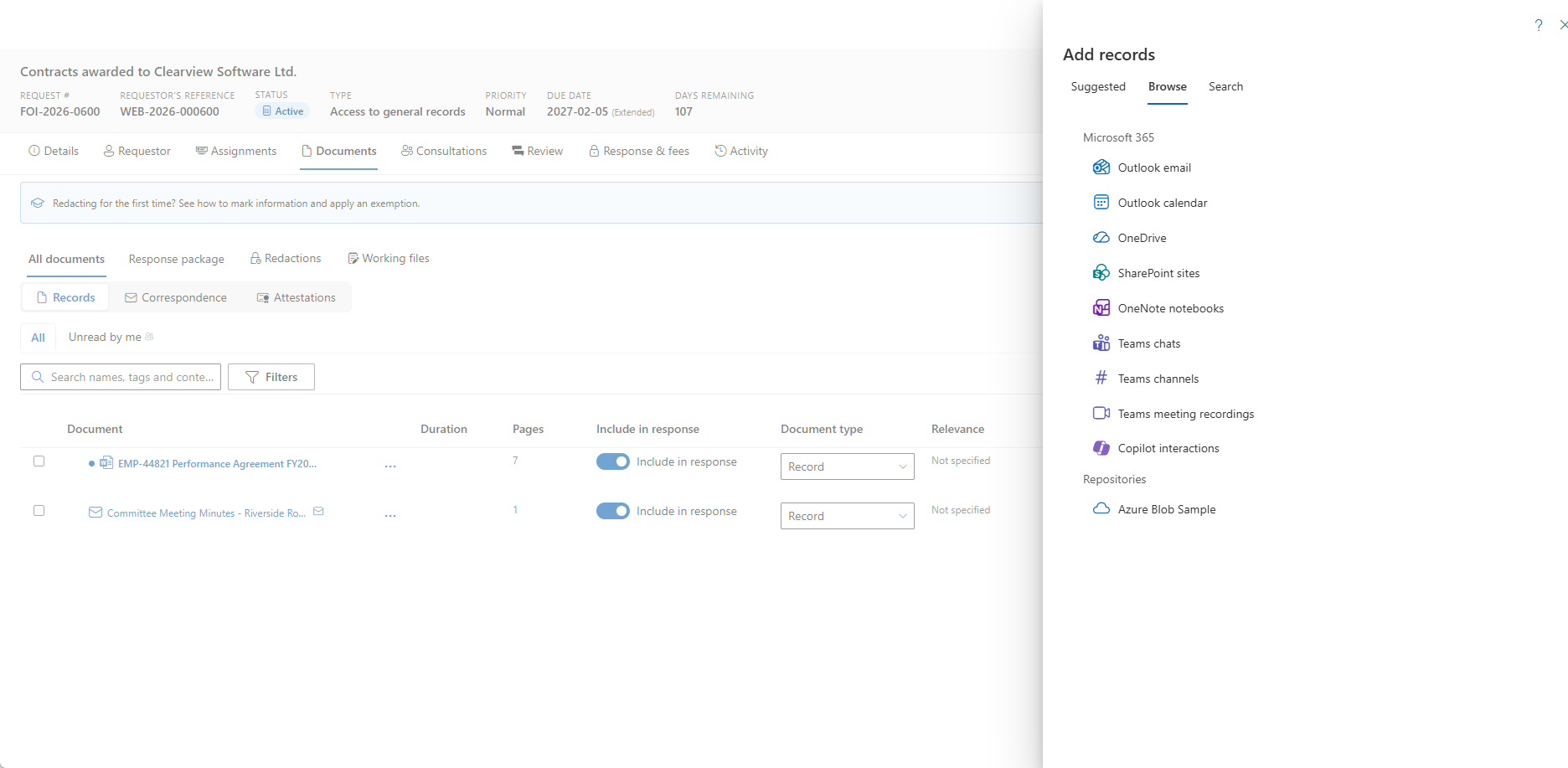
One picker for every source
Add from… lists Microsoft 365 and each connector you may use, with its own icon. Browse with a breadcrumb, filter what's loaded, and open a record's details for the metadata the source publishes — a record number, a document type, a retention class.
Search the source itself
Search here sends your query to the source system. On the Search tab, the Source selector runs one query against Microsoft 365, then against a records system, from the same box.
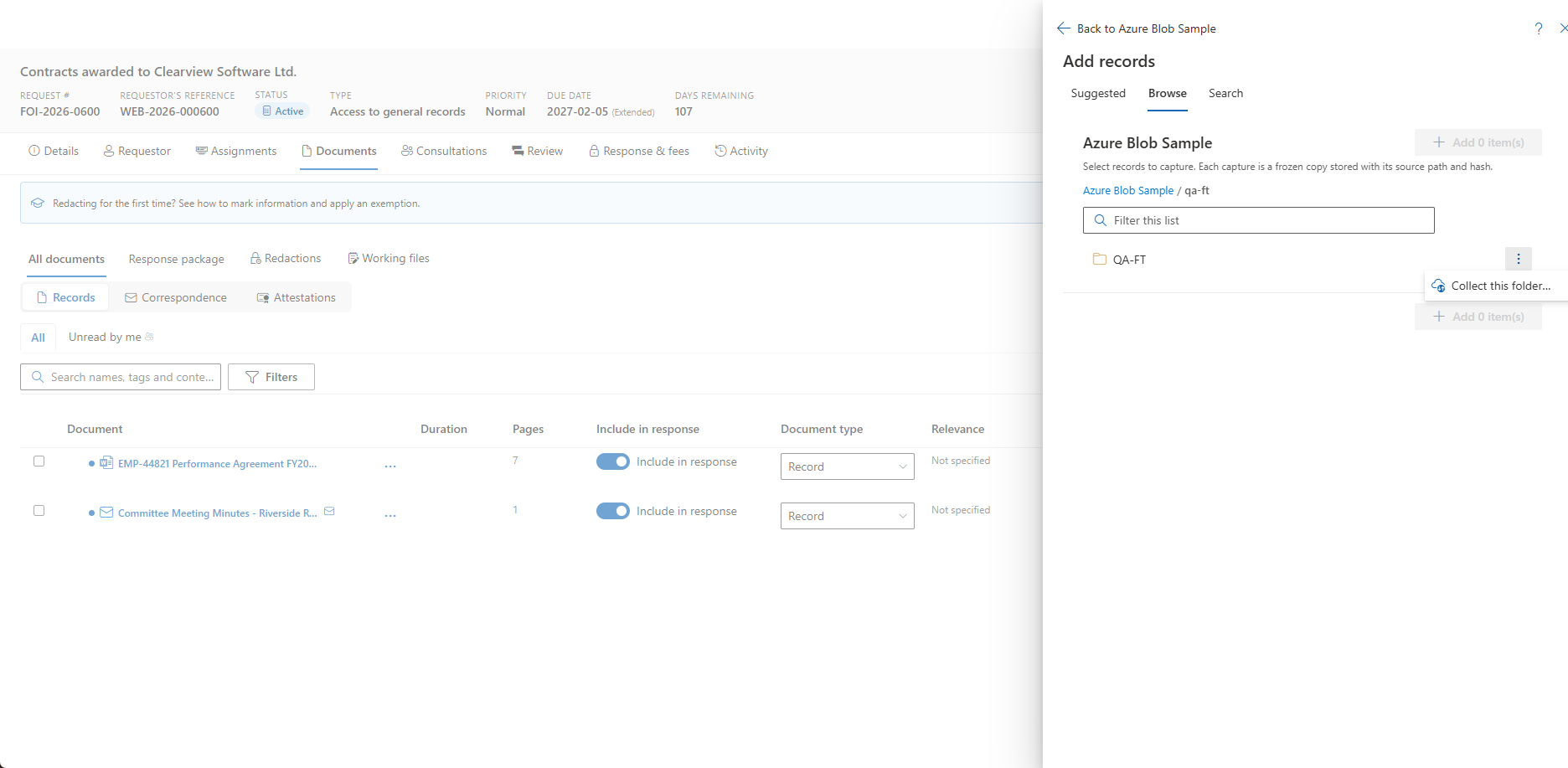
Collect this folder
Take a custodian's export or a case file's folder tree in one tracked background job, narrowed by dates, name pattern, extensions and size, with the source folders mirrored into the case. Re-running skips what's already there.
Suggestions and Ask AccessPoint
Suggested documents asks connectors for records matching the request's terms and period. Ask AccessPoint lists repository hits visible to you — names, paths and dates, never content — and offers a capture step you confirm.
Built in, or beside the source
Azure Blob, SQL view, CMIS and MCP connectors run inside the AccessPoint API. Remote connectors run in your Azure subscription or on premises, reached through a Hybrid Connection.
Custodians can collect their own
Coordinators see connectors by default. An administrator can widen one to custodians, and a custodian's repository row can be bound to a connector folder, with Browse here and Search here on the assignment.
See it in AccessPoint
Real screens from the product, running in a Microsoft 365 tenant. Click any one to enlarge.
Chain of custody
Every capture is an upload — with its provenance attached
A record taken from a connector enters the case through the same door as a file you upload: the same permission rule, the same PDF conversion, search indexing, redaction scans, duplicate detection and, where deployed, the Defender malware scan. What it adds is the record of where it came from. Source details show the source path and item id, the version taken, the hash with a Verified, Mismatch or Not declared pill, when the source last modified it, who captured it and when, and the collection job it arrived through. Open in source opens it in the source system with the person's own access, the Captured from facet filters the workspace by source, every capture writes an audit-ledger entry, and the same eight provenance columns travel in the tenant export. A connector that has captured anything can be disabled but never deleted, so that provenance keeps resolving.
From a records system to the case
Set up once per source, then use it on every case:
- Choose the connector: a built-in kind for a source Azure can reach, or a ready-to-run Remote connector from the release's connectors folder, hosted in your Azure subscription or on premises.
- For an on-premises source, turn on Hybrid Connections in the AccessPoint deployment and install the Hybrid Connection Manager on a host that can reach the connector — outbound HTTPS only.
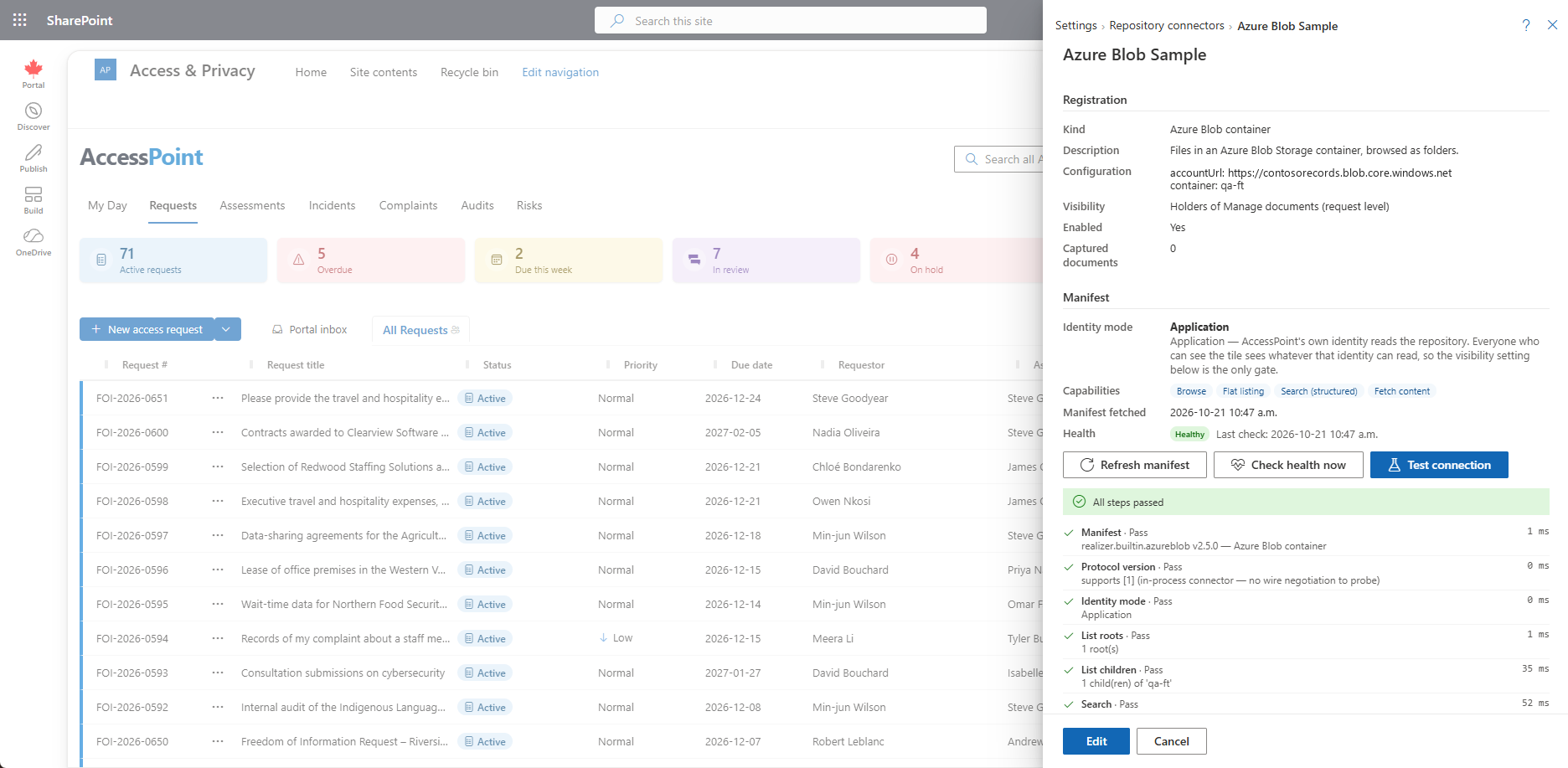
- Register it in Settings → Foundations → Repository connectors, choose who can see it, and run Test connection — the same ten-step conformance check the connector SDK's self-test runs.
- On any case, open Add from…, choose the repository, browse or search, and add records — or collect a whole folder in the background.
- Review the captures: Source details on each record, the Captured from facet across the case, and a notice that explains every skip.
Go deeper
Repository Connectors Questions
Which systems outside Microsoft 365 can AccessPoint search for FOI and ATIP requests?
Does connector data leave our tenant or pass through Realizer?
Do we need a VPN to reach on-premises records systems?
Does AccessPoint copy records or link to them?
Who can use a connector, and whose permissions apply?
What do repository connectors cost?
Flat annual pricing, published in full. Every feature in every size — access requests, privacy impact assessments, breach response, complaints, video & audio redaction, the public portal, repository connectors, and AI Assist. No per-user or per-module fees.
- Under 500 employees$2,990/yr
- 500–1,999 employees$7,990/yr
- 2,000–9,999 employees$14,990/yr
- 10,000+ employees$29,990/yr
Search Every Repository From the Case.
Try AccessPoint free for 30 days in your own Microsoft 365 tenant — repository connectors included, no per-connector fee.