
Solutions · Repository connectors
Search Azure Blob Storage for FOI and ATIP requests
Another system's export, a retired application's records, a custodian's bulk hand-over — browse the container as folders, search it by name and date, and capture files into the case as frozen copies with the blob path, ETag and SHA-256 on record. Built into AccessPoint: nothing to host.
More responsive records now arrive as exports than as originals. A line-of-business system is retired and its records are dumped to storage; a vendor hands over a case file as a folder of PDFs; a custodian with three thousand files puts them in a container instead of attaching them one by one. The access office then has to find the responsive ones, get them into the request without a detour through someone's laptop, and later show exactly which file it took and that it hasn't changed.
The Azure Blob Storage connector is built into the AccessPoint API. An administrator registers one container — or one virtual folder inside it, such as exports/2026/ — and grants the API's system-assigned managed identity the Storage Blob Data Reader role on the storage account. There is no service to install, no certificate, no Hybrid Connection and no secret to hold. Coordinators then browse the container as folders, search it by file name or path fragment with a modified-date filter, and capture files or collect whole folders. The connector only lists and downloads; it never writes to the account. The account doesn't have to be in the AccessPoint subscription: any Azure Blob Storage account the identity is granted the role on will do, as long as the App Service can reach its blob endpoint.
Each captured file becomes a document in the case with its container and blob path, the blob's ETag as its version, and a SHA-256 computed while it streams. When your export writes a sha256 metadata tag on each blob, AccessPoint compares the two and marks the hash Verified — a copy you can defend, not just a copy. The connector declares the Application identity mode: AccessPoint's own permission rule is the gate and there is no per-user trimming, so expose the folder the access office may collect from, not the whole account. Azure Storage's logs record the API's identity; who captured what, for which case and why is recorded in AccessPoint's Source details and audit ledger. Because it runs inside the AccessPoint API you already operate, the connector adds no Azure resource of its own; its reads are ordinary operations on the storage account, billed to the subscription that owns it.
Sound familiar?
Three moments every office that receives records as exports recognizes.
The export nobody can search
A retired permitting system's records were exported to a storage account last year. A request now names three applicants, and the only way to look is to ask IT to download the container and send a zip.
The detour through a laptop
Files come out of storage onto someone's desktop, get renamed, and are uploaded into the request one at a time. Afterwards, nobody can say which version was taken or where it sat.
The hash nobody checked
The export wrote a SHA-256 for every file. The request file never compares them, so the one thing that would prove each copy is intact goes unused.
What to look for when an FOI system reaches Azure Blob Storage
Whatever you use, these are the questions that separate a download link from a defensible collection.
How the Azure Blob Storage connector works
Configured in Settings, run by the AccessPoint API, read-only end to end.
Nothing to host
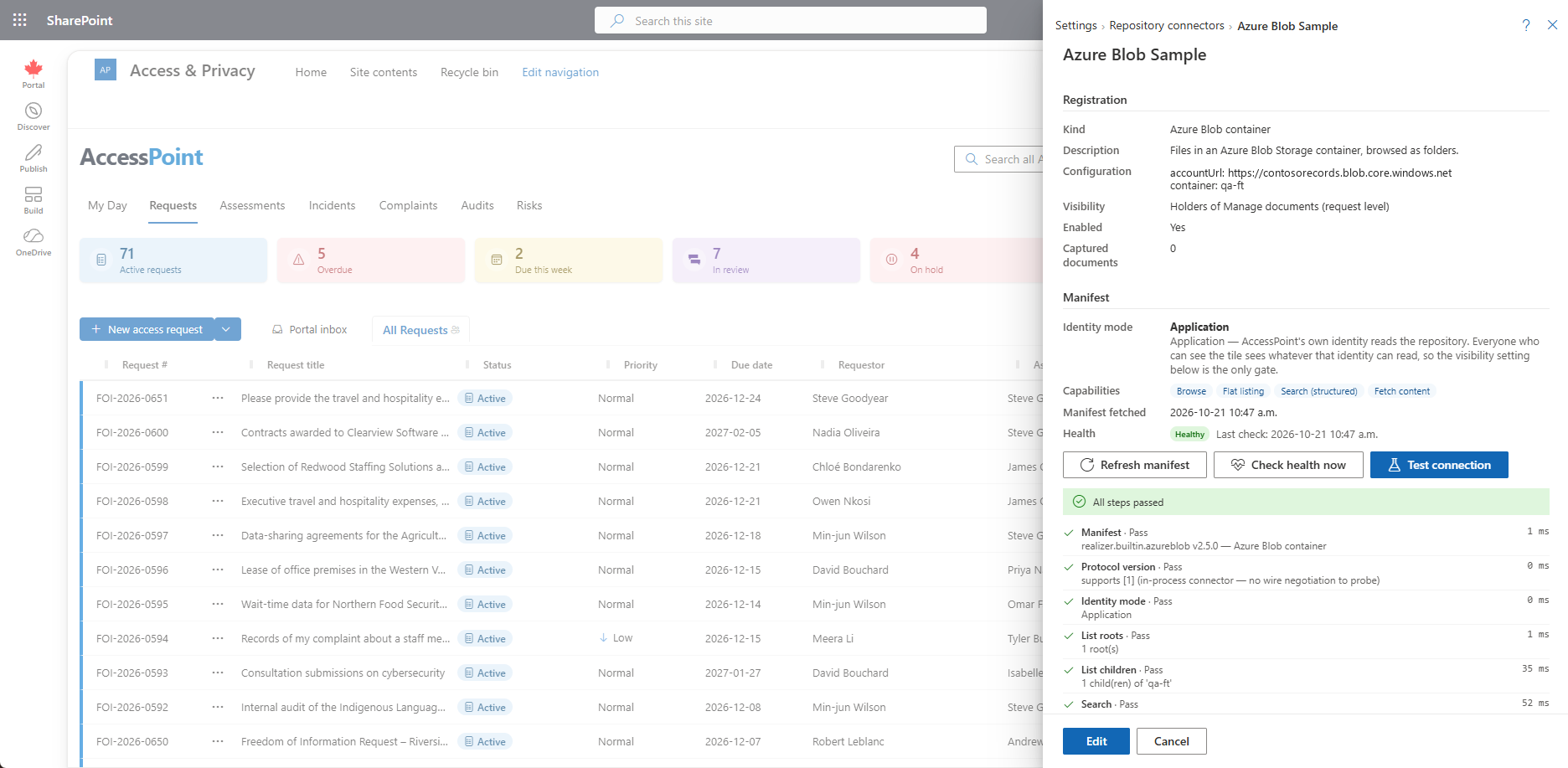
The connector runs inside the AccessPoint API. Register the storage account URL, the container and an optional folder prefix, grant one role, and run Test connection. There are no secret fields to manage.
Browse and search the container
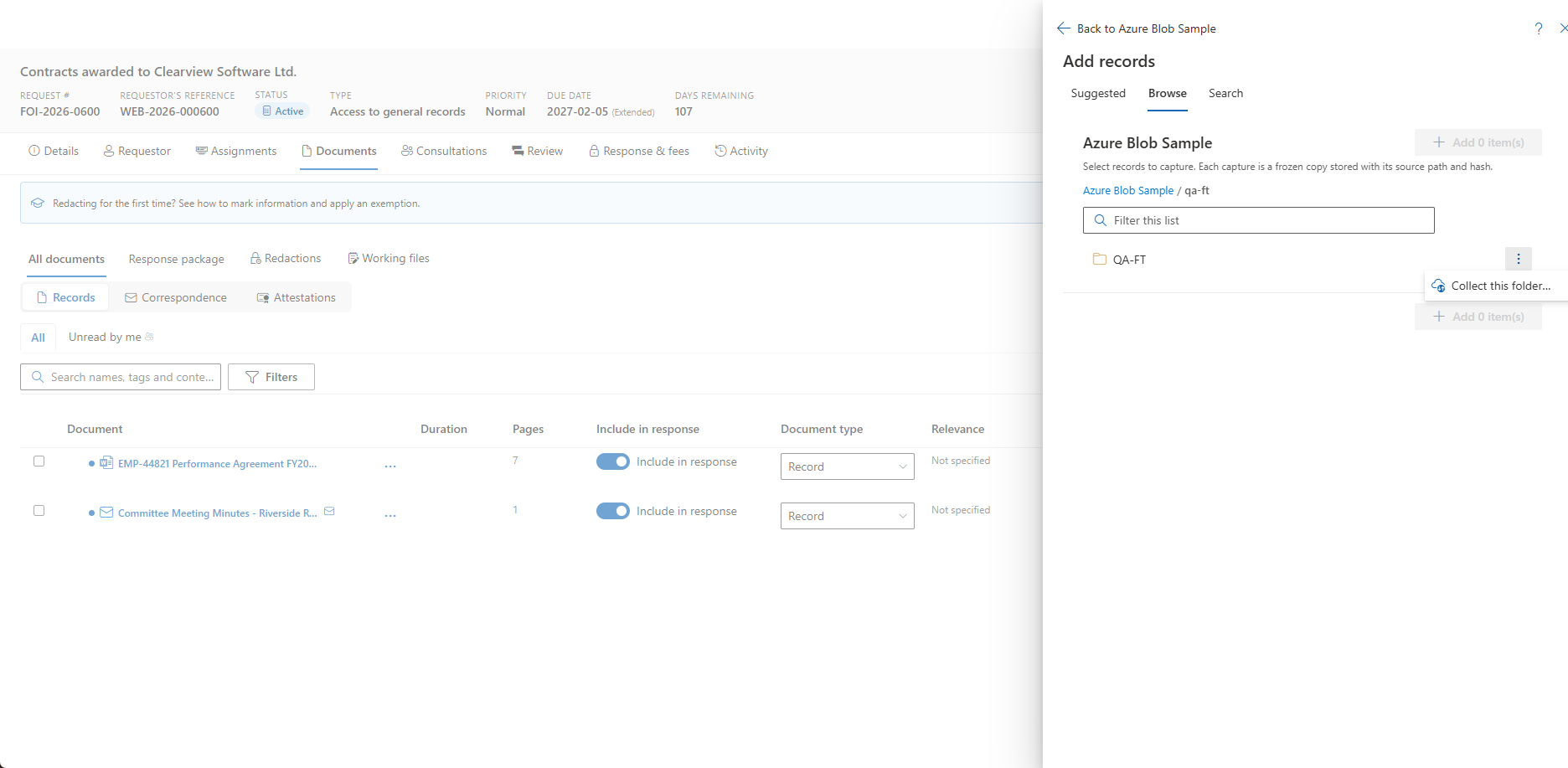
Folders are built from the / in blob names. Search matches the file name, or a path fragment such as 2026/Bud, with a modified-date filter, over up to 5,000 blobs under the folder you search from.
Collect a whole export
Collect this folder takes every current blob under a prefix, filtered by the dialog's dates, name pattern, extensions and size, mirrored into case folders if you choose. Snapshots, soft-deleted blobs and old blob versions are never collected.
Verified hash from a sha256 tag
Azure's Content-MD5 is not a SHA-256 and isn't used. Have your export write a sha256 metadata tag and provenance reads Verified — or Mismatch, which is flagged and logged, never blocked.
Guard rails by design
Only Azure Storage blob endpoints are accepted — including Azure Government, Azure China and private-link forms — and AccessPoint's own documents account is refused, so a connector can never read the case store.
Open in source
Each captured document links back to the blob's URL, and the details flyout shows its content type. Opening the link needs the person's own access to the account; AccessPoint never grants it.
See it in AccessPoint
Real screens from the product, running in a Microsoft 365 tenant. Click any one to enlarge.
Chain of custody
From blob to evidence, without a download in between
The AccessPoint API streams each blob into the case's own storage, computing its SHA-256 as it goes, then creates the document through the same pipeline as an upload. The document's Source details show the container and blob path, the ETag taken, the hash with its Verified, Mismatch or Not declared state, when the blob was last modified, who captured it and when, and the collection job it arrived through. An audit-ledger entry records the connector, the item, the version, the hash and the purpose, and the same provenance columns travel in the tenant's Settings export. A file over AccessPoint's upload limit is skipped as too large before a byte is read, and the notice after each capture explains every skip.
From container to case
Set up once, then capture from any Documents workspace:
- In the Azure portal, grant the AccessPoint API's managed identity — its object id is on the App Service's Identity blade — the Storage Blob Data Reader role on the storage account.
- In AccessPoint, open Settings → Foundations → Repository connectors → Add connector, choose Azure Blob container, and enter the account URL, the container and an optional folder prefix. Choose who sees the tile — coordinators by default.
- Run Test connection. Its List children step is the first call that reaches Azure, so a pass proves the URL, the container and the role together.
- On a request, assessment, incident or complaint, open Add from…, choose the container, browse or search, and add the files — or use Collect this folder… for a whole export.
- Open Source details on a captured document for the path, ETag and hash state, and filter the workspace by Captured from to see everything taken from the container.
Go deeper
Azure Blob Storage Connector Questions
Can AccessPoint search an Azure Blob Storage container for an FOI or ATIP request?
Does the storage account have to be in the same subscription as AccessPoint?
What permissions does the Azure Blob connector need, and can it change files?
Can it prove a file hasn't changed since it was exported?
Does data leave our tenant?
What does the Azure Blob Storage connector cost?
Flat annual pricing, published in full. Every feature in every size — access requests, privacy impact assessments, breach response, complaints, video & audio redaction, the public portal, repository connectors, and AI Assist. No per-user or per-module fees.
- Under 500 employees$2,990/yr
- 500–1,999 employees$7,990/yr
- 2,000–9,999 employees$14,990/yr
- 10,000+ employees$29,990/yr
Turn the Export Into Evidence.
Try AccessPoint free for 30 days in your own Microsoft 365 tenant — repository connectors included, no per-connector fee.