
Solutions · Repository connectors
Search MCP servers for FOI and ATIP requests
Any server that exposes MCP search and fetch tools — the convention behind Copilot federated connectors and ChatGPT connectors — becomes a search-only source in every case. Coordinators query it from the picker, and each result they choose is captured as a record with its title, text, source URL and metadata, hashed and attributed.
Organizations are publishing their systems to AI assistants. A knowledge base, a case-management search or a ticketing system gets an MCP server so Copilot can search it — and that same server is a ready-made search interface for the access office, which still has to find the responsive records in those systems and show exactly what it took.
The MCP search server connector is built into the AccessPoint API. It's an MCP client: for each search it opens a Streamable HTTP session to the server, calls one tool, and closes the session. An administrator registers the server URL, the authentication — none, a static bearer token stored encrypted or as a Key Vault reference, or an Entra token the API's managed identity requests for an audience you name — and, if the server names them differently, the search and fetch tools. Coordinators search the server from the picker's Search tab or with Search here — free text, up to 50 results a query, in the server's own ranking — and each result they select is fetched and rendered as one HTML record: the title, a source line naming the server, the result's URL and the capture time, the result's metadata as a table, and its text verbatim. The record then converts to PDF, is indexed and is scanned for redactions like an uploaded file.
The connector declares the Application identity mode: the server is searched with the connector's credential and AccessPoint's permission rule is the gate. No user attribution is sent to the server — the only header the connector adds is Authorization — so the server's logs show the credential, while AccessPoint records who captured what, for which case and why. Because it declares free-text search, an MCP server is also one of the repositories Ask AccessPoint can look in on a case. It is search-only by design — no folders, no folder collection, no date filter — which makes it the right fit for servers you don't control; where a system has a full AccessPoint connector, that connector adds browsing, collection and provenance from the source's own ids. There is nothing to host: the connector runs inside the AccessPoint API, and the server must be reachable from it over HTTPS.
Sound familiar?
Three moments an access office meets as more systems are opened to AI assistants.
Searchable by Copilot, not by the access office
IT built an MCP server so Copilot could answer questions from the service desk system. The FOI coordinator still emails the service desk for an export.
A chat answer is not a record
Someone pastes an assistant's summary into the request file. It isn't the record, it doesn't say where it came from, and it can't be released as one.
No trail of the search
The search happened in a browser tab against another system. There's no record of the query, the result chosen, or the moment it was taken.
What to look for when an FOI system reaches an MCP server
Whatever you use, these are the questions that separate a chat transcript from a captured record.
How the MCP search server connector works
Built into the AccessPoint API, speaking the same search and fetch convention as Copilot connectors.
Register a URL
Server URL, authentication, and tool names if they aren't search and fetch. Test connection runs a search and checks that the server lists both tools; health is probed every five minutes.
Free-text search, server-ranked
Your query goes to the server's search tool verbatim, and up to 50 results come back in the server's own order — so specific queries work best.
Each result as a record
The fetch tool's answer becomes one HTML file — title, source line, metadata table and text, all HTML-encoded — processed like an upload. Only what the fetch tool returns is captured; no attachments.
Ask AccessPoint can look there
On a case, Ask AccessPoint can search the MCP servers you may see and list the hits — names, paths and dates, never content — with a capture step you confirm.
A hash on the copy
The SHA-256 is computed over the record AccessPoint stores, so provenance always reads Verified. It attests to the copy AccessPoint made, not to anything the server signed.
And the other way round
The connector SDK includes an optional MCP search and fetch façade, so a connector you build — or one of the publisher's Remote connectors — can also publish its source to Copilot-style agents.
See it in AccessPoint
Real screens from the product, running in a Microsoft 365 tenant. Click any one to enlarge.
Chain of custody
A search result, turned into a record
An assistant's answer disappears with the chat. A captured MCP result is a record: the AccessPoint API fetches it server-side, renders the title, source URL, metadata and text into one HTML file with a line naming the server and the UTC time, streams it into the case's own storage while computing its SHA-256, and processes it like an upload. Source details keep the result id, its URL as the path, who captured it, when and for which case, and the audit ledger records the connector, the item, the hash and the purpose. A result carries no version, so the same result is captured once per case.
From MCP server to case
Set up once, then search it from any case:
- Get the server's Streamable HTTP endpoint and its credential: a bearer token, best kept in Key Vault, or the App ID URI of an Entra app registration the server accepts tokens for.
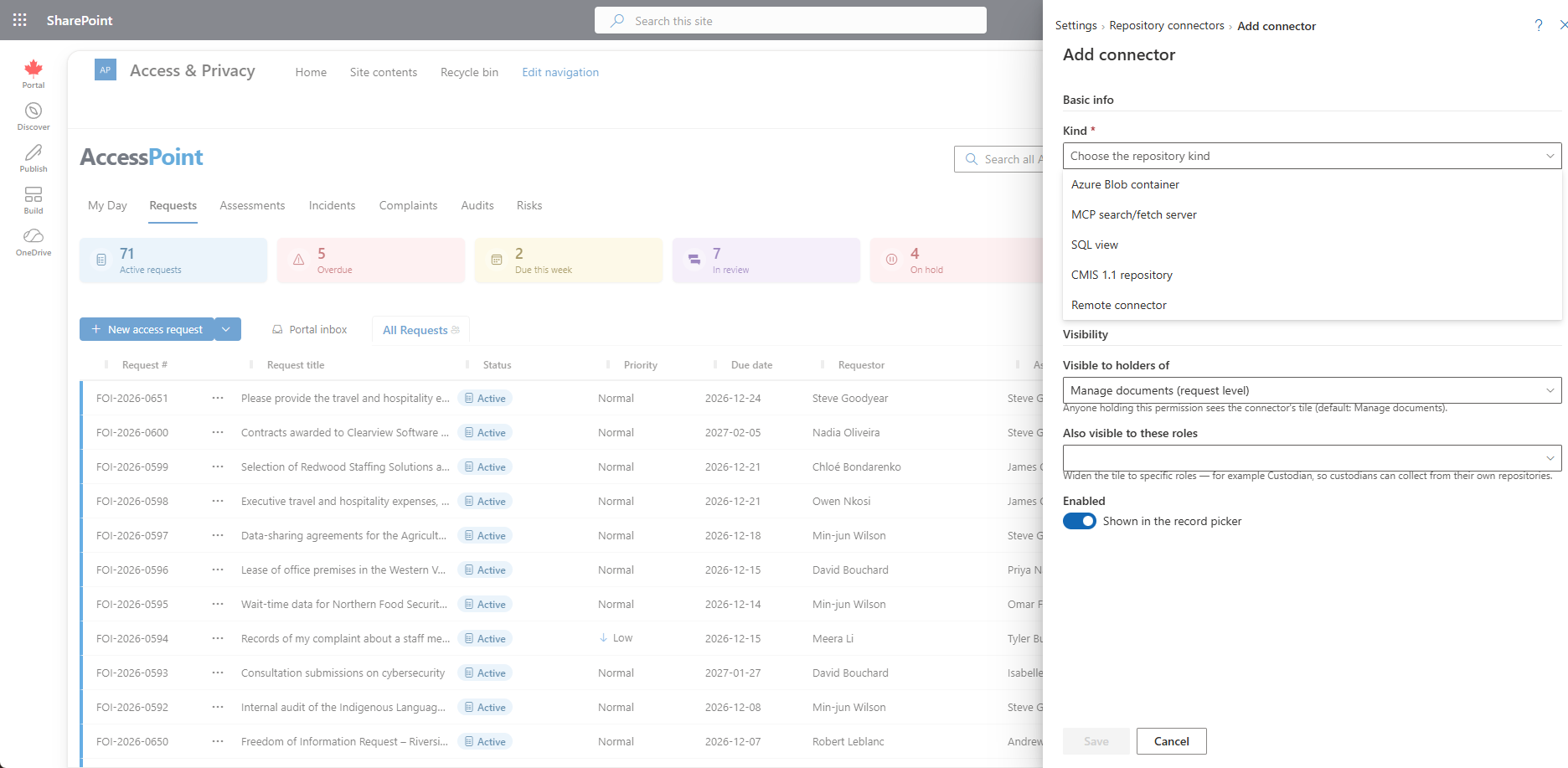
- In Settings → Foundations → Repository connectors → Add connector, choose MCP search/fetch server, and enter the URL, the authentication and, if needed, the tool names.
- Run Test connection — it searches the server and checks both tools. Because the test never calls fetch, capture one result on a test case to confirm the server's fetch answer.
- On a case, open the picker's Search tab, choose the server under Search in, run your query, and add the results you need.
Go deeper
MCP Search Server Connector Questions
What MCP servers can AccessPoint search?
Does AccessPoint send the user's identity or token to the MCP server?
Does it copy the record or link to it?
Can we browse folders or collect in bulk from an MCP server?
Does data leave our tenant?
What does the MCP search server connector cost?
Flat annual pricing, published in full. Every feature in every size — access requests, privacy impact assessments, breach response, complaints, video & audio redaction, the public portal, repository connectors, and AI Assist. No per-user or per-module fees.
- Under 500 employees$2,990/yr
- 500–1,999 employees$7,990/yr
- 2,000–9,999 employees$14,990/yr
- 10,000+ employees$29,990/yr
Put Your Search Server to Work on Requests.
Try AccessPoint free for 30 days in your own Microsoft 365 tenant — repository connectors included, no per-connector fee.