
Solutions · Repository connectors
Search line-of-business databases for FOI and ATIP requests
A case register, a complaints log, a licensing or ticketing system — expose one SQL Server or Azure SQL view, and each row a coordinator selects is captured as a self-contained record of the columns you chose, with the row id, the modified stamp and a SHA-256 on record. Built into AccessPoint, read-only, and every value a user types reaches the database as a parameter.
Some of the most-requested records aren't documents at all. The responsive record for a by-law complaint, a business licence, an inspection or a service ticket is a row in a line-of-business system — and the usual way to get it into a request is a screenshot, a report someone runs by hand, or a spreadsheet export that loses the record's identity the moment it's saved.
The SQL database connector is built into the AccessPoint API. A database administrator prepares a view that presents exactly the columns the access office may see; an AccessPoint administrator registers the server, database, schema and view, and names an id column, a name column, an optional modified column and up to 50 body columns. The view is browsed as a single folder, its rows listed by name and searched by name — and by date, when a modified column is named — and the details flyout shows a row's columns before anything is captured. A captured row becomes one HTML record: the name as its heading, a source line naming the view, server, database, record id and capture time, then the body columns in your order. It then converts to PDF, is indexed and is scanned for redactions like any uploaded file.
The connector signs in with the API's system-assigned managed identity, granted db_datareader or SELECT on the view, so there is no secret anywhere — or, for a SQL login, a database in another tenant or a server that only accepts SQL authentication, with a connection string held as a Key Vault reference. Connections are encrypted with the server certificate validated, and the connector never writes. It declares the Application identity mode: AccessPoint's permission rule is the gate, and row-level security in the database applies to the connector's identity, not to the coordinator. Nothing about the user reaches the database — its audit shows the connector's identity under the application name AccessPoint SQL view connector — while AccessPoint records who captured which row, for which case and why. There is no service to host; the connector checks the view's columns once per call, which matters only for a database that bills per query.
Sound familiar?
Three moments every office that answers requests for database records recognizes.
The record that is a row
A requester asks for every complaint filed about one property. The answer is forty rows in the by-law system, and the only way out of it is a screenshot of each one.
The export that lost its identity
Someone runs a report to Excel, filters it, and attaches it. Six months later, nobody can say which rows were in the system that day or how they were chosen.
Too much in the extract
IT exports the whole table because it's quicker — including columns the access office was never meant to see, now sitting in the request file.
What to look for when an FOI system reaches a SQL database
Whatever you use, these are the questions to ask before a line-of-business database is opened to the access office.
How the SQL database connector works
Built into the AccessPoint API, configured in Settings, shaped by a view you control.
Built in, checked on save
Register the server host name, database, schema, view and columns. Saving validates every name against the view's schema, so a typo or a missing grant is refused before anyone sees the tile.
Browse and search rows
Rows are listed in id order and paged. Search matches the name column, with characters such as % and _ matched literally; a modified column adds the date filter.
Each row as a record
A capture renders one HTML file per row — heading, source line, record id and modified stamp, then your body columns, every value HTML-encoded — and sends it through the same pipeline as an uploaded file.
A hash on every capture
The SHA-256 is computed over the record AccessPoint stores, so provenance always reads Verified. It attests to the copy; the capture time in the source line makes each capture its own file.
Versions from your modified column
Name a modified column and its value becomes the source version: a row changed since its last capture is captured again; an unchanged one on the same case is skipped as already captured.
Guard rails
With managed identity the host must be an Azure SQL endpoint, AccessPoint's own SQL server is refused, and schema, view and column names must be plain identifiers — letters, digits and underscores.
See it in AccessPoint
Real screens from the product, running in a Microsoft 365 tenant. Click any one to enlarge.
Chain of custody
The row as it stood, on the day you took it
A screenshot proves nothing about where it came from. A captured row carries its own source line — the view, the server, the database, the record id and the UTC time it was taken — inside the record, and the document's Source details hold the same facts, with the modified stamp as its version, who captured it, when, and for which case. An audit-ledger entry is written for every capture, and the provenance columns travel with a tenant export. Files the row merely points at are not fetched, so what the case holds is exactly what the view returned.
From view to case
The path for a complaints or licensing database:
- Create a view that exposes exactly what the access office may see, with a unique id column, a name column and, ideally, a modified date/time column. Index the id, name and modified columns.
- Create a database user for the AccessPoint API's managed identity and grant it db_datareader or SELECT on the view — or store a connection string in Key Vault.
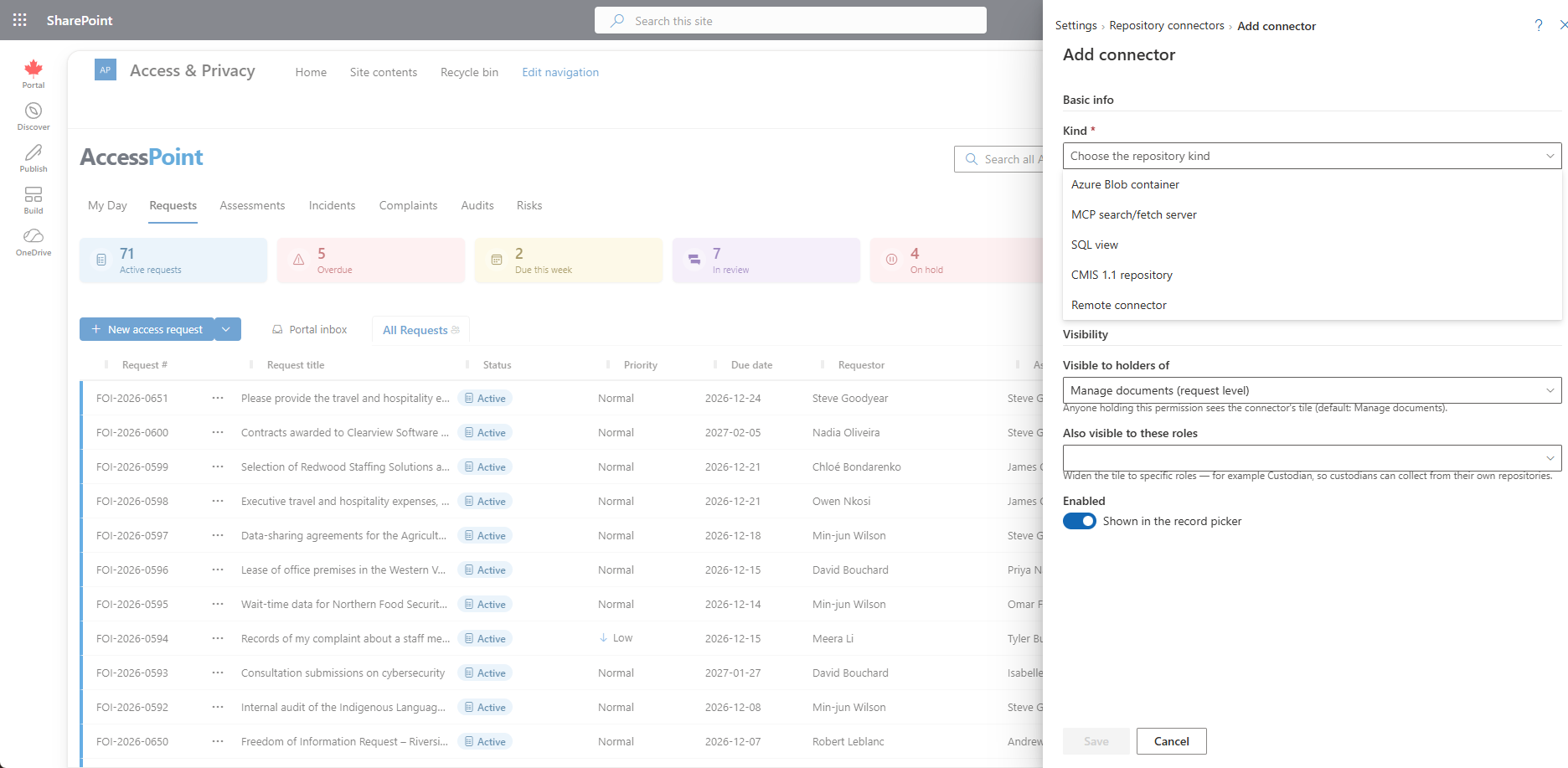
- In Settings → Foundations → Repository connectors → Add connector, choose SQL view and enter the server, database, schema, view and columns. Save checks every column against the view.
- Run Test connection, then choose who sees the tile — coordinators by default.
- On a case, open Add from…, choose the database, search by name or date, check a row's columns in the details flyout, and add it. Larger selections run as a background job.
Go deeper
SQL Database Connector Questions
How can we capture records from a line-of-business database for an FOI request?
Which databases does the SQL connector support?
What permissions does it need, and can it change data?
Does it fetch files the database points to?
Does database data leave our tenant?
What does the SQL database connector cost?
Flat annual pricing, published in full. Every feature in every size — access requests, privacy impact assessments, breach response, complaints, video & audio redaction, the public portal, repository connectors, and AI Assist. No per-user or per-module fees.
- Under 500 employees$2,990/yr
- 500–1,999 employees$7,990/yr
- 2,000–9,999 employees$14,990/yr
- 10,000+ employees$29,990/yr
Capture the Row, Not a Screenshot.
Try AccessPoint free for 30 days in your own Microsoft 365 tenant — repository connectors included, no per-connector fee.