
Solutions · Repository connectors
Body-worn camera public records requests, from Axon Evidence to release
AccessPoint's Axon Evidence connector lets records staff browse cases, categories, recording dates and owners, search evidence, and capture body-worn, in-car and interview-room recordings into an FOI or public records request — streamed with a verified SHA-256 hash and the Axon evidence ID — then redact them in AccessPoint's media viewer with the exemption cited on every span.
The footage is in Axon Evidence; the request is somewhere else. A body-worn camera request means someone downloads each clip from Evidence.com to a shared drive, uploads it into the request system, and redacts it in whatever tool is at hand — and the file that reaches the request has lost its evidence ID, its case, and any way to prove it matches what Axon holds. For in-car and interview-room video, that is gigabytes per file moved by hand.
AccessPoint's Axon Evidence connector reaches an agency's evidence through the Axon Partner API, for Axon Evidence in the cloud or Axon Evidence Local 5.4 and later. Axon has no folders, so the connector builds them from what Axon records: Cases, Categories, Recorded on by year and month, and Owners, each listing evidence newest first. An evidence item with one file lists as that file; one with several — the original, converted renditions, a transcript — opens as a container of its files. Each record carries the evidence ID, title, status, recorded-on date, duration, owner, categories, cases, tags, source and device. Search by category, case or owner (by name or id), by recorded-on window, by evidence ID or by title; run Axon's free-text search over titles and tags; or pass allow-listed Evidence Search parameters. Collect this folder… takes every file under a case, category, month or owner in the background — never the whole agency at once.
A captured recording joins the request through the same pipeline as an upload, so it is prepared for playback and opens in AccessPoint's media viewer like any other recording: face and on-screen text detection propose marks for a reviewer to accept, regions are tracked and blurred, voices muted or distorted, the exemption is cited on every span, and the release is a burned MP4 with a hash manifest and a time-based redaction log. Axon's own Redaction Studio and Redaction Assistant redact inside Axon Evidence, where the footage lives; the connector brings the footage to where the access request lives, so the redaction record sits in the same file as the rest of the response.
The connector authenticates as one Axon API client, with the agency's partner ID, a client ID and a secret. Axon offers API clients no way to act on behalf of a person, so the connector does not pretend to check per-user access: what the client may list, view and download is what every permitted coordinator can browse, and AccessPoint's rule on who may add records to the case is the per-user gate. Grant the minimum — evidence list, view and download; case list; category view; user read only if the Owners view is on — create one client per access office, and restrict it to the connector's outbound IP addresses. For Axon Evidence in the cloud, the connector runs as an App Service or Container App in your own Azure subscription and calls your agency's Evidence.com host directly; for Evidence Local, it reaches the server through an Azure Relay Hybrid Connection or runs as a Windows service beside it. The costs are in your own subscription: a small host (two vCPUs and 2 GB of memory are ample), about USD $10 a month per Hybrid Connection listener at list price for Evidence Local, and any optional media services you add, such as Azure AI Speech for transcripts. Axon and Axon Evidence are trademarks of Axon Enterprise, Inc.; AccessPoint is not affiliated with or endorsed by Axon.
Sound familiar?
Three moments every police records unit that answers footage requests recognizes.
Eleven gigabytes on a shared drive
To get a clip into the request system, someone downloads it from Evidence.com to a network share first. Now a copy of the footage lives where no retention schedule or access log reaches it.
Which file is this?
The recording that reaches the request is called video_0412.mp4. Its evidence ID, case and recording date stayed in Axon, and there is no hash to show it is the same file.
The copy nobody can tie back
Months into an appeal, the commissioner asks for the original. The office has a download on a share — and no record of which evidence item, which file, or who took it.
What happens after the footage lands
The connector brings the recording into the request. This two-minute demo shows the next step in the media viewer: faces detected and blurred, an area marked by hand, and the exemption cited on every mark.
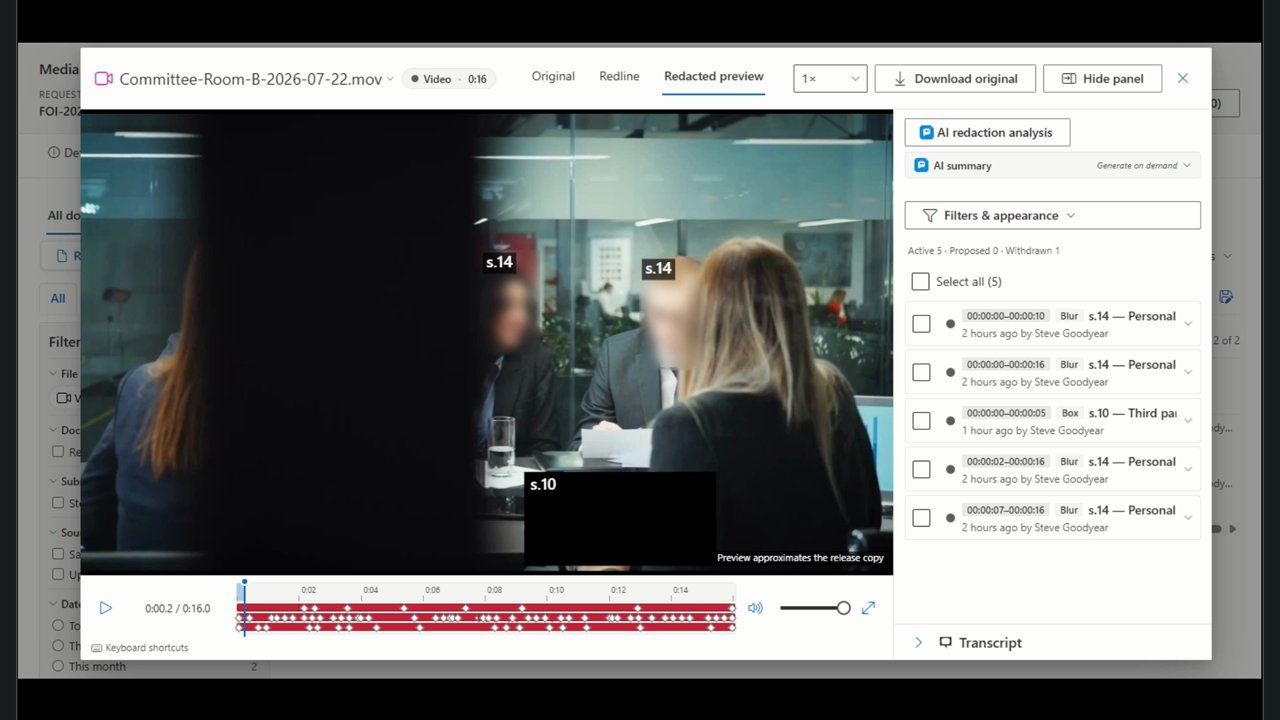
What to look for when bringing Axon Evidence footage into a records request
Whatever you buy — including if it isn't AccessPoint — these are the questions to ask of any tool that moves footage from Axon Evidence into an access request.
How the Axon Evidence connector works
Built on the Axon Partner API — these are the pieces that matter to a records unit.
Cases, categories, dates and owners
Four views built from Axon's own data: your cases, your evidence categories, recordings by year and month, and owners. Each lists evidence newest recorded first; turn off any view the API client may not list.
Every file of an evidence item
Single-file evidence lists as the file itself. Evidence with several files — the original, converted renditions, a transcript — opens as a container, so you choose which to capture.
Search the way Axon indexes
Filter by category, case or owner by name or id, a recorded-on window or an evidence ID; free text matches titles and tags. Once a recording is captured, AccessPoint's own transcript and content search covers what was said.
Large recordings, streamed
Files stream in small blocks and are never buffered on the connector. A selection above ten records or 100 MB becomes a background job with its progress in the Upload queue, so nobody waits in the picker.
Straight into the media viewer
A captured clip is prepared for playback like an upload and opens in the media viewer: detect faces and on-screen text, track and blur, mute or distort, and cite the exemption on every span.
Rate-limit aware
A connector-side ceiling on Axon calls, Axon's retry-after honoured, cursor paging, and collections scoped to a case, category or month keep the agency inside Axon's per-agency limits.
Chain of custody
From Axon's ledger to the release, with the person who acted in between
Each file is hashed with SHA-256 as it streams into the case's own storage in your Azure subscription; when Axon's API exposes its own digest for the file, the connector compares the two after the full stream and logs any difference. What the request keeps is a frozen snapshot that outlives the evidence's retention period in Axon. Source details name the Axon evidence ID and file ID, the hash with its Verified pill, and who captured it and when; AccessPoint's hash-chained audit ledger records the capture; and when the redacted release goes out, its manifest carries the hash of every file. Axon's own audit trail will show the API client rather than the coordinator, so the connector logs every call with the AccessPoint user, the case and the purpose — together, the two records connect Axon's ledger to the person who acted.
From Axon Evidence to release
The path for an agency connecting Axon Evidence:
- In Axon Evidence, confirm API access is on for the agency (Evidence Local needs version 5.4 or later), then create an API client for AccessPoint under API Settings with only evidence list, view and download, case list and category view, restricted to the connector's outbound IP addresses. Record the partner ID, client ID and secret — the secret is shown once.
- Deploy the connector as an App Service or Container App in your Azure subscription, set your agency's Evidence.com host, the views to show and the allowed download hosts, and hold the secret as a Key Vault reference. For Evidence Local, add a Hybrid Connection or run the connector on premises.
- Run the connector's self-test, then register it under Settings → Connectors as a Remote connector, run Test connection and enable it.
- On the request, choose Add from… and the Axon Evidence tile, open a case or search by recording date, and add the recordings — or collect a whole case in the background.
- Open each recording in the media viewer, review the detection proposals, mark and cite the exemptions, and export the response package with the burned release, the hash manifest and the redaction log.
Go deeper
Axon Evidence Connector Questions
Does body-worn camera footage leave our tenant when AccessPoint captures it from Axon Evidence?
Do we need a VPN or an inbound firewall rule to connect Axon Evidence?
Which Axon Evidence versions does the connector support, and has it been validated against our agency?
Does AccessPoint copy the footage or link to it?
Who can see which evidence through the Axon Evidence connector?
Is there a per-connector or per-seat fee for Axon Evidence and video redaction?
Flat annual pricing, published in full. Every feature in every size — access requests, privacy impact assessments, breach response, complaints, video & audio redaction, the public portal, repository connectors, and AI Assist. No per-user or per-module fees.
- Under 500 employees$2,990/yr
- 500–1,999 employees$7,990/yr
- 2,000–9,999 employees$14,990/yr
- 10,000+ employees$29,990/yr
From Axon Evidence to Release, in One File.
Try AccessPoint free for 30 days in your own Microsoft 365 tenant — repository connectors and video redaction included, no per-seat add-on.