
Solutions · Repository connectors
Search Alfresco, Nuxeo and other CMIS repositories for FOI and ATIP requests
Any enterprise content management system that speaks CMIS 1.1 through its browser binding — browse its folders, search it in the modes it declares, see version history, and capture documents and folder trees into the case with the object id, version label and hash on record. Built into AccessPoint: register a URL and a credential.
When an organization's records live in an enterprise content management system, the access office usually depends on a records analyst to run the search, export what was found, and send it over. The request file ends up with copies, but not the facts that make them defensible: which repository object each one was, which version, and who looked.
The CMIS repository connector is built into the AccessPoint API and works with any repository that implements CMIS 1.1 through its browser (JSON) binding — Alfresco, Nuxeo, OpenText and others. An administrator registers the browser-binding URL, an optional repository id and root folder, and a credential: a read-only service account over basic authentication, a bearer token, or an Entra token requested by the API's managed identity, with secrets stored encrypted or as Key Vault references. The repository decides what the connector offers, and AccessPoint reads it from the repository's own capabilities: search follows capabilityQuery — a structured name-and-date search scoped to a folder, full-text CONTAINS, or a coordinator's own read-only CMIS QL SELECT — folder collection follows capabilityGetDescendants, and version history follows capabilityAllVersionsSearchable. Each record shows its object type and creator in the details flyout.
By default the connector declares the Application identity mode: the service credential reads the repository and AccessPoint's permission rule is the gate. Where the repository, or the SSO gateway in front of it, accepts a run-as header — X-Alfresco-Remote-User, for example — the connector sends the coordinator's UPN on every call and declares Application with user check, so the repository trims what each person sees and AccessPoint asks it to confirm access immediately before each capture. There is nothing to host and no Azure resource to add: the connector runs inside the AccessPoint API, and the repository must be reachable from it over HTTPS. Alfresco, Nuxeo and OpenText are trademarks of their respective owners; AccessPoint connects through the CMIS 1.1 standard and is not affiliated with or endorsed by them.
Sound familiar?
Three moments every office that searches an ECM system for requests recognizes.
The search only records can run
The request lands with the access office, but the ECM search belongs to the records team. Two emails and a week later, a zip arrives with no note of what was searched.
Which version went out?
A policy document has eleven versions in the repository. The copy in the request file carries no version label, and the appeal turns on whether the draft or the final was released.
One account sees everything
The integration runs as a service account with read on the whole repository, so a coordinator browsing it sees folders the repository would never show them in person.
What to look for when an FOI system reaches a CMIS repository
Whatever you use, these are the questions that separate an export from a defensible ECM search.
How the CMIS repository connector works
Built into the AccessPoint API, shaped by what your repository declares.
Register a URL and a credential
Browser-binding URL, optional repository id and root folder, and basic, bearer or Entra authentication. Saving reads the repository's information, so a wrong URL or credential is refused at once.
Search in the repository's own modes
A structured name-and-date search scoped to a folder, full-text CONTAINS, or a native CMIS QL SELECT — whichever the repository declares. A repository with both full-text and metadata search also feeds Suggested documents.
Collect a folder tree
Where the repository supports getDescendants, Collect this folder takes the subtree in one call — up to 10,000 entries — filtered by the dialog's dates, name pattern, extensions and size.
Version history, read-only
Where declared, Versions lists each version's label, date, author, size and hash. A capture always takes the current version, and a new version is captured again.
Per-user trimming with a run-as header
Name the header your repository or gateway accepts and the coordinator's UPN goes on every call. A record the repository refuses is skipped as access denied, never captured.
Hashes the repository vouches for
A SHA-256 content-stream hash from the repository becomes the declared hash, and provenance reads Verified — or Mismatch, flagged and logged, never blocked. Without one, AccessPoint stores the digest it computed.
See it in AccessPoint
Real screens from the product, running in a Microsoft 365 tenant. Click any one to enlarge.
Chain of custody
The object, the version, the person — on the record
Every capture is streamed by the AccessPoint API into the case's own storage while its SHA-256 is computed, then processed exactly like an upload — PDF conversion, indexing, redaction scans and duplicate detection. The document's Source details keep the CMIS object id, the path, the version label taken, the hash and its Verified, Mismatch or Not declared state, who captured it, when and for which case. The repository receives a request id it can log against each call — and, with a run-as header, the person's UPN — while AccessPoint's audit ledger records the connector, the item, the version, the hash and the purpose.
From repository to case
Set up once, then use it on every case:
- Confirm the repository exposes CMIS 1.1 with the browser binding enabled — not only AtomPub — and create a read-only service account, a bearer token, or an Entra app registration the repository accepts tokens for.
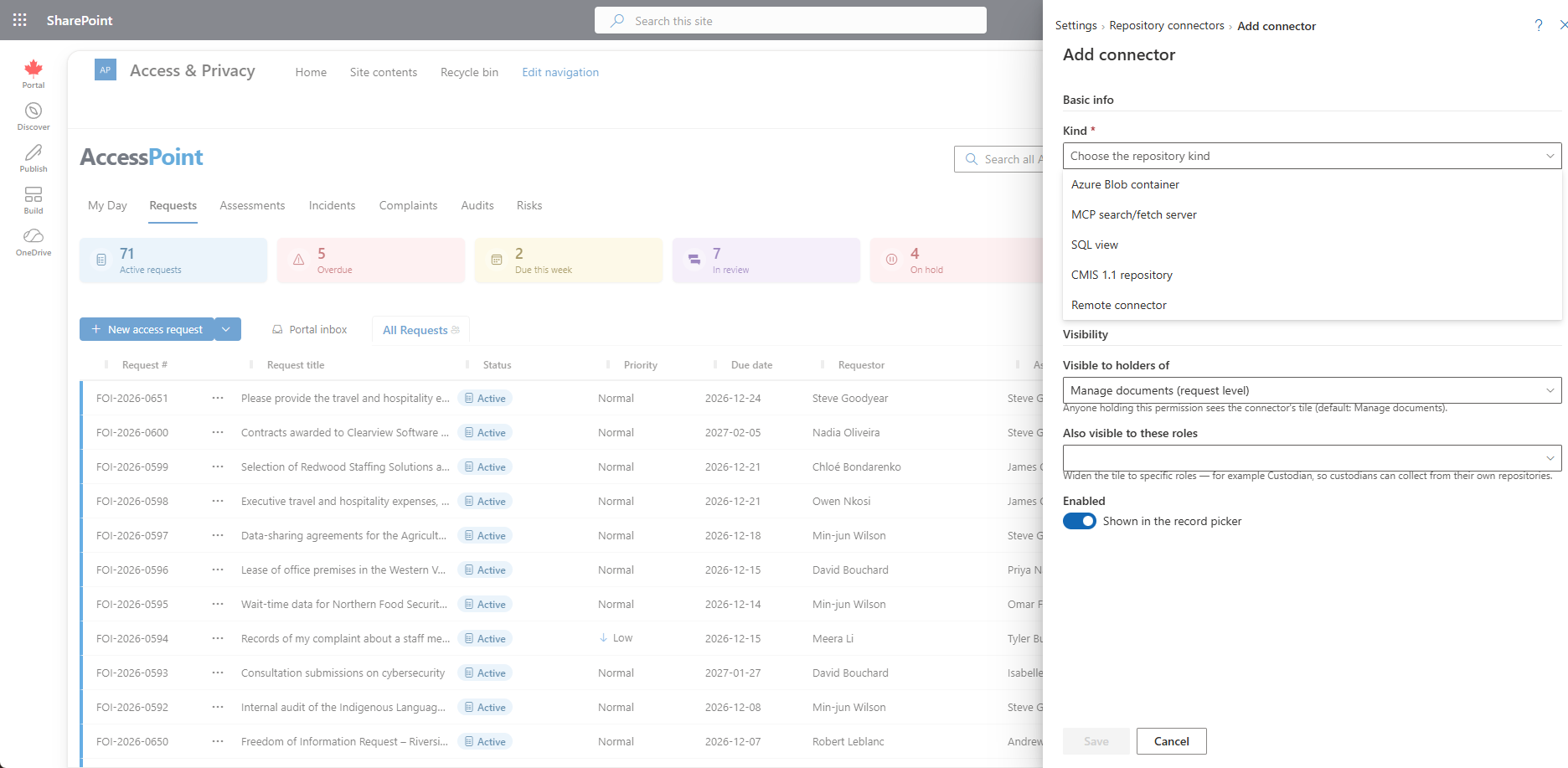
- In Settings → Foundations → Repository connectors → Add connector, choose CMIS 1.1 repository, and enter the browser-binding URL, the authentication and, optionally, a root folder and a run-as header.
- Run Test connection. The registration's capabilities then show what the repository declared: browse, folder collection, search modes, versions and access check.
- On a case, open Add from…, choose the repository, browse or search, check a document's versions, and add documents — or collect a folder tree in the background.
Go deeper
CMIS Repository Connector Questions
Which ECM systems does AccessPoint's CMIS connector work with?
Should we use the CMIS connector or the OpenText Content Server connector for GCdocs?
Can the repository enforce its own permissions for each person?
Does it copy documents or link to them, and which version?
Do we need a VPN, and does data leave our tenant?
What does the CMIS repository connector cost?
Flat annual pricing, published in full. Every feature in every size — access requests, privacy impact assessments, breach response, complaints, video & audio redaction, the public portal, repository connectors, and AI Assist. No per-user or per-module fees.
- Under 500 employees$2,990/yr
- 500–1,999 employees$7,990/yr
- 2,000–9,999 employees$14,990/yr
- 10,000+ employees$29,990/yr
Bring Your Repository Into the Case.
Try AccessPoint free for 30 days in your own Microsoft 365 tenant — repository connectors included, no per-connector fee.