
Solutions · By organization
Public records software for police services, where the record is footage
Body-worn camera, in-car video, CCTV, 911 and dispatch audio, interview rooms: AccessPoint runs the request, the redaction, and the release for police services, sheriffs' offices, 911 centres, and corrections — with the exemption cited on every span, and every byte in your own Microsoft 365 tenant.
Police records units process the most demanding requests in the public sector: recordings by the hour, third-party privacy on every frame, law-enforcement exemptions with a public-interest edge, and a statutory deadline that does not scale with footage. Whether the statute is Ontario's MFIPPA for a municipal police service, a state public-records act for a sheriff's office, or the federal Access to Information Act for a national agency, it counts the days the same way it does for a memo.
Regulators have stopped accepting capacity as an excuse. British Columbia's Information and Privacy Commissioner wrote in its January 2026 surveillance guidelines that "lacking the capacity to blur or sever information to respond to an FOI request is not a valid reason under FIPPA to excuse a public body from performing this task." Ontario's Commissioner has ordered a police service to obscure the images of every individual other than the officers and the appellant, and has twice ordered that a 911 caller's voice be distorted rather than removed. Washington's Public Records Act enumerates distorting and pixelating as chargeable methods and excludes redaction time from the agency's time limits. The expectation is temporal and spatial severance, done properly and cited.
AccessPoint is built for exactly that release. It is the request system and the redaction studio in one, running in the police service's own Microsoft 365 tenant — no footage uploaded to a vendor cloud, no per-seat video add-on, and no exemption code left behind in a separate tool. The same platform runs the privacy side of the unit: impact assessments for new surveillance programs, breach response, and complaints.
Records requests at the speed of footage
Three pressures that every police records unit knows.
The clock runs at 1x, the review at 5x
Eleven hours of body-worn footage arrive on a thirty-day clock. At the rate agencies have measured — four to six analyst-hours per hour of video — that is fifty hours of review before a single exemption is decided.
Everyone in the frame is a third party
A single sidewalk clip holds bystanders, licence plates, a victim, a witness, and a child. Each face is a privacy decision, and each decision needs a citation the commissioner will read.
The disc went out unblurred
A 911 recording released with the caller's voice intact, or a body-worn clip with one face missed, is a privacy breach — and a second, differently redacted release months later is the cautionary tale every unit has heard.
Watch it work
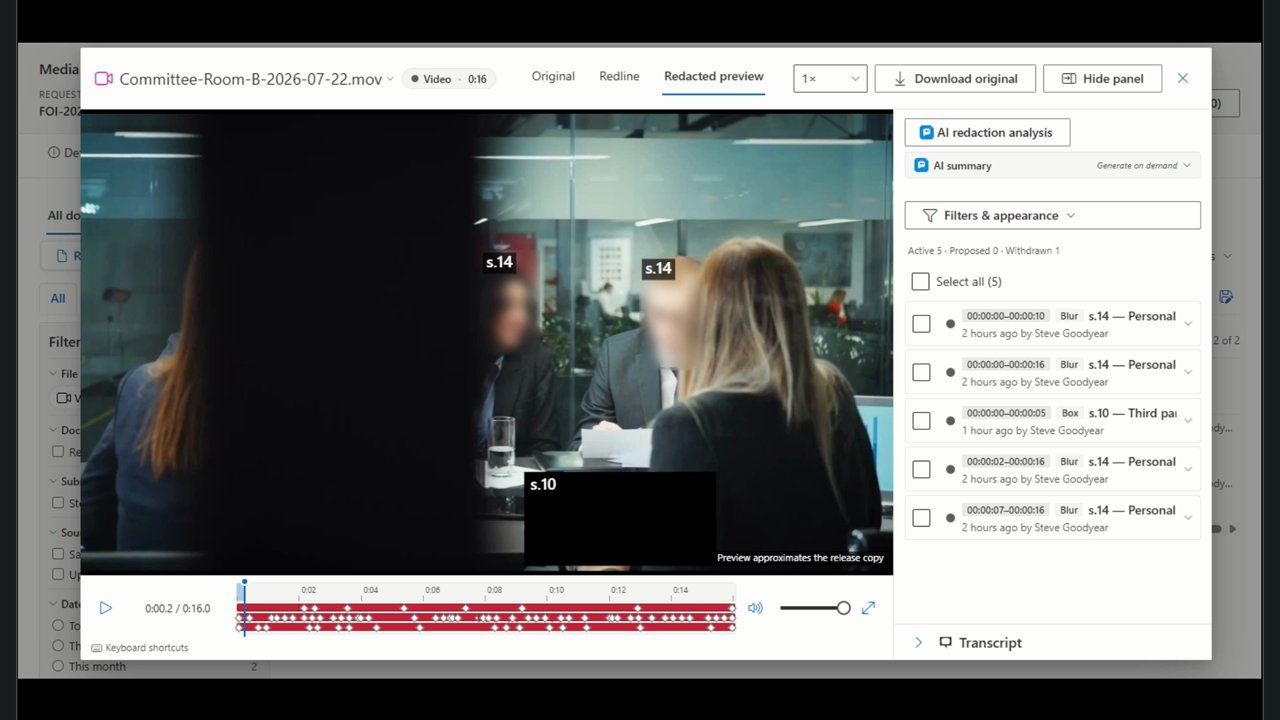
Two minutes in the media viewer with a meeting-room recording — the same steps a body-worn camera clip takes: faces detected and blurred, an area severed by hand, and the exemption cited on every mark.
What a police records unit actually needs
Whatever software you choose — including if it isn't AccessPoint — these are the capabilities that matter when the responsive record is a recording.
How AccessPoint carries a body-worn camera request
From the request to the release, in one governed system.
Footage as a record
Body-worn, in-car, CCTV, and interview-room exports up to 50 GB upload through a resumable queue and sit beside the documents on the request. Microsoft Defender for Storage can scan every upload, and a flagged file can never be played or released. Footage held in Axon Evidence is captured straight onto the request through the Axon Evidence connector.
The Axon Evidence connector →Redact the frame and the sound
Box, blur, or pixelate a region and let automatic tracking follow the person through the clip; mute, bleep, or distort a voice for a span; withhold the whole recording where that is the decision. Every mark carries its exemption, alternates, approval, and audit entry.
Faces found in your own tenant
Detect faces and text on screen proposes one tracked region per face and flags plates, badges, and documents on screen. The face detector runs on your own App Service — nothing leaves the tenant — and a person accepts or dismisses every proposal.
911 audio by transcript
Azure AI Speech transcribes the call in your own subscription with speaker labels and timings. Find the caller's name, jump to the moment it is spoken, and accept the proposed mute — or distort the voice across the span, as regulators have ordered.
Your Act's exemptions, cited in-frame
Your jurisdiction pack's law-enforcement and privacy exemptions — Ontario's, your state's, or the federal Act's — are cited on each mark and burned into the frame as a caption at the span where the deletion is made. The redaction log records every span and its authority.
Effort and fees the statute allows
The Fees panel estimates media review from the recording's duration, four reviewer-hours per recorded hour by default. Where your statute allows charging for redaction time, the fee line is pre-filled; where it does not, the estimate still tells the unit what the request will cost.
What regulators now order
Sever both temporally and spatially — and say why at the place in the record
The orders are specific. Ontario's Commissioner has directed a police service to sever a recording between timestamps and to obscure the images of every individual other than the officers and the appellant; in two 911 cases the order was that the caller's voice be distorted so the recording no longer contains that person's personal information. British Columbia's Commissioner has said that lacking the capacity to blur or sever is not a reason to refuse. Australia's Information Commissioner asks that the schedule of documents specify the sound inserted where audio was deleted and the basis for each deletion. AccessPoint produces exactly that release: obscured regions and distorted spans, each with its citation in the frame and in the log.
A body-worn camera request in AccessPoint
From the intake mailbox to the released package:
- The request lands from your intake mailbox with the statutory clock computed on your jurisdiction pack's calendar.
- Upload the footage; it is prepared for playback, scanned, and transcribed in your own subscription while the estimate of review effort appears on the Fees panel.
- Run Detect faces and text on screen, accept the proposals, and add region, span, and voice marks by hand where the detector cannot decide.
- Cite the law-enforcement or privacy exemption and alternates on each mark, route through approval, and check the Redacted preview.
- Export the response package — the burned MP4 or MP3, the manifest of hashes, and the redaction log — and record the disposition.
Go deeper
Police Services & Public Safety Questions
Can AccessPoint redact body-worn camera footage?
Does the footage leave our tenant?
How long does video redaction take?
Can we charge for redaction time?
Which jurisdictions does it cover?
Flat annual pricing, published in full. Every feature in every size — access requests, privacy impact assessments, breach response, complaints, video & audio redaction, the public portal, repository connectors, and AI Assist. No per-user or per-module fees.
- Under 500 employees$2,990/yr
- 500–1,999 employees$7,990/yr
- 2,000–9,999 employees$14,990/yr
- 10,000+ employees$29,990/yr
Release the Footage. Keep the Evidence.
Try AccessPoint free for 30 days in your own Microsoft 365 tenant — video and audio redaction included, no per-seat add-on.