
Solutions · By capability
A public request portal that opens straight onto the case file
A guided request form on your own website, a status page requestors can check and reply from, secure delivery of released records, online fee payment and a public reading room — in up to eleven languages, with no requestor accounts to manage. Every submission is triaged by your team into the same request record your office already works, and the portal runs in your own Azure subscription.
Most access-to-information offices already have a front door — a PDF form, a web form that e-mails an intake mailbox, a phone number. What comes through it is rarely ready to work: no time period, no program area, "all records about the arena". The request is retyped into the system or the spreadsheet, a clarification letter goes out, and the requestor starts calling to ask where things stand.
AccessPoint's public request portal replaces that front door with one built for the statute. The guided form asks for what a search needs, with worked examples and a checklist that explains what is missing but never blocks. The requestor confirms with a one-time code e-mailed to them — no account, no password — and from then on can check the request, reply to a question, add detail, answer a fee estimate, pay, withdraw, and collect the released records, on one page that explains each phase in plain words.
Behind it, nothing becomes a request on its own. Submissions wait in a Portal inbox until someone on your team promotes, merges or rejects them, and a promoted submission becomes an ordinary AccessPoint request — the requestor's own words filed as its first correspondence, the attachments in its Documents workspace, the received date set to the day the requestor confirmed. The portal is an optional web app you deploy into your own Azure subscription, isolated from the rest of AccessPoint by design, and included in every plan.
Sound familiar?
Three moments every office with a public front door recognizes — whether the requests land in a spreadsheet or a legacy case system.
The web form that feeds a mailbox
The request form on your website e-mails the intake inbox. Someone copies the name, the address and three paragraphs of request text into the system — or the spreadsheet — and saves the attachments to a shared drive, hoping the file names will make sense later.
"All records about the arena"
No date range, no department, no kind of record. The clarification letter goes out on day two, and a request that could have been searched in an afternoon waits weeks for a reply.
"Just checking on my request"
The same requestor calls every Monday. Someone looks the file up, decides how much of the internal status to share, explains "on hold" again, and logs the call — if they remember to.
What to look for in a public records request portal
Whatever you buy — including if it isn't AccessPoint — these are the capabilities that separate a web form from a front door that actually reduces the work behind it.
How the AccessPoint portal works
One front door for requests, complaints and privacy concerns — these are the load-bearing pieces.
A guided form on your own website
Embed the form with a two-line snippet, or link to the portal's own page. It asks what you are looking for beside a worked example, a time period, kinds of records and program areas, with a completeness checklist that never blocks — single page or step by step, previewed before you publish.
A Portal inbox, not a back door
Every submission waits for triage. Promote opens Create request pre-filled with the scope, the requestor contact and their language; Merge attaches it to a request already on the register; Reject records a reason. The received date is the day the requestor confirmed.
A status page that closes the loop
Seven public phases mapped from your statuses, each explained in plain words, holds that say why, a dated history, shared letters, fees with a Pay button and your review-rights text at closing. Requestors can reply, add detail, answer a fee estimate, withdraw, or see all their requests with one code.
Secure delivery of released records
Deliver the response package from Export History: copied with each file's SHA-256, held until Microsoft Defender for Storage reports it clean where deployed, opened with a fresh code, downloaded through short-lived links, acknowledged by the requestor and revocable at any time.
A public reading room
Publish a released package for anyone to search and download. It takes two people — one proposes, a different senior official publishes — and each entry states what its accessibility check found and offers an accessible edition where there is one.
Complaints, concerns and own-information requests
A form registers in Requests, Complaints or Incidents. Templates cover a guided access request, a request for your own information that lands on your identity-verifying request type, a privacy complaint and a privacy concern report.
See it in AccessPoint
Real screens from the product, running in a Microsoft 365 tenant. Click any one to enlarge.
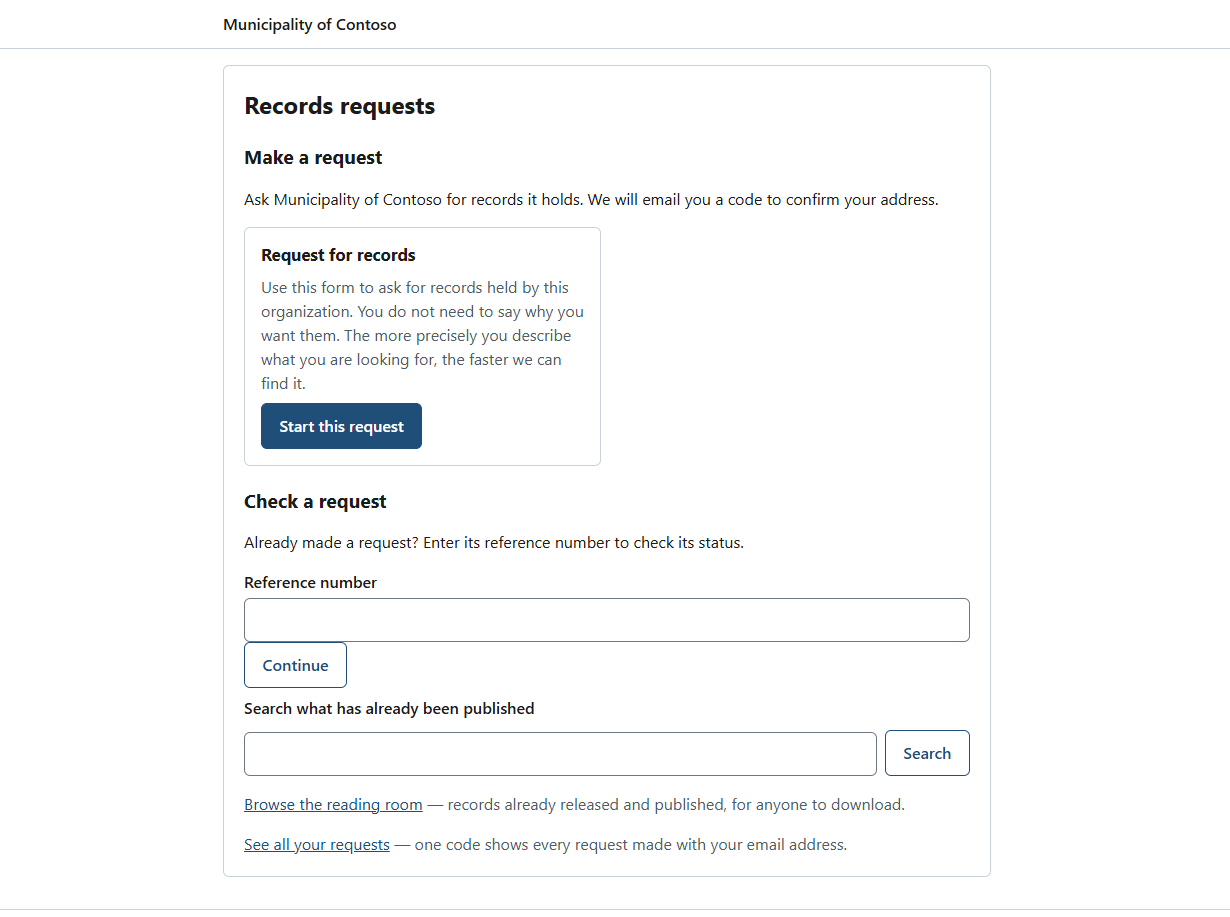
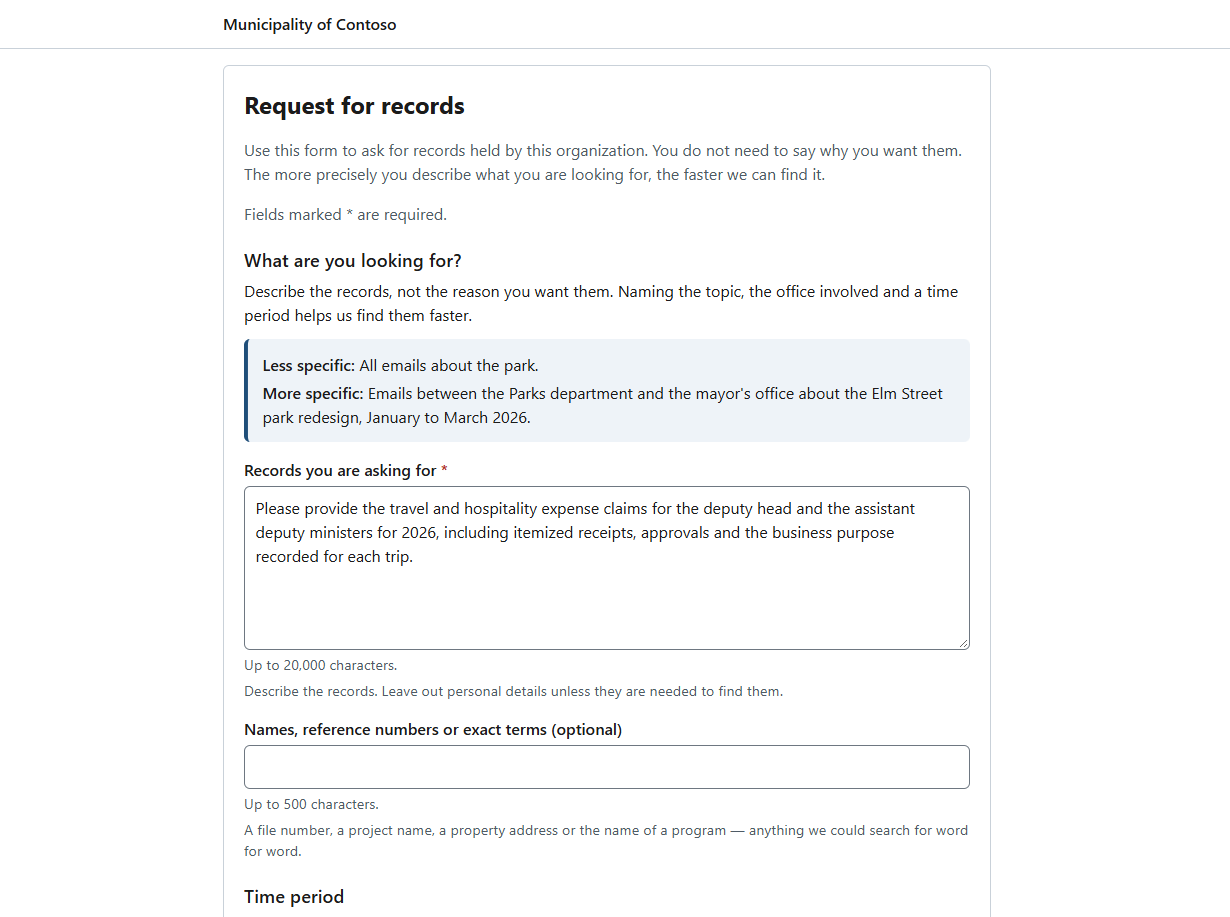
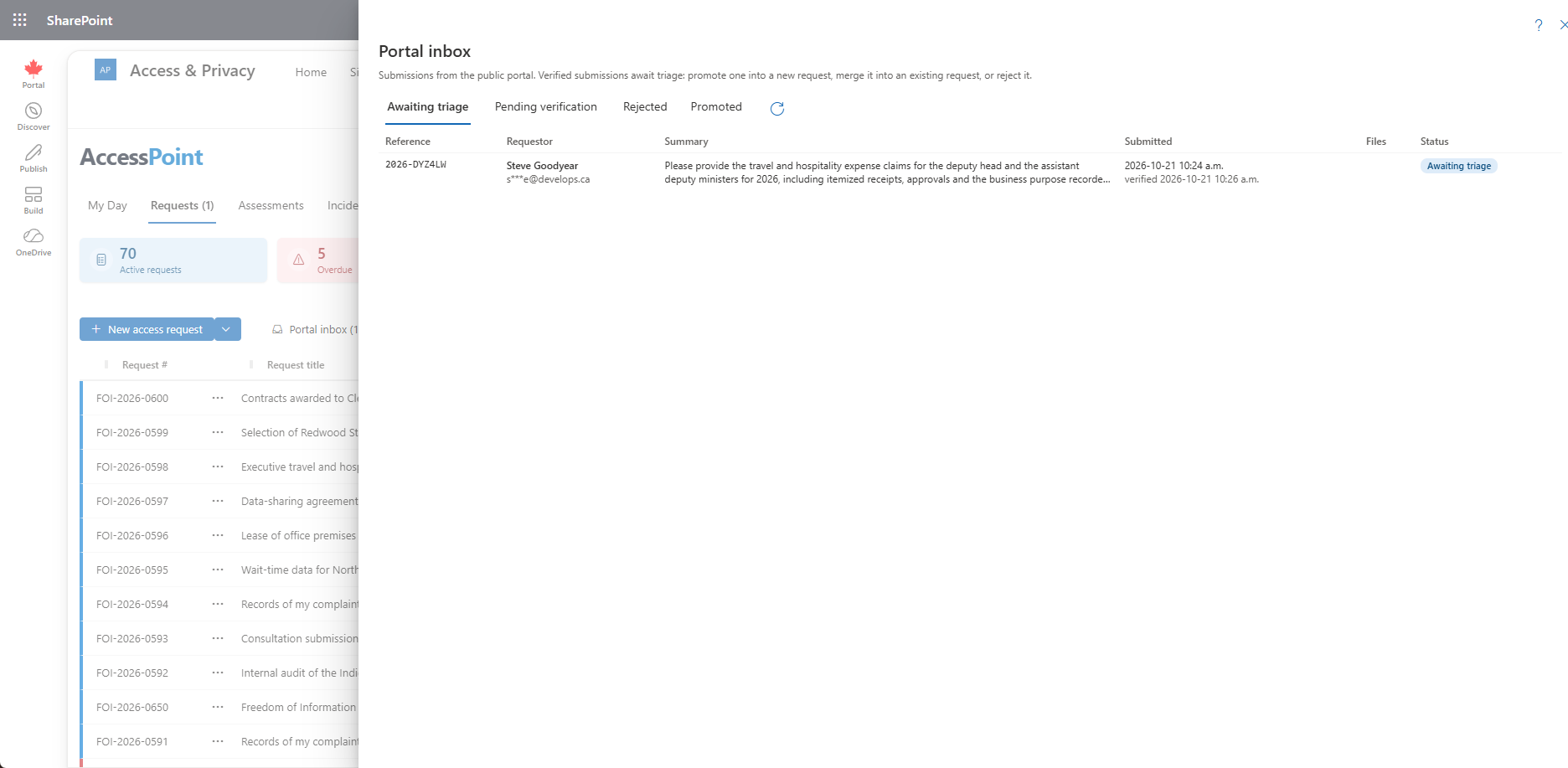
The structural difference
The front door is in your tenant, and it opens onto the case file
When the public portal and the case system are separate products, every submission has to be moved across, and the requestor's record lives in two places. AccessPoint's portal is part of the same deployment, in your own Azure subscription. A promoted submission is an ordinary request, with the requestor's own words as its first correspondence and the attachments in its Documents workspace. The status page is drawn from that request; replies land on its Requestor tab with a follow-up on the access officer's My Day and never restart a paused clock by themselves; payments land in its fee ledger; and deliveries leave from its Export History through the same release gate as every package. The portal itself runs as a separate web app with its own managed identity, confined to its own database schema and two storage containers, with no network path into the AccessPoint API.
From deployment to first release
The path for an office opening the portal:
- Deploy the portal web app into your Azure subscription — optionally behind Azure Front Door with a web application firewall — and switch it on under Settings → Features.
- Choose the languages, the reference prefix and the websites allowed to embed the form; create the guided form from your pack's template, preview it and publish.
- Paste the two-line snippet into your website, or link to the portal's own page.
- Triage submissions in the Portal inbox — promote, merge or reject — and work each request the way you already do.
- Release records through a secure delivery, and publish the packages the public should see to the reading room.
Go deeper
Public Request Portal Questions
What is an FOI request portal, and what does AccessPoint's portal do?
Do requestors need an account, and how are they verified?
Does a portal submission start the statutory clock automatically?
Where does the portal run, and what does it cost?
Is the portal accessible and multilingual?
How do we know whether the portal is reducing clarification letters?
Flat annual pricing, published in full. Every feature in every size — access requests, privacy impact assessments, breach response, complaints, video & audio redaction, the public portal, repository connectors, and AI Assist. No per-user or per-module fees.
- Under 500 employees$2,990/yr
- 500–1,999 employees$7,990/yr
- 2,000–9,999 employees$14,990/yr
- 10,000+ employees$29,990/yr
Give the Public a Front Door. Keep It in Your Tenant.
Try AccessPoint free for 30 days in your own Microsoft 365 tenant — the public request portal, online payments and reading room are included in every plan.